
Logos vs Olive Tree: A Head-to-Head for 2026
By Sankalp Jonna · Last reviewed 2026-05
How we tested
Every app here was installed and used personally. We capture raw findings — typed notes, screenshots, screen recordings, voice memos — and the writing is AI-assisted from those raw notes. Scores, rankings, and "best for / skip if" calls reflect our actual experience with each app. Read the full methodology →
Logos Bible Study
Olive Tree Bible
Quick verdict
Choose Logos Bible Study if
- You preach or teach weekly and you want the deepest possible commentary library, original-language datasets, and sermon-prep tools.
- You're comfortable with a subscription model and prefer paying $9.99-$24.99/mo for ongoing access over making one-time purchases.
- You want AI study features (Logos AI), syntax-tree searches, and academic resources Olive Tree doesn't carry.
- You're already in the Faithlife ecosystem (Sermons, Proclaim, Equip) and want your Bible study tied to those tools.
- You see your library as a working tool that's always being updated, not a permanent collection.
Choose Olive Tree Bible if
- You hate subscriptions and want every resource you buy to be yours forever.
- You read mostly on iPhone and iPad and want a study Bible app that genuinely sings on mobile.
- Your budget is $200-500 over a few years rather than $200-500 every year.
- You want a real free tier — Olive Tree's free Bible app and free study resources are usable on their own without paying anything.
- You're a serious lay student or small-group leader who wants pro tools without seminary-level pricing.
Side-by-side
Feature-by-feature, the way we'd lay it out at a kitchen table.
| Feature | Logos Bible Study | Olive Tree Bible |
|---|---|---|
| Pricing model | Subscription-first ($9.99-$24.99/mo) plus optional base packages | Ownership-first; resources purchased once and kept forever |
| Free tier | Free tier; full access via paid subscription | Free tier; full access via paid subscription |
| Subscription option | Premium $9.99/mo, Pro $14.99/mo, Max $24.99/mo | Olive Tree Plus optional: $5.99/mo, $29.99/semi-annual, $59.99/year |
| One-time base packages | $294.99-$10,799.99 base packages | Build library piece by piece via store; major study Bibles $30-100 each |
| Library breadth | Deepest catalog — academic, denominational, niche commentaries | Strong Protestant and Reformed catalog; lighter on Catholic/Orthodox |
| Original-language tools | Research-grade — morphology, syntax trees, semantic-domain search | Strong's, interlinears, Greek/Hebrew lexicons; usable for non-scholars |
| AI features | Logos AI assistant (chat, smart search) inside subscription tiers | No AI |
| Mobile experience | Improved but still desktop-first | Genuinely strong on iPhone, iPad, and Android |
| Note-taking | Powerful but tied to the Logos ecosystem | Long-form, taggable, organized by passage; clean cross-device sync |
| Best-fit reader | Working pastors, seminary students, professional teachers | Serious lay students, small-group leaders, mobile-heavy readers |
Setup & onboarding
Core features
Pricing breakdown
Support & community
Mobile experience
Verdict
Warmpeach — coming soon
Join the Bible chat app waitlist
Why this comparison comes up
Anyone shopping for a serious-study Bible app eventually lands on Logos and Olive Tree in the same browser tab. They're the two adults in the room — both have desktop and mobile clients, both have decades of catalog, both serve pastors and serious lay students, and both cost real money. The question that brings them together isn't "which is better" but "what kind of relationship do I want with my Bible software?"
Logos answers: a subscription. Olive Tree answers: a library. Logos's pitch is that you pay every month and the catalog grows around you; the platform improves, the AI gets smarter, the resources update, and you ride the whole curve as long as you keep paying. Olive Tree's pitch is that you pay once per resource and what you bought is yours; the catalog is shallower than Logos's, the platform evolves more slowly, and the trade-off is that you actually own your library when you're done.
Both philosophies have a real customer base. The choice has more to do with how you think about software than with which app has feature X.
The buyer profile
The Logos buyer is usually a working pastor, a seminary student, or a serious lay teacher whose weekly Bible time is research-shaped. The Passage Guide and Factbook compress hours of work into minutes; the original-language datasets reach into morphological and syntactic territory no other app touches; the AI assistant is grounded in real commentaries and lexicons.¹ If your job description includes "preach a sermon every Sunday" or "lead a small group through Romans this fall," Logos pays for itself in time saved.
The Olive Tree buyer is harder to caricature, which is partly the point. They might be a small-group leader, a curious lay reader who outgrew YouVersion, a Mac-using pastor who finds Logos's interface too busy, or someone who simply hates subscriptions on principle. The throughline: they want serious study tools without the academic-research depth Logos optimizes for, they live mostly on mobile, and they'd rather make occasional purchases than carry a recurring charge.
The subscription question
This is the actual crux of the comparison. Logos's subscription model is excellent if you'll use the deeper tiers heavily and you're comfortable with the ongoing bill. It's a bad deal if your usage is sporadic, because you're paying for access you aren't exercising. Olive Tree's ownership model is excellent if you make purchases deliberately and use them for years. It's a bad deal if you'd benefit from the constant drip of new tools and resources Logos's subscription includes.
Most users who try to be honest about their actual study habits (rather than the study habits they wish they had) find one model fits and the other doesn't.
What stuck with us in actual use
After several weeks running both, two things stuck.
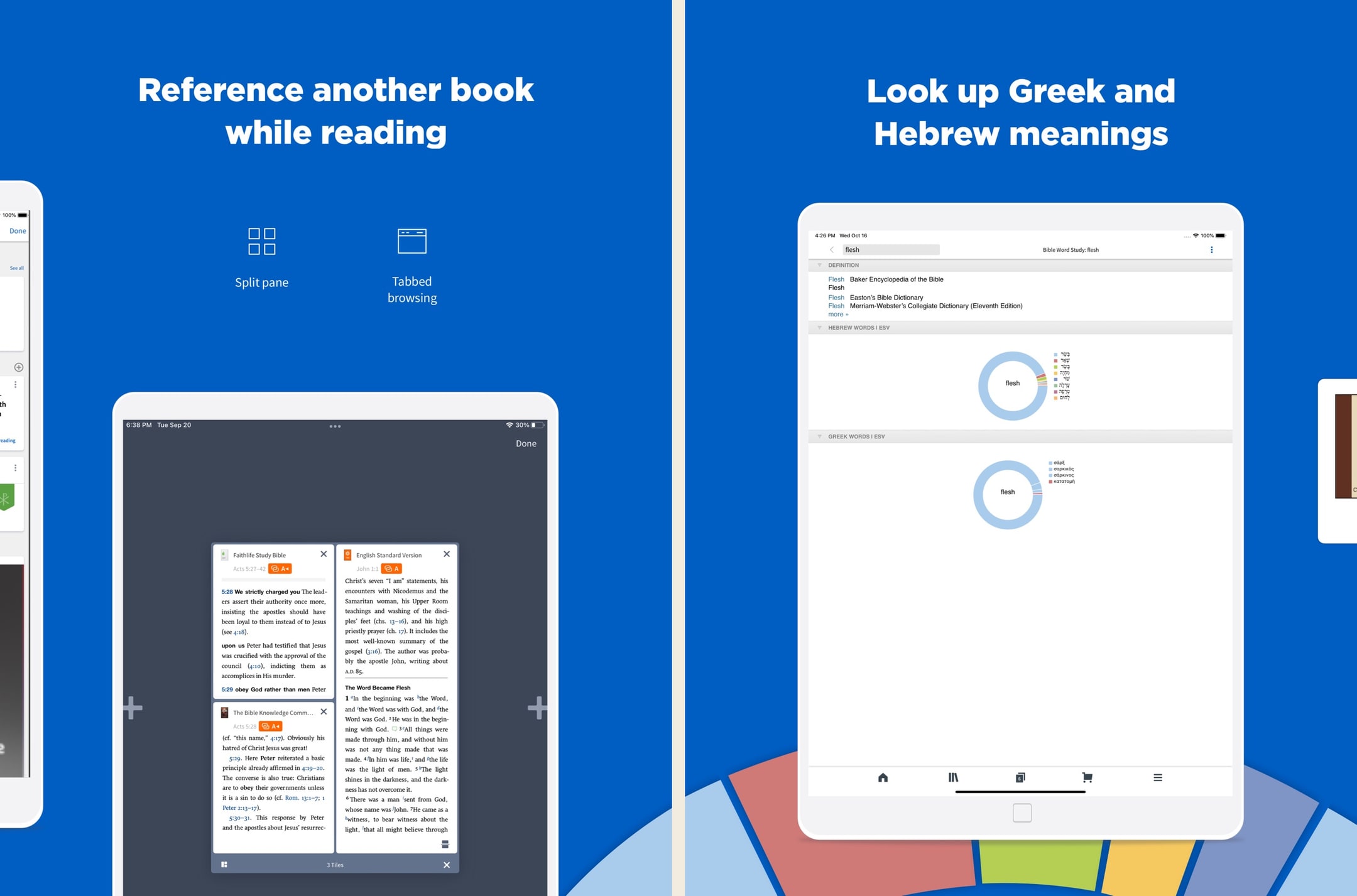
First: Olive Tree on a phone is the most underrated study experience in Bible apps. The split-window view — two translations side by side, or a translation paired with a commentary — is the single best small-screen study feature we tested across any app, and it makes Olive Tree usable as a daily tool in a way Logos still isn't on phones.²
Second: Logos's Passage Guide remains the killer feature it's been for fifteen years. Click a passage, get a research dossier in seconds — cross-references, commentary excerpts, original-language data, related Factbook entries, all auto-assembled.¹³ Nothing else in the category does this. Olive Tree's manual workflow gets you to the same place eventually, but Logos collapses the time.
The honest cost picture
Spend ten minutes with a calculator before buying either. A pastor running Logos Pro at $14.99/month for ten years has paid roughly $1,800 in subscription alone, and that's before any base package.¹ The same pastor making $200 of Olive Tree purchases every two years has spent $1,000 over ten years and owns a permanent library. The Logos pastor has access to a deeper catalog and ongoing AI improvements; the Olive Tree pastor has a thinner catalog but no recurring bill and full ownership. Both can be right. Just don't pretend the math is the same.
The mobile reality
A surprising number of Logos users we talked to said they barely open Logos on their phone. They use it on a laptop for sermon prep and use a different app — often Olive Tree, often YouVersion — for daily reading. If you're going to do that anyway, you might as well admit it up front and budget accordingly. The honest stack for many working pastors is Logos on the laptop plus a free or near-free reader on the phone, not Logos on every device.
When to pick which
Pick Logos if your weekly work demands the deepest catalog, you'll use the original-language datasets and AI features regularly, and you're comfortable with a recurring subscription. The depth and the platform investment are real, and for the right user they're worth the premium.
Pick Olive Tree if you want to own what you buy, your study life is mobile-heavy, and your work doesn't require the deepest possible commentary catalog. Olive Tree covers about 80% of what Logos does at meaningfully lower long-term cost, and that 80% is enough for most serious lay students and many working pastors.
Don't run both at full price. The overlap is real, and the pattern that actually works is owning a Logos base package outright (no recurring subscription) and using Olive Tree as your daily mobile tool — or vice versa.
What real users say
Real-user reviews
I love this app.
I have used many Bible apps and software and when by the grace of God I was led to the Logos web site, I was like a kid in a candy store with the permission to eat anything I wanted. I still keep the other Bible software but primarily I use Logos and the more resources you purchase the more powerful your Bible software becomes you only need to purchase what you need, I am just a lay person some of the packages I can't use at the present time. I think that any investment into The things concerning God is prosperous. To whom it may concern I hope anything that I say being just a lay person who is still reaping the benefits of what I don’t deserve which is to walk in the spirit of God and stumbling, falling and bouncing off the walls , if you will, and still reaching and walking after the perfection and that perfection being Christ. So this is my second time writing a review for this. I can barely find the words most glorious I don’t know powerful Bible software that I know to date many preachers use it so all I got to say is I hope I’m understood because I am not erudite and speech, but there are no lies coming out of my mouth, I just love LOGOS though when I found out about it so many books, I haven’t even read yet by the grace of God I’m gonna spend my life in his service and his word praise be to God, peace and spiritual prosperity to all who read this, I said the spirit of Godand the spirit does not stay with you always which is why we have to keep walking after pray for you. You know what I’m talking about. I’m saying I’m not saying God.
— Hldavis7455
GO DEEPER
I am really impressed with the abilities the Logos software enables me to have. Notes on scriptures. Word meanings and their origins. The original Hebrew and its pronunciations. Bible word studies and word searches. Cutting my search time down immensely so I may study more in depth and for longer. I can discover more scriptures using words I want to understand more fully in the amount of time it takes me to type the word. I can even access a nightly devotion and never lose my place. I can do everything on my phone so I am always ready to show my friends. It’s not just for pastors. It’s not just for sermon writing. This allows me a deeper study with My Savior. This is education at my desk or in my pocket so His word is ever before me. It’s an app with easy to use tools for the layman that he too may explore his Bible more fully and ‘Knock’ at the door. Seek and you may find. This allows me to seek ever more deeply and quickly. As a mom of five, time to study is short. The ability to go from page to page and reference to reference quickly is important. The ability to use the app anywhere helps because you never know when you may get a free moment or the urge to seek understanding.
— Jgourle3
Real-user reviews
God’s Word on the go!
I have used this particular Bible app. off and on for several years. I really enjoy this version of the Bible. The Bible itself is easily understood and user friendly. I would strongly recommend this wonderful book to any and all both Christian and novice alike. I intend to use it more often and try harder to absorb the words and their meanings each and every day. Probably the best approach would be to start a daily journal to better understand what I am reading. Many do not read the Bible I believe because some of the readings are hard to understand but this version is very user friendly as stated. So those reading these comments let me encourage you to take some time to read and pursue the Olive tree Bible version and see for yourself. Ask God to open your mind, heart and eyes in the pursuit of His truth and watch the blessings flow in your life. We are living in hard times so much doubt and fear surrounds us all. Many are looking for peace. The peace you look for can be found in God’s Word. Don’t believe me read for yourself. If you are looking for a true friend Look no further than God Himself. He loves you and cares very much for you and your family and friends. As a follower of Christ even though we have never met I love you as a bother and sister. My prayer is that God will open your eyes and heart to what He wants for you in this life. Never give up, keep reaching to the heavens and know your are loved beyond your comprehension. Blessings to all Rick
— a new begjnning
My "Go to" Bible
Since the days of Palm, Blackberry and other PDA's, it's amazing that there are literally dozens of different translations and dozens of different commentaries available at ones fingertips. Olive Tree's app is easy to access and easy to use (and this by someone not the least bit tech savvy), with their Resource Guide handily cross referencing Bibles, commentaries, dictionaries, and other reference materials... even one's personal notes. I use it for my individual Bible study/daily devotions, and my husband uses it in far more detail and depth for his sermon prep.. It can be as simple or complex as someone wants to make it, and there is no lack of choices in Olive Tree's library. It moves a bit more smoothly than Laridian, is far simpler to navigate that Accordance, and is more affordable than Logos... One thing to note... When you purchase books, I recommend you always go through their website instead of buying them through the app... 1. If there's a problem you can return the book for a full refund, 2. You can earn points and get discounts... One thing I would improve... The search engine... When a word or phrase is searched, it only searches the book that is open... (As opposed to Laridian which will search your entire library...) After using a number of computer programs, PDA and other Bible apps for years, I find that Olive Tree is the app I start with, end with, and use the most in between...
— Biblehearted
Warmpeach — coming soon
A Bible chat app — pastor and therapist in one.
Warmpeach is a Bible chat app that blends a pastor's care with a therapist's questions, grounding every reply in scripture. Join the waitlist and we'll email you when it opens up.
Sources
-
Logos Bible Study — App Store listing (subscription tiers, Passage Guide, Factbook, original-language datasets, AI assistant). Accessed 2026-05-11. https://apps.apple.com/us/app/logos-deep-bible-study/id336400266
-
Olive Tree Bible — App Store listing (split-window reading, Plus subscription, ownership-model resources). Accessed 2026-05-11. https://apps.apple.com/us/app/bible-app-by-olive-tree/id332615624
-
Hands-on testing notes captured during 2026-05 — Logos Passage Guide vs Olive Tree manual workflow timing comparison. Raw screenshots in our internal archive.