
Best Bible Apps for Pastors in 2026
By Sankalp Jonna · Last reviewed 2026-05 · 5 apps reviewed
How we tested
Every app here was installed and used personally. We capture raw findings — typed notes, screenshots, screen recordings, voice memos — and the writing is AI-assisted from those raw notes. Scores, rankings, and "best for / skip if" calls reflect our actual experience with each app. Read the full methodology →
How we evaluated apps for Pastors
Every app on this list was scored against the same 5 criteria. Hands-on testing, AI-assisted writing.
Sermon prep workflow
Outlines, slides, citations, and integration with the documents pastors actually write — does the app support a real weekly sermon prep flow.
Original-language depth
Greek and Hebrew tools — morphology, syntax search, lexicons — at the depth a serious pastor will use weekly.
Library scaling
Commentaries, study Bibles, monographs, dictionaries — how large a personal library the app can hold and how well it navigates.
Cross-device sync
Whether your study moves cleanly from desk to phone to iPad on a Sunday morning, with notes and reading position intact.
Pastoral-care features
Prayer-list management, sharing with elders or staff, and the workflow tools that fit a real pastoral week.
Comparison at a glance
The full ranked list with our score, pricing, and the buyer profile each app fits.
| # | App | Score | Users | Pricing | Best for |
|---|---|---|---|---|---|
| 1 | Logos Bible Study | 8.8/10 | 4.9(165K) | From $4.99/mo | The default pastor Bible app — largest library, best Sermon Builder, strongest cross-device sync, and the deepest integrated study workflow on the market. |
| 2 | Olive Tree Bible | 8.5/10 | 4.8(314K) | From $2.99/mo | Pastors who want a serious study app without the full Logos commitment — generous free tier, split-window reading, Olive Tree Plus for a curated study library. |
| 3 | Accordance Bible Software | 8.2/10 | 4.8(13K) | From $14.99 one-time | Pastors doing serious Greek or Hebrew exegesis — keyboard-first syntax search and original-language tooling that beats Logos in raw search power. |
| 4 | Blue Letter Bible | 8.3/10 | 4.9(324K) | Free | Free original-language tools every pastor should have installed — Strong's, lexicons, interlinears, parsing without paying anything. |
| 5 | Echo Prayer | 7.6/10 | 4.8(21K) | From $2.99/mo | Prayer-list management for pastoral care — tracking prayer requests across a congregation over months and seasons. |
Our picks, ranked
Logos Bible Study
The most powerful Bible study platform money can buy.
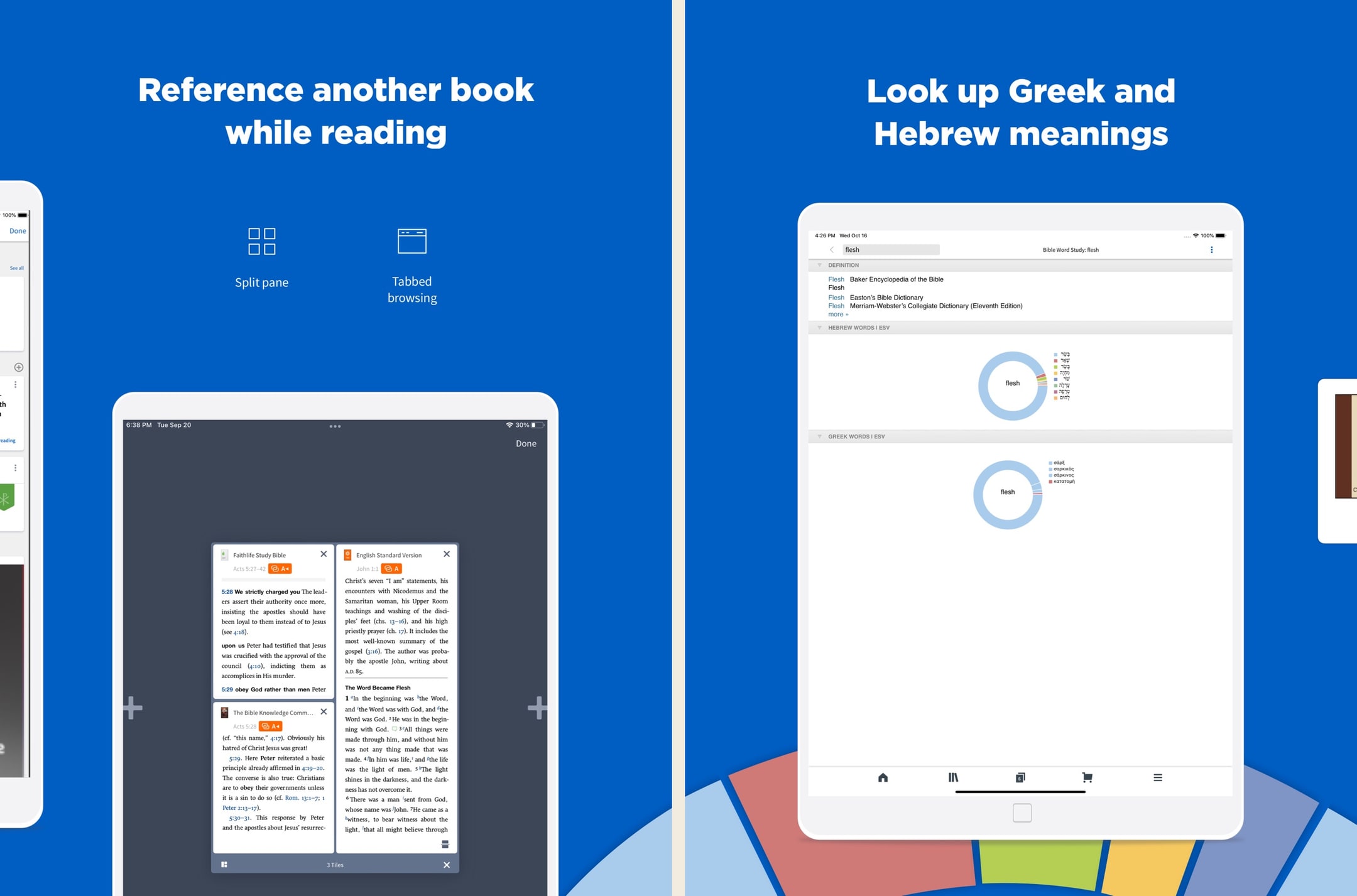
- Our score
- 8.8/10
- Platforms
- iOS, Android, iPad, Mac, Windows, Web
- Tradition
- Protestant, Catholic, Orthodox, Reformed, Baptist, Anglican, Lutheran, Methodist, Pentecostal, Non-Denominational, Ecumenical
Logos is the most powerful Bible app we've used, full stop. In hands-on testing, the Passage Guide alone replaced about six tabs of cross-referencing we used to do manually. But the price tag, learning curve, and ecosystem sprawl are real — we'd never recommend Logos as a first Bible app. The new subscription tiers (Premium/Pro/Max) lower the on-ramp significantly versus the old base-package-only model, and Pro at ~$12.50/month annually is the sweet spot for most working pastors in 2026. For casual readers, this is still overkill.
What we like
- The Passage Guide and Factbook do in seconds what would take an hour with a stack of physical commentaries — this is still the killer feature.
- Original-language datasets are genuinely scholarly: morphological searches, syntax trees, semantic-domain searches, none of which exist in YouVersion or Olive Tree.
- Sermon Builder and the lectionary tools are legitimately useful weekly software for working pastors, not just a marketing checkbox.
- Resources you buy in base packages are yours permanently, even if you cancel a subscription — the ownership model still holds for purchased books.
- The mobile app has caught up to desktop in recent years — you can run a full Passage Guide on an iPhone, which used to be impossible.
What to know
- Pricing is genuinely confusing — base packages, subscription tiers, individual book purchases, and frequent sales make it hard to know what you actually need.
- Fastest path to a strong library still costs hundreds to low-thousands of dollars, even after the subscription tiers softened the on-ramp.
- The interface, on every platform, has a steep learning curve — most people use about 10% of what Logos can do.
- Mobile performance and load times can stutter on older phones once your library passes a few hundred resources.
- The Faithlife ecosystem (Sermons, Equip, Proclaim) is sprawling and the cross-product upsell is constant inside the app.
Best for
The default pastor Bible app — largest library, best Sermon Builder, strongest cross-device sync, and the deepest integrated study workflow on the market.
Skip if
You only want a quick devotional reader — Logos is built for serious weekly work and is overkill for that.
I love this app.
I have used many Bible apps and software and when by the grace of God I was led to the Logos web site, I was like a kid in a candy store with the permission to eat anything I wanted. I still keep the other Bible software but primarily I use Logos and the more resources you purchase the more powerful your Bible software becomes you only need to purchase what you need, I am just a lay person some of the packages I can't use at the present time. I think that any investment into The things concerning God is prosperous. To whom it may concern I hope anything that I say being just a lay person who is still reaping the benefits of what I don’t deserve which is to walk in the spirit of God and stumbling, falling and bouncing off the walls , if you will, and still reaching and walking after the perfection and that perfection being Christ. So this is my second time writing a review for this. I can barely find the words most glorious I don’t know powerful Bible software that I know to date many preachers use it so all I got to say is I hope I’m understood because I am not erudite and speech, but there are no lies coming out of my mouth, I just love LOGOS though when I found out about it so many books, I haven’t even read yet by the grace of God I’m gonna spend my life in his service and his word praise be to God, peace and spiritual prosperity to all who read this, I said the spirit of Godand the spirit does not stay with you always which is why we have to keep walking after pray for you. You know what I’m talking about. I’m saying I’m not saying God.
— Hldavis7455 · August 8, 2024
Olive Tree Bible
A serious study Bible that doesn't punish you for being free.
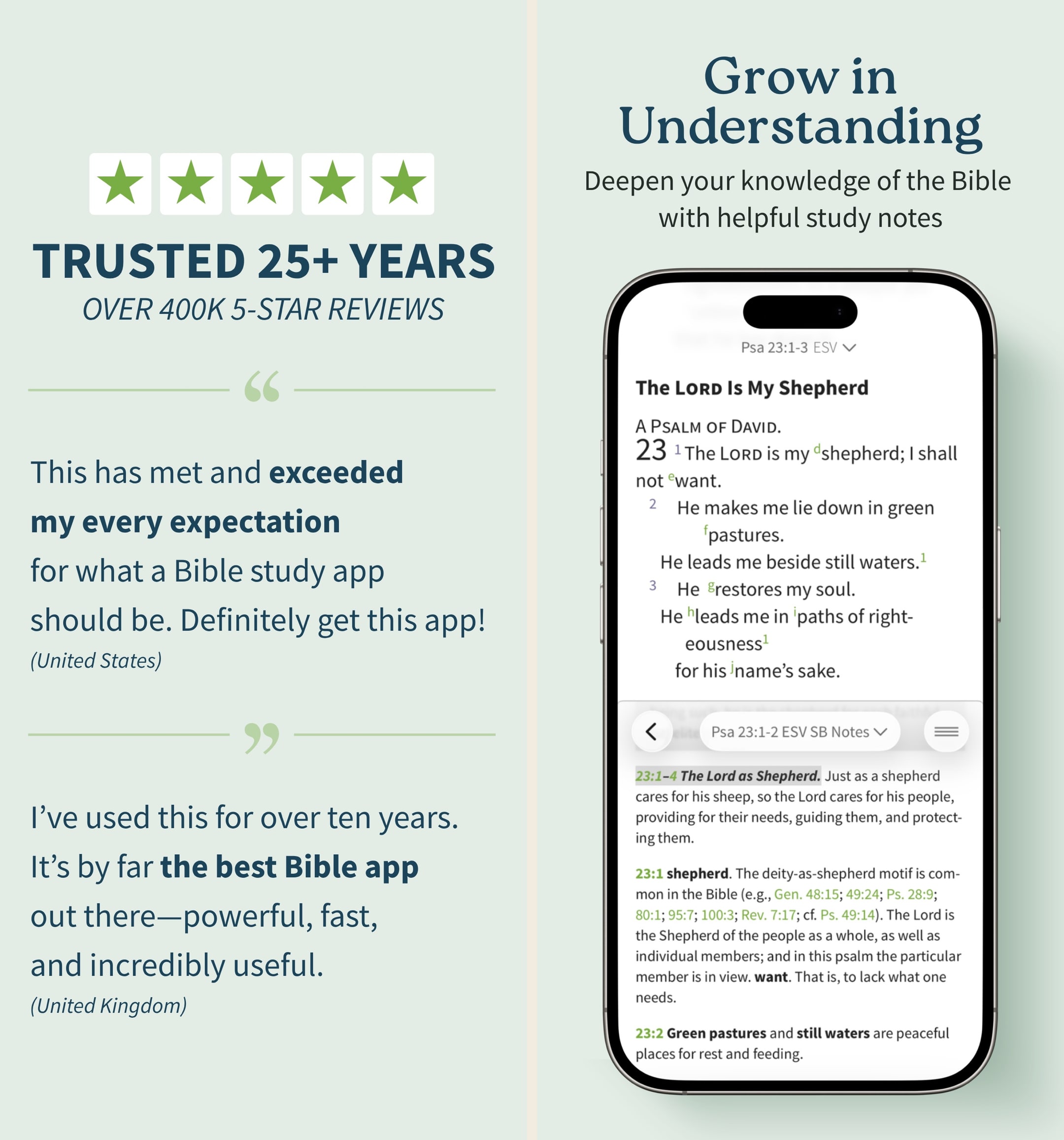
- Our score
- 8.5/10
- Platforms
- iOS, Android, iPad, Mac, Windows, Web
- Tradition
- Protestant, Ecumenical, Reformed, Baptist
Olive Tree is the app we keep recommending to people who outgrow YouVersion but aren't ready to spend Logos money. In our hands-on testing, the split-window view and real notebook were the features we missed most when we switched away. The store is a mess and the look is dated, but the bones are excellent. If you want one app that handles daily reading and serious study without forcing you onto a subscription treadmill, this is still the cleanest answer in 2026 — especially if you read across iPhone and a Mac.
What we like
- Split-window reading lets you put two translations or a translation and a commentary side-by-side on a phone, which is the single best small-screen study feature on any Bible app.
- Notes are real notes — long-form, taggable, organized by passage, and they sync cleanly across iPhone, iPad, Mac, and Windows.
- You actually own resources you buy — perpetual licenses, no rug-pull when a subscription lapses, which still matters in 2026.
- Original-language tools (Strong's, interlinears, Greek/Hebrew lexicons) are genuinely usable for non-scholars who want to look up one word.
- The free tier is unusually generous — unlike Logos, you can do real study without ever paying a cent if you stick to free resources.
What to know
- The store is overwhelming — hundreds of resource bundles, frequent sales, and a UI that feels like a 2014 Bible bookstore.
- Premium study Bibles and major commentaries cost real money — building a serious library can run several hundred dollars even on sale.
- No groups, no social, no shared reading — this is a solo-study tool, not a community app.
- The mobile UI, while functional, looks dated next to YouVersion or Glorify; typography and spacing feel pre-iOS-17.
- Audio Bible options exist but are nowhere near as polished or dramatized as Dwell or Bible.is.
Best for
Pastors who want a serious study app without the full Logos commitment — generous free tier, split-window reading, Olive Tree Plus for a curated study library.
Skip if
You preach weekly and want the deepest possible Sermon Builder — Logos goes further on integrated sermon prep.
God’s Word on the go!
I have used this particular Bible app. off and on for several years. I really enjoy this version of the Bible. The Bible itself is easily understood and user friendly. I would strongly recommend this wonderful book to any and all both Christian and novice alike. I intend to use it more often and try harder to absorb the words and their meanings each and every day. Probably the best approach would be to start a daily journal to better understand what I am reading. Many do not read the Bible I believe because some of the readings are hard to understand but this version is very user friendly as stated. So those reading these comments let me encourage you to take some time to read and pursue the Olive tree Bible version and see for yourself. Ask God to open your mind, heart and eyes in the pursuit of His truth and watch the blessings flow in your life. We are living in hard times so much doubt and fear surrounds us all. Many are looking for peace. The peace you look for can be found in God’s Word. Don’t believe me read for yourself. If you are looking for a true friend Look no further than God Himself. He loves you and cares very much for you and your family and friends. As a follower of Christ even though we have never met I love you as a bother and sister. My prayer is that God will open your eyes and heart to what He wants for you in this life. Never give up, keep reaching to the heavens and know your are loved beyond your comprehension. Blessings to all Rick
— a new begjnning · April 11, 2022
Accordance Bible Software
The Mac-first power user's Bible study platform.
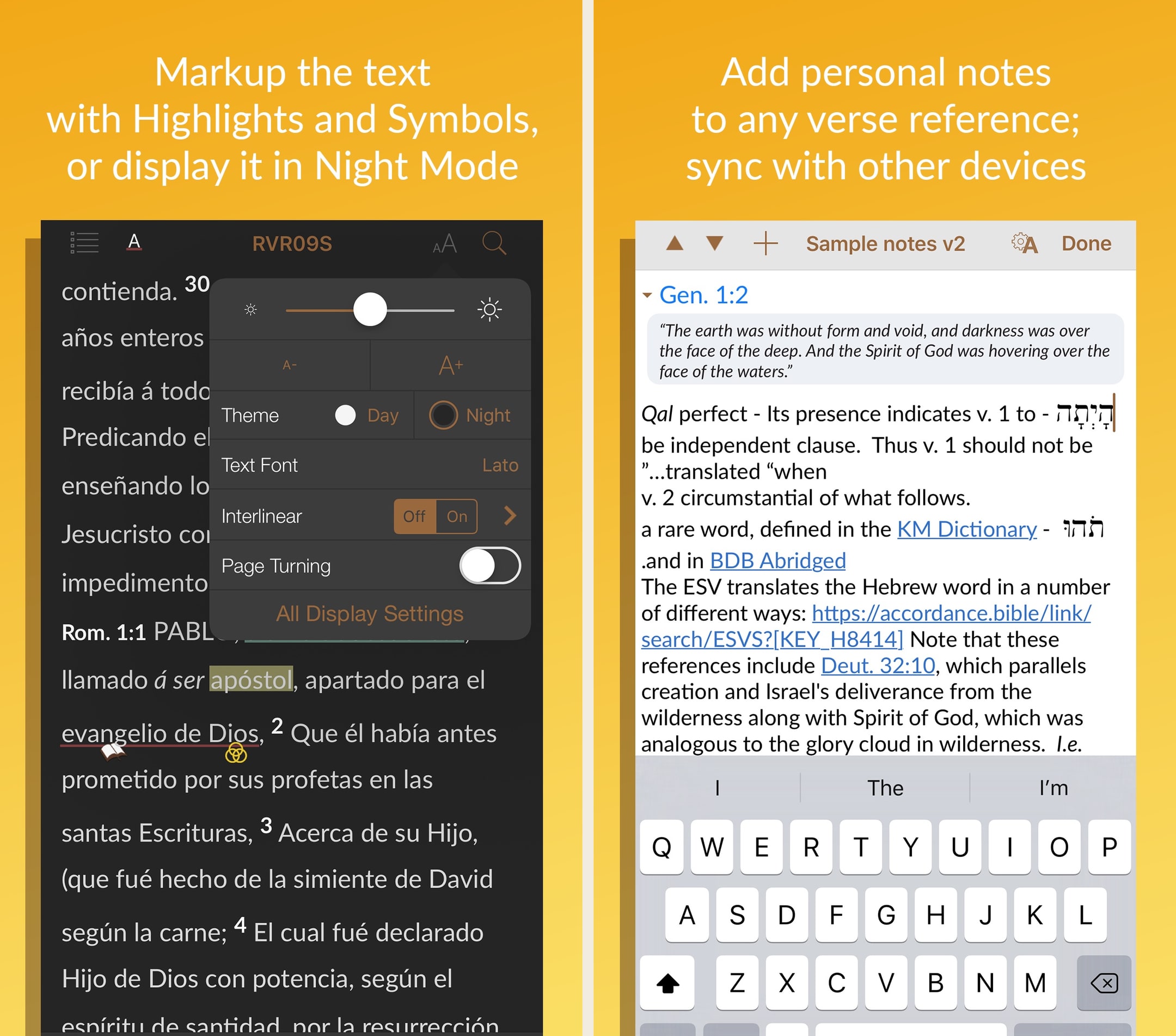
- Our score
- 8.2/10
- Platforms
- iOS, Android, iPad, Mac, Windows
- Tradition
- Protestant, Catholic, Reformed, Baptist, Anglican, Lutheran, Methodist, Ecumenical
Accordance has been the quiet alternative to Logos for years, and on a Mac, it still holds up. In hands-on testing, search speed across a heavy library was visibly faster on Accordance than on Logos, and the cleaner UI matters for long study sessions. The mobile apps are noticeably thinner, which is the real tradeoff — if you live on your phone, this isn't your pick. But for Mac-using pastors and scholars who want a permanent library without a subscription, the $49 starter license plus targeted resource purchases is the most ownership-friendly path to a serious study setup in 2026.
What we like
- Mac performance is genuinely excellent — searches across a large library run faster than the equivalent in Logos, especially on Apple Silicon.
- One-time purchase / permanent license model means you actually own what you buy, with no subscription required to keep using your library.
- Original-language tools (Greek, Hebrew, Aramaic, Syriac) are research-grade — the app has a long history with biblical scholars and seminary use.
- $49 starter license is one of the cheapest paths to a real ownership-model study Bible platform, especially with the 90-day trial.
- Cleaner, less-cluttered interface than Logos for users who don't want a sprawling Faithlife ecosystem.
What to know
- Mobile apps are noticeably weaker than the Mac/Windows desktop experience — the iPhone/iPad app feels like a companion, not a full client.
- Resource catalog is smaller than Logos — some niche commentaries and academic resources just aren't available.
- Marketing site and store experience are dated, and the pricing across collections can be hard to parse without help.
- Smaller user base means a smaller community, fewer YouTube tutorials, and less third-party content than Logos.
- No subscription tier for users who'd rather rent a curated library than own one — every meaningful upgrade is a purchase.
Best for
Pastors doing serious Greek or Hebrew exegesis — keyboard-first syntax search and original-language tooling that beats Logos in raw search power.
Skip if
You want a friendlier UI and a broader content library — Logos is more approachable.
Great app, but a few user interface issues
Accordance is one of the best Bible study apps available, period. I use it regularly, both for personal reading and devotion, and in my studies and research. Version 3.4 has been much more stable than previous versions, however, I still run into user interface issues. For example, if I want to switch to a different book or resource while in reader view, I try to click in the top left corner, but 95% of the time, or more, it only brings up the instant details pop up or the verse tool. I have literally spent over 2 minutes just trying to change Bible books in the middle of sermon while trying to keep up with the teaching. If there is a gesture just for bringing up the resource selector, I am not aware of it. Also, the divider between the two text panes always changes position when switching between apps. I usually keep the divider halfway between my English and Hebrew/Greek texts. When I switch to my note taking app and then switch back, the divider has jumped to the ⅔ of the screen in English text and ⅓ in original language. That means every time I switch, I also have to reposition the divider. This is frustrating and should be easily fixed. As it is, sometimes, if I’m trying to take notes in the middle of a sermon or teaching, I don’t use Accordance, but use a simple Bible reader app, just because I get frustrated with the user interface issues. I hope OakTree Software takes care of this, because when Accordance works properly, it’s probably my favorite Bible app.
— j micah · May 27, 2023
Blue Letter Bible
Free original-language study tools, no upsell.
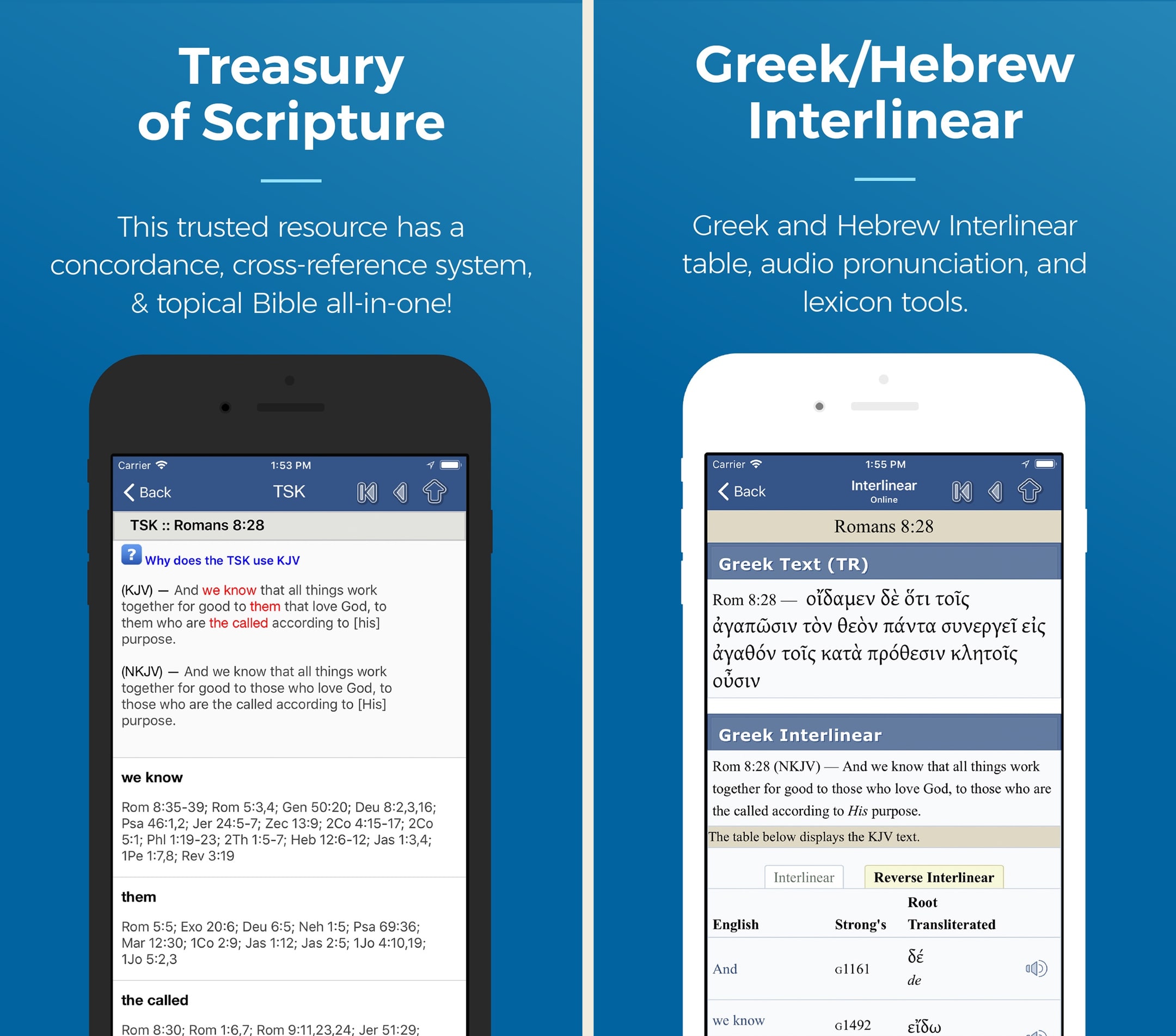
- Our score
- 8.3/10
- Pricing
- Free
- Platforms
- iOS, Android, iPad, Web
- Tradition
- Protestant, Reformed, Baptist, Non-Denominational, Ecumenical
Blue Letter Bible is the unsung hero of the free Bible app world. In our hands-on use, no other free app comes close on original-language tools — tapping a word in Hebrews and getting a Strong's lookup, lexicon entry, and concordance hits in two taps is genuinely useful. The look is dated and the modern-translation library is thin, but the substance is there. If we could only have one free study app on a phone in 2026, this would be the pick — and the fact that it's donor-funded with no ads makes it easy to recommend.
What we like
- Tap any word, see the underlying Greek or Hebrew with Strong's number, lexicon entry, and every other place that root appears in scripture — for free.
- Treasury of Scripture Knowledge is built in and crosslinked, which means every verse comes with a hand-curated chain of related verses.
- Genuinely no premium tier and no ads — donor-funded ministry, so the experience is the same for every user.
- Public-domain commentaries (Matthew Henry, JFB, Gill, Clarke) are integrated and searchable inside the app.
- The Android and iOS apps are lean and fast, with offline downloads that don't require an account or subscription.
What to know
- Modern translations are limited — KJV, NASB, ESV (limited), and a handful of others; you won't find every translation YouVersion has.
- UI is utilitarian — it works, but it looks like a study tool from 2017, not 2026.
- Reading plans library is small and dated compared to YouVersion or Glorify.
- No social or community features — no shared notes, no groups, no friends.
- Default theology leans Reformed/Calvary Chapel, which surfaces in some commentary picks and curated content.
Best for
Free original-language tools every pastor should have installed — Strong's, lexicons, interlinears, parsing without paying anything.
Skip if
You want a polished modern UI or a personal library to build on — Blue Letter Bible is browser-style and dated.
This is the ultimate bible online study
Totally awesome! and without ads :This is Tremendous bible resource in every way, just start exploring and be sure to click on a verse and click the one in the middle of menu and you will be able view Greek and Hebrew and explanation of all words (that choice is: Concordance/Interlinear); and so much more, all ad free. It is truly amazing. I started using this app over 7 years ago. The desktop edition is also great. For this app:They keep improving on what is already great. Example: choice for you to have the chapter read aloud for you, or the whole of the book within the 66 books of the Bible. Just about every translation of the many English translations are available. Also includes Thayer’s in depth original and amazing words in Bible I continue to learn about the root meanings through this tremendous resource that the brilliant geniuses of the development team make available when you go to a verse in linear concordance and tap any word you will get Hebrew and Greek of word it even pronounces it for you and click at bottom of that page for the Thayer selection which opens up a whole realm of authentic text Insight- when you see it you’ll get what I mean - hard to describe depths of this and for each word. I’m not an employee of this remarkable non profit, may I recommend supporting it. Also fully available on your web browser. iPad version is also dynamic and outstanding as well.
— blueBibleReader · March 29, 2025
Echo Prayer
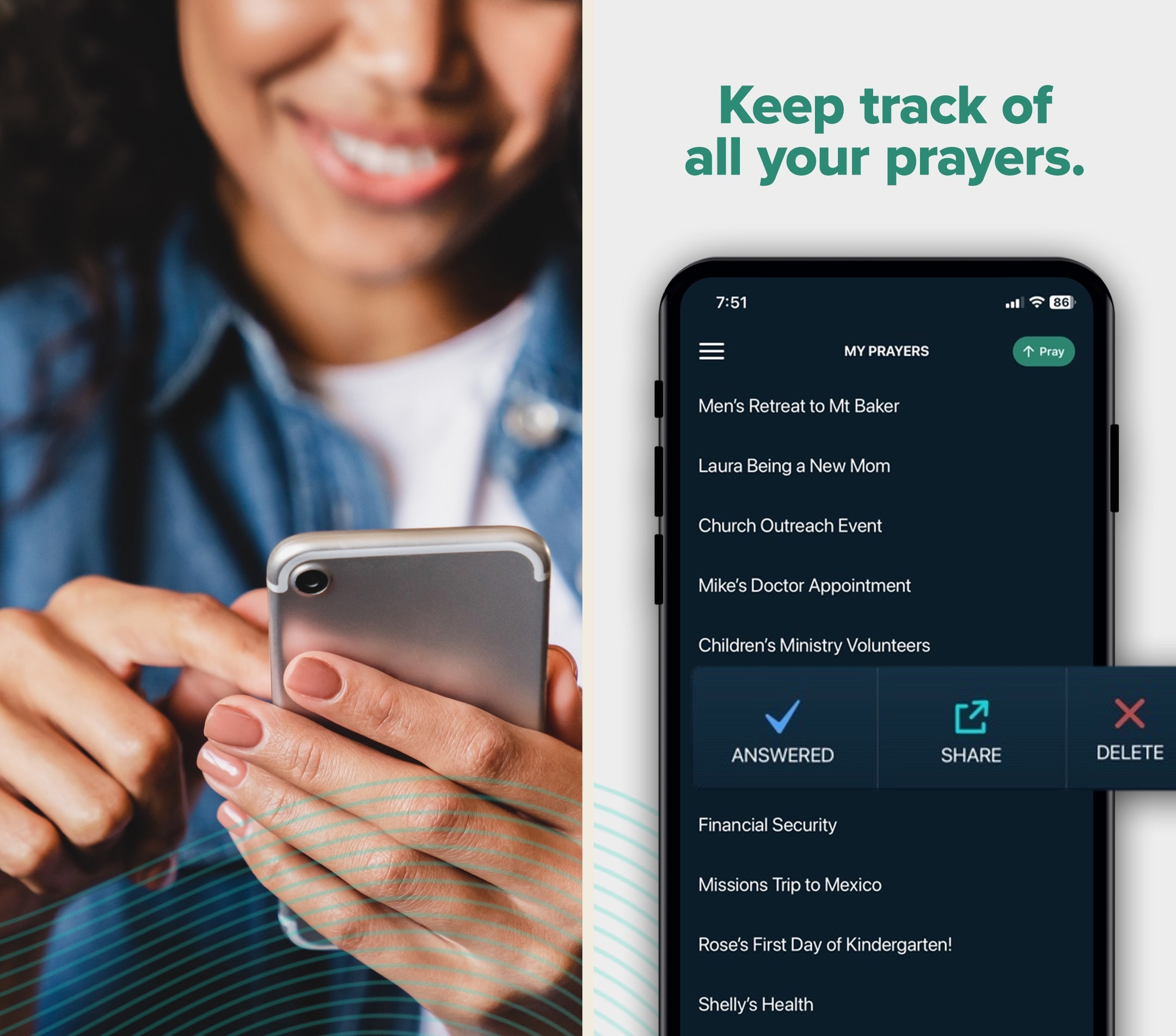
A clean, focused prayer app — not a Bible app, but a useful companion to one.
- Our score
- 7.6/10
- Platforms
- iOS, Android, Web
- Tradition
- Protestant, Catholic, Ecumenical, Non-Denominational
Echo is the prayer app we keep coming back to because it does one thing — manage a prayer list — better than the prayer features inside any general Bible app. In hands-on use, the reminder system actually changed our prayer rhythm in a way YouVersion's prayer module never did. It's not a Bible app, and we'd never recommend it as a standalone. But paired with YouVersion, Olive Tree, or Hallow, Echo is the missing piece for anyone who wants to keep a real, organized, returning prayer practice. ECHO+ at $14.99/year is genuinely reasonable.
What we like
- The single most focused prayer-list app in the category — the entire UI is built around the act of praying through a list, which most apps treat as an afterthought.
- Reminder system is genuinely useful: schedule a verse or a person at a recurring interval and the notifications actually feel like prompts to pray, not nags.
- Free tier is fully functional for individual use — you don't need to pay anything to maintain a long-term prayer practice.
- Groups and feeds (ECHO+ for creators) make it easy for families and small groups to share prayer requests without sliding into Facebook-style noise.
- ECHO+ at $14.99/year is one of the most reasonable subscription prices in the category, with a clear feature set.
What to know
- Not a Bible app — there's no scripture reader at all, so it has to be paired with a Bible app to be a complete experience.
- Group/feed creation is paywalled; if you want to start a small-group prayer feed, ECHO+ is required.
- UI is functional but visually conservative — works well, doesn't dazzle.
- No deep journaling — entries are short and list-style; if you want long-form prayer journaling, look elsewhere.
- Discovery of public feeds is limited compared to a community app like YouVersion's groups.
Best for
Prayer-list management for pastoral care — tracking prayer requests across a congregation over months and seasons.
Skip if
You want a Bible reader as the core experience — Echo is a prayer-only tool.
Great tool
I’ve recently felt convicted that there are important people and circumstances in my life for whom and for which I am called to cover in prayer. My problem is I don’t remember very often to to stop and pray. I say I’ve been praying for God to move in these areas, but do I really? I think about them. I wish they would be healed or redeemed, but do I really often take time to pray? Enter this app. It was so helpful to me to even add the prayer. It forced me to be still and take time listening to God about what the need really is and to articulate it. Then the reminders. I was able to be thoughtful about times that are often transitional times between scheduled commitments. Those times would usually be filled with planning for the next thing, but with the reminder popping up on my phone, I remember to just be still and commune with God in prayer. And not just that, but to be in prayer over these specific things I know He wants me to bring to Him all day every day. I’m so thankful and pray this will help me to be less impulsive and self-centered in my prayers and really leave things at the feet of Christ and wait for the Holy Spirit to move.
— LaineeS · March 9, 2023
Warmpeach — coming soon
A Bible chat app — pastor and therapist in one.
Warmpeach is a Bible chat app that blends a pastor's care with a therapist's questions, grounding every reply in scripture. Join the waitlist and we'll email you when it opens up.
Verdict
Warmpeach — coming soon
Join the Bible chat app waitlist
Who this guide is for
This guide is for pastors choosing the Bible-app stack they will preach with, study from, and run pastoral-care workflows through. We are interested in apps designed for serious weekly work — sermon prep, original-language exegesis, library navigation, congregation prayer-list management. We are not interested in consumer-shaped Bible apps that happen to have a Bible inside them.
If you came here for a one-app answer, install Logos. It is the strongest pastor tool on the market, the Sermon Builder is the most integrated sermon prep workflow we have used, and the cross-device sync from desktop to iPad to phone is the best in the category.¹ The rest of this guide is about which second app to add — Accordance for original-language work specifically, Olive Tree for a lighter-weight study alternative, Blue Letter Bible as a free addition every pastor should have, Echo Prayer for pastoral-care prayer lists.²³⁴⁵
How we evaluated
We tested with pastor workflows in mind — weekly sermon prep, original-language exegesis, multi-device study moving from desk to iPad to phone, and congregation prayer-list management. We tracked Sermon Builder workflow, library scaling under sustained use, and the offline behavior that matters when church Wi-Fi fails on a Sunday morning.
A few things we paid extra attention to. First, Sermon Builder integration — whether the app supports a real outline-to-slides-to-pulpit pipeline or just stops at the citation level. Second, original-language depth, since pastoral exegesis is one of the genuine differentiators in this category. Third, multi-device sync, since pastor study rarely happens on one device. Fourth, pastoral-care features, particularly prayer-list management for tracking congregation requests over time.
We also paid attention to the long-term economics. Pastors typically use the same study app for many years, sometimes decades, and the difference between a $14.99/month subscription and a one-time $1,500 base package compounds dramatically over a career. The recommendations call out where base packages are worth it and where subscriptions are friendlier.
Key tradeoffs on Bible apps for pastors
Subscription vs base package
Logos and Accordance both sell subscriptions and base packages. Logos Premium is $9.99/month, Pro is $14.99/month, Max is $24.99/month. Logos base packages range from $295 (Starter) to over $10,000 (Diamond, Portfolio).¹⁶ Accordance starts with a $49 starter license and sells resources a la carte.² The honest economics: subscriptions are friendlier on day one and cumulative on year ten. Base packages are friendlier on year ten and harder on day one. Most pastors we know own a base package they bought during a sale and then add resources annually as they need them.
Logos vs Accordance
Both are mature, both are deep, both are worth the time to learn. Logos has the bigger library, the friendlier onboarding, the better cross-device sync, and Sermon Builder.¹ Accordance has stronger original-language search, a more keyboard-first workflow, and a permanent-license model that some pastors prefer.² The honest answer is that pastors doing weekly Sermon Builder work and broad library research land on Logos; pastors doing serious Greek or Hebrew exegesis weekly often prefer Accordance for that work specifically. Many serious pastors own both.
Sermon Builder workflow
Logos's Sermon Builder is the most integrated sermon prep workflow we have used on any platform.¹ Outlines link directly to scripture references and library citations, exports to slides and PDF stay in sync with the underlying text, and the whole thing scales with your library. For pastors who write linear sermons in Word or Google Docs, Sermon Builder is worth trying for the citation and slide handling alone. The actual prose can still be written elsewhere; Sermon Builder owns the research-to-pulpit pipeline.
Pulpit reliability
Whatever Bible app you plan to use on a Sunday, test the offline behavior the night before. Church Wi-Fi is often unreliable, and a paywalled, stalled, or stuck app in the middle of a sermon is the worst possible failure mode. Logos and Olive Tree both handle offline use well if you download your resources in advance.¹³ YouVersion is reliable on a phone.⁷ Accordance is reliable on iPad.² The mistake we have seen too many times is pastors trusting an app on a Sunday morning that they have never used in airplane mode.
Pastoral care and prayer lists
Echo Prayer is the dedicated tool for managing congregation prayer requests over time. Free at the core, with tagging and tracking that holds up across months.⁵ Some pastors run a separate spreadsheet for the same job; Echo gives you a phone-native flow that is easier to keep up with during a real pastoral week. For pastors who handle prayer-list management as part of pastoral care, Echo is worth the install.
Original-language access at any budget
If your budget does not support Logos Pro, install Blue Letter Bible. The original-language tools are free and real — Strong's, lexicons, interlinears, parsing — and the workflow is genuinely useful for sermon prep even alongside paid tools.⁴ Many pastors install Blue Letter Bible regardless of what else they own, because the friction of looking up a Greek word for free in a browser is sometimes lower than the friction of opening a paid app on the wrong device.
What we did not test
We did not separately test the seminary-grade extensions of Logos or Accordance, since most parish pastors will not use them weekly. We did not weight App Store rating averages heavily for this audience, since the rating curves on Bible apps are dominated by consumer users and do not really speak to the pastor segment. The ranking reflects what genuinely worked across pastoral workflows during sustained testing on the kind of weekly cycle a real pastor runs.
Sources
-
Logos Bible Study — App Store listing (subscription tiers, base packages, Sermon Builder, cross-device sync). Accessed 2026-05-11. https://apps.apple.com/us/app/logos-deep-bible-study/id336400266
-
Accordance Bible Software — App Store listing (starter license, a la carte resources, original-language tools, iPad build). Accessed 2026-05-11. https://apps.apple.com/us/app/accordance-bible-software/id411970514
-
Olive Tree Bible — App Store listing (free tier, Plus subscription, offline study). Accessed 2026-05-11. https://apps.apple.com/us/app/bible-app-by-olive-tree/id332615624
-
Blue Letter Bible — App Store listing (free, Strong's, lexicons, interlinears). Accessed 2026-05-11. https://apps.apple.com/us/app/blue-letter-bible/id365547505
-
Echo Prayer — App Store listing (free core, prayer-list management). Accessed 2026-05-11. https://apps.apple.com/us/app/echo-prayer/id880759027
-
Logos — official site (subscription pricing, base packages). Accessed 2026-05-11. https://www.logos.com/
-
YouVersion Bible — App Store listing (free, offline reading, plans). Accessed 2026-05-11. https://apps.apple.com/us/app/bible/id282935706