
Bible Apps That Actually Work With VoiceOver and TalkBack in 2026
By Sankalp Jonna · Last reviewed 2026-05 · 7 apps reviewed
How we tested
Every app here was installed and used personally. We capture raw findings — typed notes, screenshots, screen recordings, voice memos — and the writing is AI-assisted from those raw notes. Scores, rankings, and "best for / skip if" calls reflect our actual experience with each app. Read the full methodology →
How we evaluated apps for Blind People
Every app on this list was scored against the same 6 criteria. Hands-on testing, AI-assisted writing.
Screen reader support
Whether VoiceOver on iPhone and TalkBack on Android can reach every primary feature with properly labeled controls and a navigation order that makes sense without sight.
Audio Bible quality
Full Old and New Testament narration, narrator clarity, chapter and verse navigation, and playback controls — speed, skip, sleep timer — that work via the screen reader.
Voice search and navigation
Whether the user can say 'go to John 3:16' and have the app jump there, or whether every passage requires scrolling through pickers.
Large-text and high-contrast modes
Relevant for low-vision readers who are not fully blind — Dynamic Type respect on iOS, comparable scaling on Android, and high-contrast themes.
Subscription and paywall behavior
Whether accessibility-relevant features are gated behind paid tiers, and whether subscription flows are screen-reader-traversable without sighted assistance.
Active development and reliability
Whether the app is still being updated and whether accessibility regressions get fixed quickly — particularly important since iOS and Android accessibility APIs change with most major OS updates.
Comparison at a glance
The full ranked list with our score, pricing, and the buyer profile each app fits.
| # | App | Score | Users | Pricing | Best for |
|---|---|---|---|---|---|
| 1 | Bible.is | 7.8/10 | 4.8(131K) | Free | The strongest free option for blind users — large audio catalog, clean VoiceOver and TalkBack pass through the player, no paywall on any feature, and dependable offline downloads for travel. |
| 2 | YouVersion Bible | 9.2/10 | 4.9(13M) | Free | The default mainstream pick — 99 percent VoiceOver-clean per long-running AppleVis threads, free audio Bible bundled in, free everywhere with no paywall, and the largest community of blind users already on it. |
| 3 | Dwell | 8.4/10 | 4.9(81K) | From $9.99/mo | The production-quality audio pick when the budget supports it — multiple narrator voices, music tracks, and a listening flow that holds attention through long sessions, with screen-reader-respectful playback controls. |
| 4 | Olive Tree Bible | 8.5/10 | 4.8(314K) | From $2.99/mo | Buy-once resource model that suits blind readers who want to own a study Bible permanently rather than rent it monthly — paired audio, deep cross-references, and reliable VoiceOver labels on the core read view. |
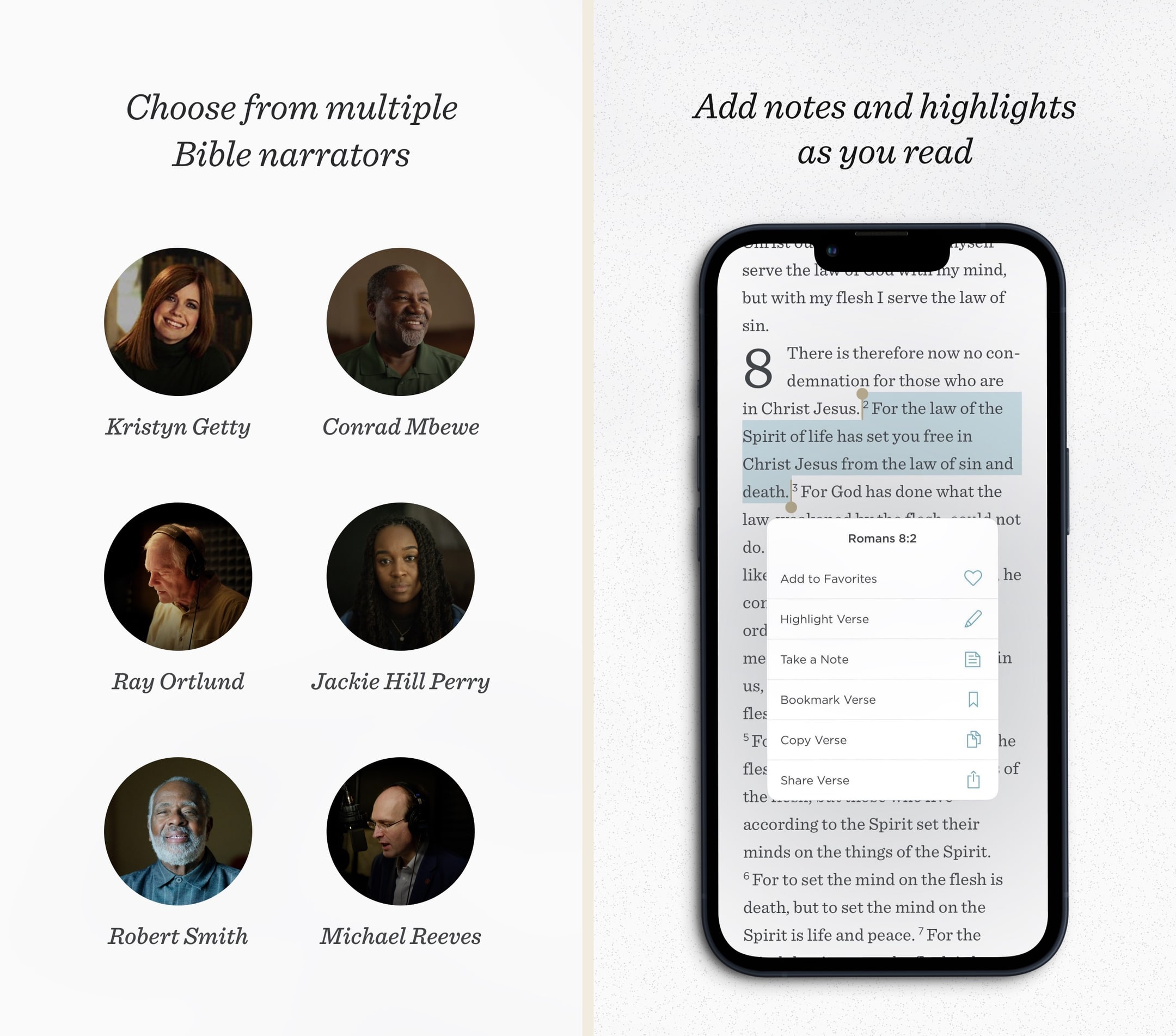
| 5 | ESV Bible | 7.8/10 | 4.7(9K) | From $3.99/mo | The clean low-vision pick for ESV readers — Crossway respects Dynamic Type properly so the type scales without breaking, the audio is read by Kristyn Getty and David Cochran Heath, and there are no upsells anywhere. |
| 6 | Abide | 7.7/10 | 4.9(121K) | From $4.99/wk | Audio-first meditation and bedtime Bible content with strong narrator quality — useful as a complement to a primary Bible app for sleep, anxiety, and end-of-day listening. |
| 7 | Logos Bible Study | 8.8/10 | 4.9(165K) | From $4.99/mo | The deepest study library for blind seminary students and pastors — VoiceOver works well on the iPhone read view per AppleVis reports, and the desktop client has a long history of accommodating accessibility tooling. |
Our picks, ranked
Bible.is
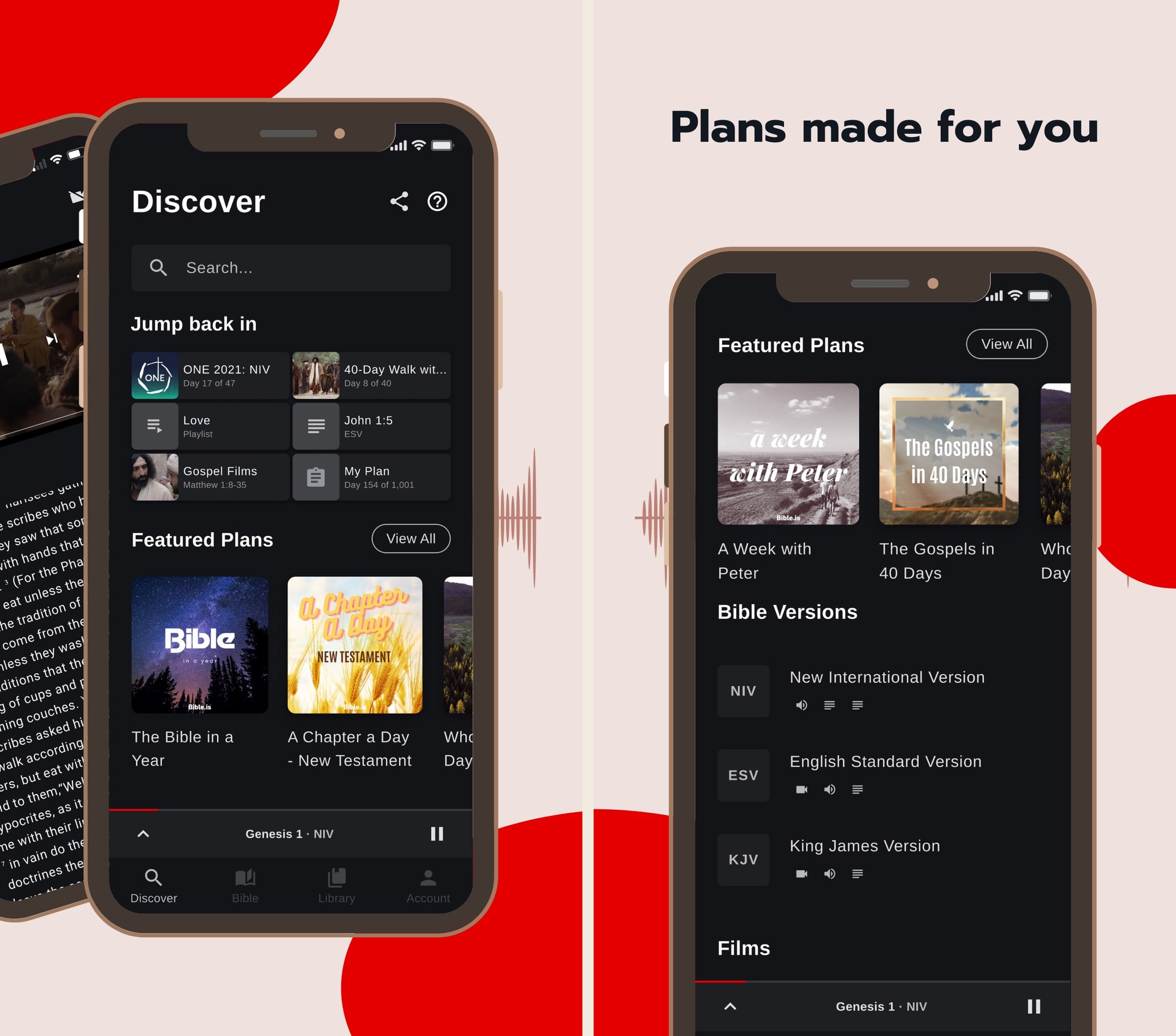
Dramatized audio Bible in 2,600+ languages, free.
- Our score
- 7.8/10
- Pricing
- Free
- Platforms
- iOS, Android, iPad, Kindle Fire, Web
- Tradition
- Protestant, Catholic, Ecumenical
Bible.is is the audio Bible we recommend when someone says they don't read well or wants to listen in the car. In hands-on use, the dramatized audio quality is genuinely a step up from the flat narration most apps default to — you can hear the difference within thirty seconds. The text experience is fine but secondary; we treat this as an audio-first app and pair it with YouVersion or Olive Tree for reading. For multilingual families or anyone serving overseas, the language breadth makes this nearly impossible to beat in 2026.
What we like
- Dramatized audio with multiple voice actors and ambient sound is genuinely better than the read-aloud audio in most other Bible apps — closer to a great audiobook than a flat narration.
- Language coverage is unmatched: 2,600+ audio languages, with new releases every month, which makes this the default Bible app for missions and global use.
- Offline downloads work cleanly — download a New Testament in your language and you can listen on a plane in airplane mode.
- Gospel films library (1,700+ languages) is a quietly excellent resource for evangelism and family use.
- Donor-funded ministry, so there's no premium tier and no ads cluttering the experience.
What to know
- English-translation library is narrower than YouVersion — strong on the audio versions FCBH has produced, lighter on text-only modern translations.
- Study tools are essentially absent — no commentaries, no original languages, no cross-references.
- The notes/highlight system is basic and not as polished as YouVersion's or Olive Tree's.
- UI hasn't kept up with the slicker apps — functional, but visually it shows its age.
- Search across the audio Bible is workable but not as fast or fuzzy as text-only search elsewhere.
Best for
The strongest free option for blind users — large audio catalog, clean VoiceOver and TalkBack pass through the player, no paywall on any feature, and dependable offline downloads for travel.
Skip if
You want a primary text reader with serious study tools — Bible.is is audio-first and the study layer is essentially absent.
Phenomenal app, except this 3.0.5 version
This app is phenomenal and has gotten me so much further in the Bible than I have ever gotten before just in the past 2-3 weeks. I am not much of a reader and when I try to read, I fall asleep, and I wanna continue to dive deep into the Word, and these dramatized audio books help me to do just that. Everything was going well with the simple layout and pretty quick Bible book downloads for offline usage as well. However, when this new update came out and I updated the app, it deleted all of my downloads and now I had to make an account. Also it takes 3 times as long to download all the books and chapters and the app keep glitching where if I pause in the middle of a chapter, any of them, and maybe go to another app, and then come back to it, even a few seconds later, it buffers FOREVER. It doesn’t play until I use the skip button to go either forward or backward and then back to where I was. Also, every time I close the app, I have to log back in instead of it just automatically having me logged in. It’s a bit too many downfalls for a bunch of extra stuff. And the new layout (not including the extra features like the videos and bible plans, etc.) unfortunately is not as good as the old one. The old one was simpler and easier to utilize and faster. This one is a lot slower and has more defects unfortunately. That’s for version 3.0.5 by the way. It’s currently April 22,2020. I downloaded the app about a month ago or so.
— xSupernovax · April 22, 2020
YouVersion Bible
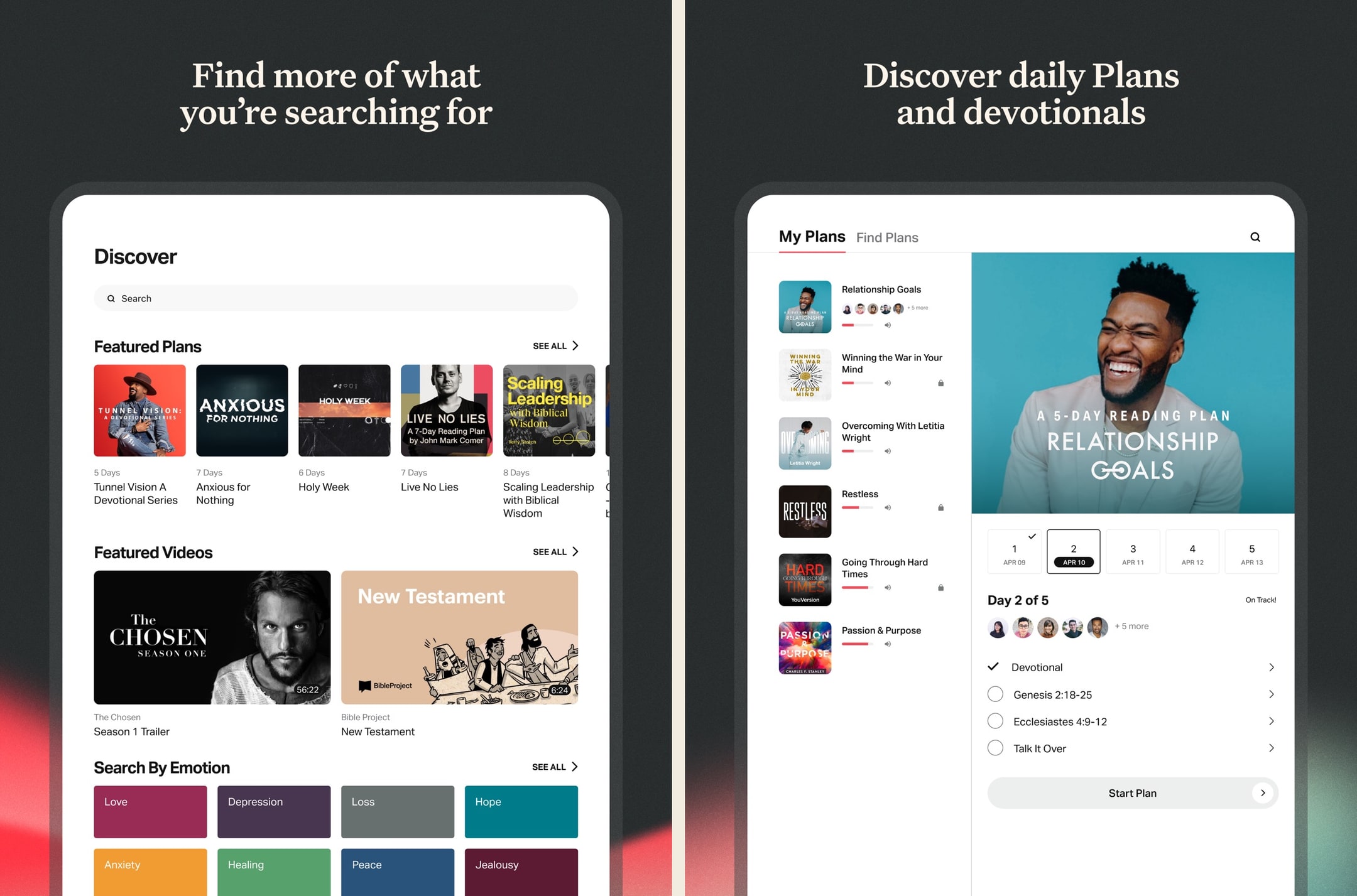
The free Bible app most people open first.
- Our score
- 9.2/10
- Pricing
- Free
- Platforms
- iOS, Android, Web, iPad, Apple Watch
- Tradition
- Protestant, Catholic, Ecumenical
We've used YouVersion daily over an extended stretch and it's still the default for a reason: free, frictionless, and good enough for 80% of what most readers want. The reading plans alone keep us coming back, and the Apple Watch + widget integrations turn opening scripture into a one-tap habit. But the moment we wanted to do real study — cross-references, commentary, original Greek — we hit a wall and reached for a different app. As a primary daily-reading Bible, it's still the one to beat in 2026.
What we like
- By far the largest free Bible-reading app — 2,500+ translations including pretty much every English version anyone reads.
- Reading plans library is enormous and well-curated, ranging from 3-day devotional plans to year-long Bible-in-a-year tracks.
- Genuinely free with no ads, no paywalls, no premium tier hiding key features behind a subscription.
- Solid offline support — download translations locally and use them on a plane or in low-signal areas without losing functionality.
- Bible Lens / verse images make sharing scripture in iMessage and social posts effortless, which is a quiet but real driver of daily use.
What to know
- Study tools are thin — there's no commentary integration, no original-language word study, no concordance worth using.
- Notes feature is closer to a verse highlighter than a real notebook — you can't write longer reflections that anyone will ever go back and find.
- Search across your own highlights and notes is weak; finding a verse you saved six months ago is harder than it should be.
- Some reading plans are openly evangelistic about Life.Church positions, which won't bother most users but lands awkwardly for Catholic, Orthodox, or denominationally-cautious readers.
- App is feature-sprawling — every release adds something, and the home screen has slowly become a content feed instead of a Bible.
Best for
The default mainstream pick — 99 percent VoiceOver-clean per long-running AppleVis threads, free audio Bible bundled in, free everywhere with no paywall, and the largest community of blind users already on it.
Skip if
You want a deep study platform or a single-purpose audio app — YouVersion is a generalist and occasional updates introduce temporary unlabeled-button regressions.
Enjoyable but a Few Considerations
I like to use the app to listen to the Scriptures. It is pretty to easy to use and so far on my end there were not glitches or issues. The app has a lot of different English versions to choose from as well I did notice that one can choose from many different languages. There are a variety of reading plans to choose from. One can select plans that are topical, reading plans, or based on length. For motivation there are verses of the day, guided Scriptures, and guided prayers. A remind notification can be setup. The app allows users to create a community by adding friends and family through Facebook or Contacts. Another feature is that the app allows for the notes and highlights. Please note that these items do not carry over from translation or language version. The app has an internal reward system through an achievement system. For example, completing a reading plan regardless of length. To help incentivize those who are multi language speakers I would like see achievements related to readings completed in different languages. To help incentivize multiple translations I would recommend adding achievements related to how many different translations a user read. Finally, I would like to see statistics on which chapters were read because sometimes a user will get a whole Bible reading plan completed twice within a plan because certain plans reuse certain passages. This will help those who want to have a nice clean progress between plans.
— Kolya290 · September 12, 2025
Dwell
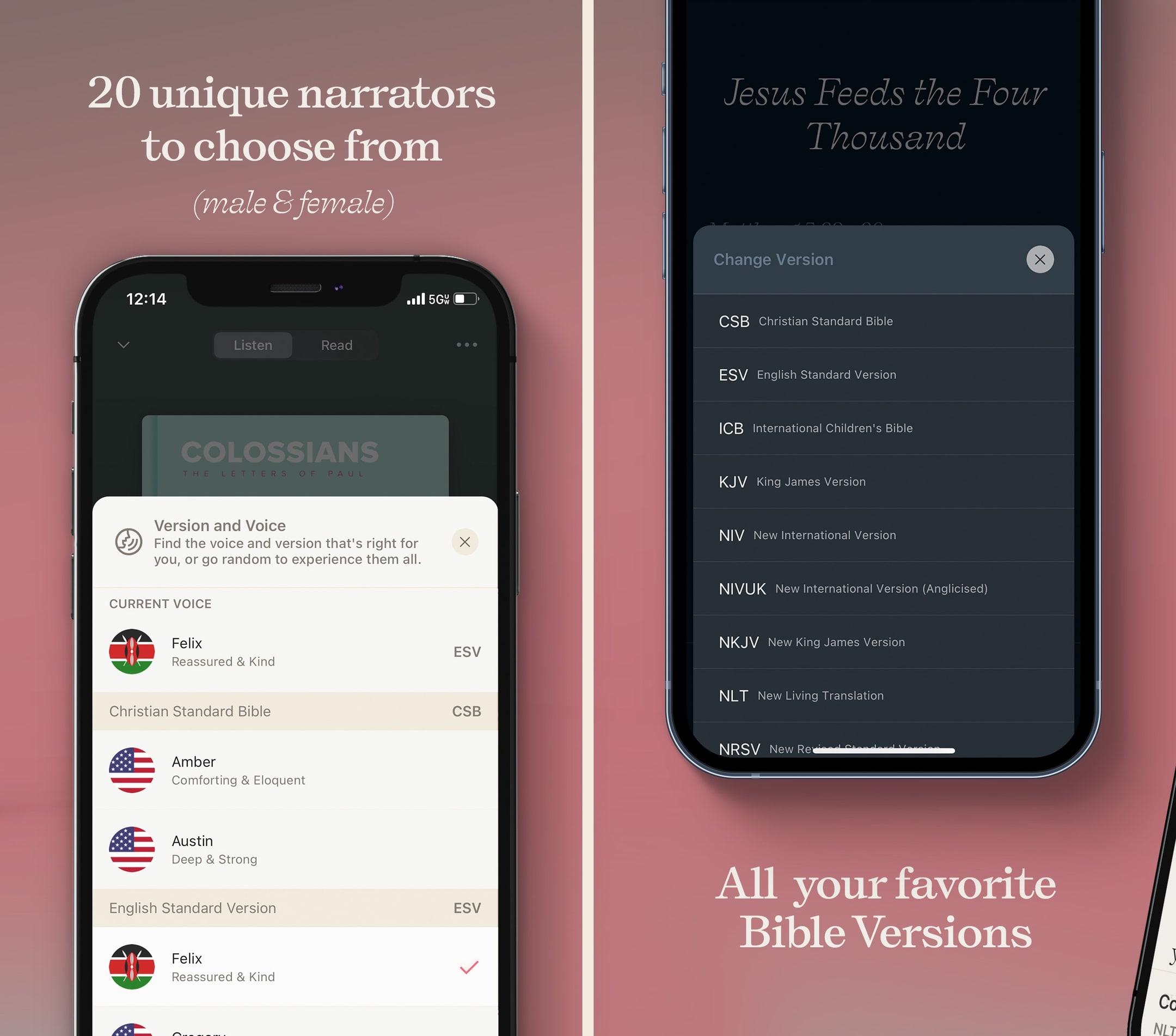
An audio Bible designed by people who love audiobooks.
- Our score
- 8.4/10
- Platforms
- iOS, Android, iPad, Apple Watch, Web
- Tradition
- Protestant, Ecumenical, Non-Denominational
Dwell does one thing — audio scripture — better than anyone. In our hands-on use, the difference between Dwell's voice acting and most read-aloud Bible audio is the difference between a great audiobook and a robotic text-to-speech. The annual subscription is steep next to free options like Bible.is, but the production quality is real and the CarPlay experience alone earns its keep for commuters. We pair Dwell with a text-first app rather than using it alone, but for the audio-listening half of our Bible time, it's the best app in 2026.
What we like
- Multiple narrator voices (male, female, dramatic, conversational) across translations — you can pick the voice you actually want to listen to for an hour.
- Background music tracks and ambient soundscapes turn the app into the closest thing to a Calm-style listening experience for scripture.
- Listening plans are genuinely well-produced — narrative arcs, themed playlists, sleep playlists — not just chronological audio drops.
- CarPlay and Android Auto integration is rock-solid; queuing the next listening plan from a steering wheel works the way you'd expect.
- Dark mode and minimalist UI are deliberately low-distraction — the app is designed for ears, not eyes.
What to know
- Strict subscription model with a thin free tier — almost everything meaningful sits behind $59.99/year.
- No real text-study features — no commentaries, no original languages, no notes worth keeping.
- Translation library is narrower than YouVersion or Bible Gateway — you get a curated handful, not a buffet.
- Not designed for skim-reading or visual study; the text view is functional but clearly an afterthought.
- Lifetime pricing requires emailing the company instead of being posted publicly, which is a small but real friction.
Best for
The production-quality audio pick when the budget supports it — multiple narrator voices, music tracks, and a listening flow that holds attention through long sessions, with screen-reader-respectful playback controls.
Skip if
You do not want to pay $9.99/month or $59.99/year, or you prefer straight-read narration to dramatized audio with music beds.
Lifetime member!!
Scripture and God’s Word delivered in this way has totally transformed my life. I am so thankful for it!! It is so thoughtful and well-done. I’ve never experienced anything like it. At first I loved listening on the go to my Bible recap plan within the app, but now I honestly love being read to as a follow along in my own Bible. It’s hard to imagine reading and studying without it now. Somehow it helps my brain to know exactly how many minutes it takes to listen to my planned reading to get through it! I retain so much more and notice things differently. Listen—I can’t stand audiobooks—I get bored and tired and annoyed at the narrators or something. But I love the options in dwell and have never felt that way. Narrator Kiley is just tremendous and I all the options to control, like speed background ambiance. The background music is so soothing and gives the scripture such power and cadence. I’m just so grateful for how God is using his Word to transform our family and renew me daily in the grace of God. Thank you Dwell Bible! You are doing holy work! I honestly downloaded the app because I was hopeful for your kids content or yoto connection? But wow am I glad I stayed for more! The integration with the Bible Recap is what stuck for me and I love the other plan options. I can wait to try the Bible project one next! (Side note-It seems like the background music is too loud in the bible project commentary if you could check that out team?) I am your biggest fan! Keep doing what you’re doing and praise Jesus!
— haleysue · January 4, 2026
Olive Tree Bible
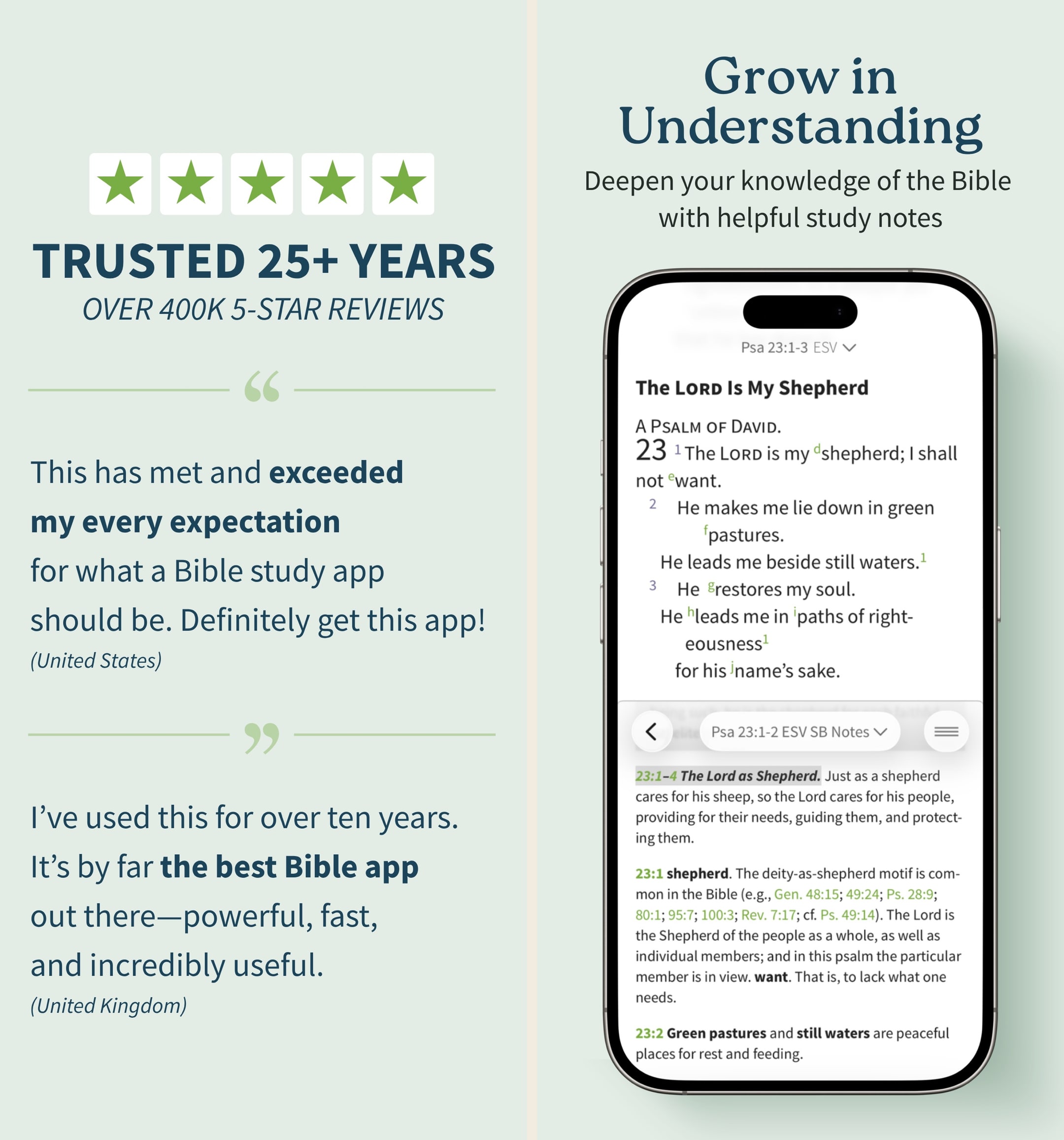
A serious study Bible that doesn't punish you for being free.
- Our score
- 8.5/10
- Platforms
- iOS, Android, iPad, Mac, Windows, Web
- Tradition
- Protestant, Ecumenical, Reformed, Baptist
Olive Tree is the app we keep recommending to people who outgrow YouVersion but aren't ready to spend Logos money. In our hands-on testing, the split-window view and real notebook were the features we missed most when we switched away. The store is a mess and the look is dated, but the bones are excellent. If you want one app that handles daily reading and serious study without forcing you onto a subscription treadmill, this is still the cleanest answer in 2026 — especially if you read across iPhone and a Mac.
What we like
- Split-window reading lets you put two translations or a translation and a commentary side-by-side on a phone, which is the single best small-screen study feature on any Bible app.
- Notes are real notes — long-form, taggable, organized by passage, and they sync cleanly across iPhone, iPad, Mac, and Windows.
- You actually own resources you buy — perpetual licenses, no rug-pull when a subscription lapses, which still matters in 2026.
- Original-language tools (Strong's, interlinears, Greek/Hebrew lexicons) are genuinely usable for non-scholars who want to look up one word.
- The free tier is unusually generous — unlike Logos, you can do real study without ever paying a cent if you stick to free resources.
What to know
- The store is overwhelming — hundreds of resource bundles, frequent sales, and a UI that feels like a 2014 Bible bookstore.
- Premium study Bibles and major commentaries cost real money — building a serious library can run several hundred dollars even on sale.
- No groups, no social, no shared reading — this is a solo-study tool, not a community app.
- The mobile UI, while functional, looks dated next to YouVersion or Glorify; typography and spacing feel pre-iOS-17.
- Audio Bible options exist but are nowhere near as polished or dramatized as Dwell or Bible.is.
Best for
Buy-once resource model that suits blind readers who want to own a study Bible permanently rather than rent it monthly — paired audio, deep cross-references, and reliable VoiceOver labels on the core read view.
Skip if
You rely heavily on the deep study panes — once you go beyond the read view the screen-reader pass through the resource panels is crowded and slows you down.
God’s Word on the go!
I have used this particular Bible app. off and on for several years. I really enjoy this version of the Bible. The Bible itself is easily understood and user friendly. I would strongly recommend this wonderful book to any and all both Christian and novice alike. I intend to use it more often and try harder to absorb the words and their meanings each and every day. Probably the best approach would be to start a daily journal to better understand what I am reading. Many do not read the Bible I believe because some of the readings are hard to understand but this version is very user friendly as stated. So those reading these comments let me encourage you to take some time to read and pursue the Olive tree Bible version and see for yourself. Ask God to open your mind, heart and eyes in the pursuit of His truth and watch the blessings flow in your life. We are living in hard times so much doubt and fear surrounds us all. Many are looking for peace. The peace you look for can be found in God’s Word. Don’t believe me read for yourself. If you are looking for a true friend Look no further than God Himself. He loves you and cares very much for you and your family and friends. As a follower of Christ even though we have never met I love you as a bother and sister. My prayer is that God will open your eyes and heart to what He wants for you in this life. Never give up, keep reaching to the heavens and know your are loved beyond your comprehension. Blessings to all Rick
— a new begjnning · April 11, 2022
ESV Bible
The cleanest single-translation Bible app on iPhone.
- Our score
- 7.8/10
- Platforms
- iOS, Android, iPad, Web
- Tradition
- Protestant, Reformed, Baptist, Non-Denominational
We come back to the ESV app when we want to read, not study. The typography alone makes it our favorite Bible-reading experience on iPhone — better than YouVersion's, better than Olive Tree's. The Global Study Bible bundled free is a real perk, and the reading plan curation skews higher-quality than most apps. The ceiling is low, though: it's one translation, no original languages, no community. We use it as a reading app and reach for Olive Tree or Logos when we want to dig.
What we like
- Typography is the best in the category — Crossway clearly hired actual book designers, and reading long stretches in this app feels like reading a well-set print Bible.
- Reading plans are curated by real teachers (Jen Wilkin, Paul Tripp, Kevin DeYoung, Nancy Guthrie) rather than algorithmically generated content slop.
- Sync with ESV.org is seamless — read on a laptop, highlight there, pick up on the phone with everything in place.
- Free streaming audio for the entire Bible, no account hoops, plus offline downloads for the text.
- Optional in-app purchases let you add the full ESV Study Bible or MacArthur Study Bible without committing to an Olive Tree or Logos subscription.
What to know
- Single translation by design — if you ever want to compare ESV to NIV, NLT, or KJV, you have to leave the app.
- Theological lean is unmistakably Reformed/complementarian; not a problem if that's your tradition, a real problem if it isn't.
- Original-language tools are absent — no Strong's, no lexicons, no interlinear.
- Community and group features are nonexistent — this is a quiet, solo-reading app.
- Premium study Bibles are individually priced and can stack up if you want more than one.
Best for
The clean low-vision pick for ESV readers — Crossway respects Dynamic Type properly so the type scales without breaking, the audio is read by Kristyn Getty and David Cochran Heath, and there are no upsells anywhere.
Skip if
You want translation comparison or you read in a translation other than the ESV — this app is single-purpose and English-only.
New version has problem
Updated: thanks for the follow-up! It appears that my problem with the update has been resolved. I may have had to delete the digging deep into the Bible plan and the reload it into the new version of the app to get it resolved. Or they fixed it. Either way I like the updated app now it tracks my daily reading. And while I don’t like having to pay for something I used to get for free (Kristyn Getty reading) I do believe “a worker deserves their wages” so I paid. I hope they keep improving the app with the funding. It is a really good way to get your Bible study in daily. And the ESV Bible is the best translation in my view. ——- old review: One star for the app update. I’ve used this app for years and was using the “digging deep into the Bible plan” that allowed me to go through the Bible in a year. It has a problem now that it checks off the days readings without ever doing the readings. It would be nice if it stopped doing that. Also I don’t like how I have to pay for a voice. Used to be free. Oh well. Everyone has to make money I suppose. At least one voice is free.
— Rhumba Jones · March 18, 2024
Abide
Christian sleep meditation and Scripture-anchored prayer with a deep audio library.
- Our score
- 7.7/10
- Platforms
- iOS, Android, Web, Apple Watch
- Tradition
- Protestant, Non-Denominational, Ecumenical
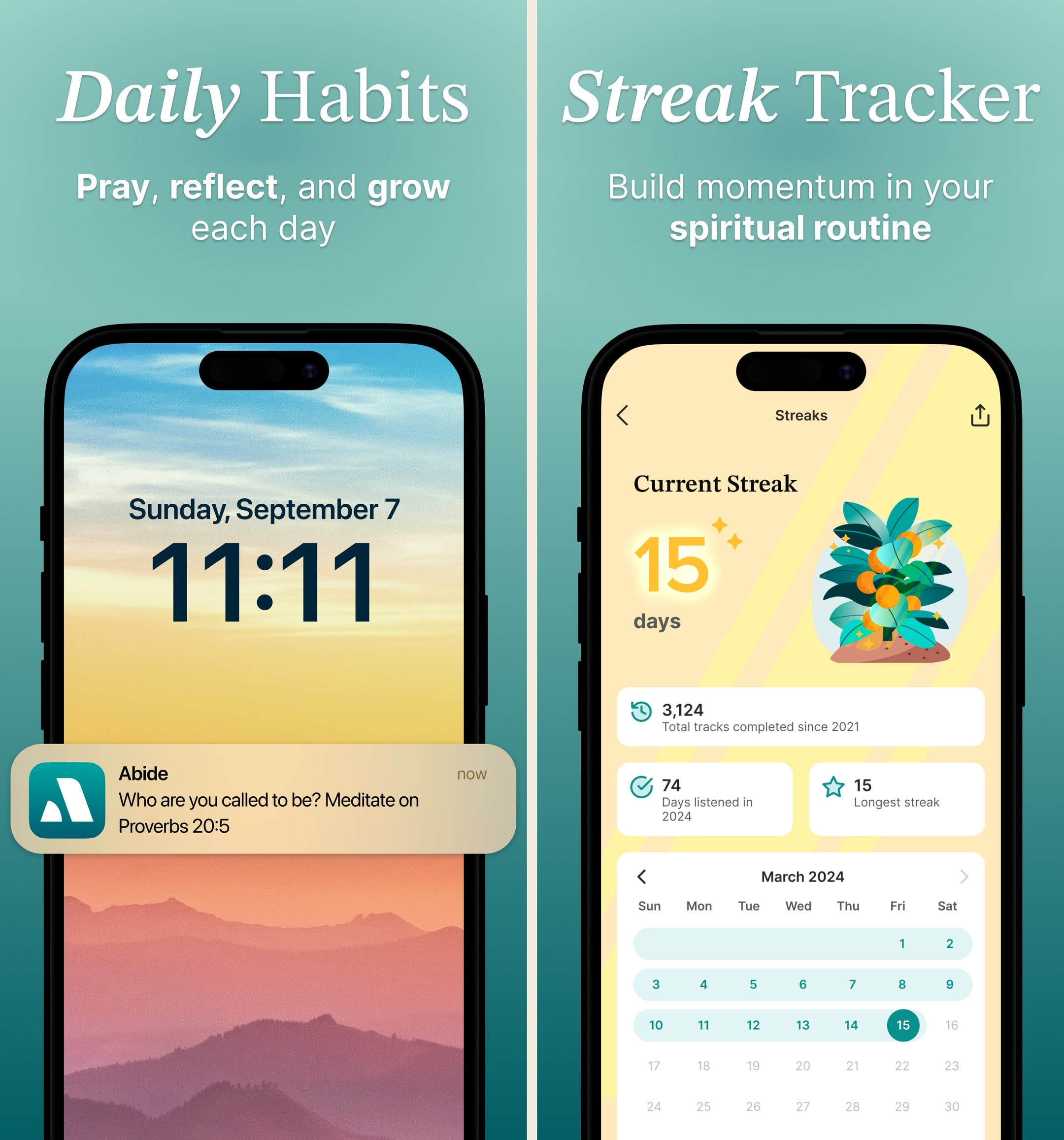
Abide is the app we install for moms who tell us they can't sleep and don't want a secular meditation app. The bedtime Bible-story library is the headline feature and it's genuinely deep — 365+ stories means a year of nightly listening without repeats, which no other Christian-meditation product can claim. The misses are real: it's not a Bible reader, the pricing is steep, and the library can feel like Calm-for-Christians rather than tightly Scripture-anchored prayer. We pair it with YouVersion for daily reading and treat Abide as the bedtime-and-anxiety layer. For a stressed mom or a chronic-insomnia adult, that pairing is more useful than any single Bible app on its own.
What we like
- 365+ bedtime Bible stories is a category-leading library for Christian sleep meditation — there's nothing else with this depth on the App Store.
- Sleep and anxiety meditations are clearly the strongest content lane, and the production quality (voice talent, ambient audio, pacing) holds up to repeat use.
- Apple Watch integration for short prayer prompts and breathing sessions is well-implemented — not just a phone app ported to a watch face.
- Heavy mom audience overlap is real — Abide shows up in mom-focused listicles consistently because the bedtime-story format genuinely fits family life.
- Free tier covers a daily meditation and a limited bedtime library, which is enough to evaluate before paying for Premium.
What to know
- Premium pricing at $13.99/month is on the steep end for a Christian meditation app, and the annual at $59.99 is the more reasonable path.
- Not a Bible reader — Scripture appears within meditations but the app is a meditation library, not a place to read books of the Bible.
- Theological framing is broadly evangelical-Protestant; non-denominational users will be fine, more liturgical readers may want a different app.
- Some content drifts into general 'Christian wellness' territory rather than tightly Scripture-anchored prayer, which is a feature for some users and a complaint for others.
- Discovery within the meditation library can feel overwhelming — 2,000+ sessions is a lot to navigate without curated paths.
Best for
Audio-first meditation and bedtime Bible content with strong narrator quality — useful as a complement to a primary Bible app for sleep, anxiety, and end-of-day listening.
Skip if
You want a primary Bible reader — Abide is a meditation library, not a place to read books of the Bible cover to cover, and the meditation paywall is a real friction point.
Worth every penny!
I love Abide!!! This app has helped me be consistent being in God’s word. I’ve never been able to sit down and read the Bible because I’ve been too overwhelmed and it was difficult for me to understand. Abide has been such a blessing in my life. After using the free version for a little bit I knew it was what I needed to help me be get excited about learning more about what the Bible says. To me, the paid version is just suppprring a ministry that is helping others get closer to God which makes me that much more joyful in paying the subscription. I no longer scroll through my phone at bedtime and now fall asleep every night in a calmer state with my mind more at ease so it’s also improved my sleep. I play the kids versions for my 6 year old twins and 5 year old at bedtime and they all fall asleep easier too!! I love that you can search by topic and focus on something you need help with. I’ve had some really amazing discoveries come out of my time listening to Abide and am so grateful to God for an app like this that makes me excited to learn. And the amazing thing is…after having and listening to Abide for several months, I’m actually now able to read and digest the Bible so much easier and no longer feel the same overwhelmed feeling I once felt. Thank you to everyone at Abide for helping others seek the Kingdom of God in a really creative & thoughtful way and for understanding everyone learns differently. You’ve helped unlock something in my brain and have helped me immensely on my walk with God!!!
— Ashley0427 · February 6, 2022
Logos Bible Study
The most powerful Bible study platform money can buy.
- Our score
- 8.8/10
- Platforms
- iOS, Android, iPad, Mac, Windows, Web
- Tradition
- Protestant, Catholic, Orthodox, Reformed, Baptist, Anglican, Lutheran, Methodist, Pentecostal, Non-Denominational, Ecumenical
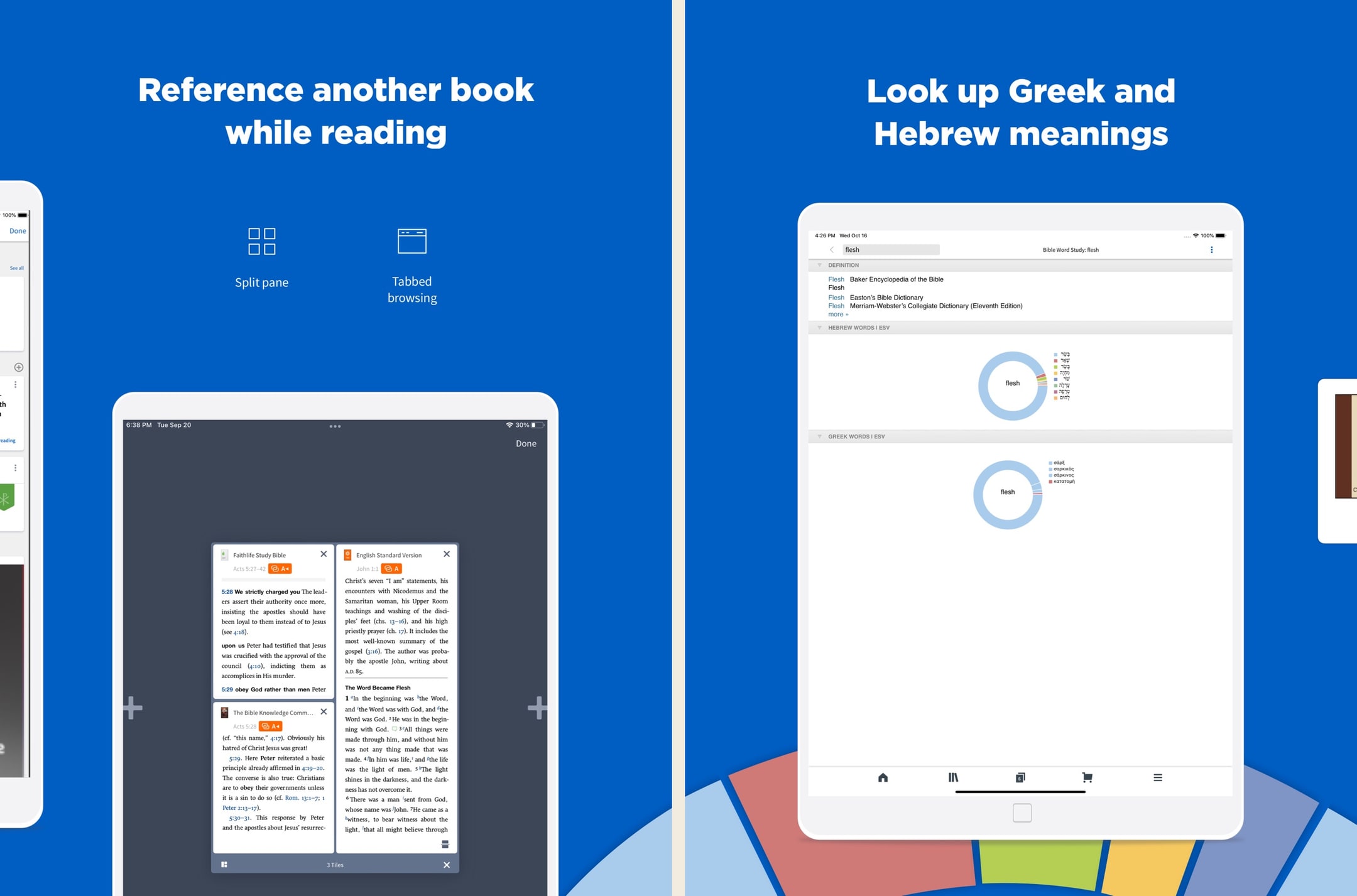
Logos is the most powerful Bible app we've used, full stop. In hands-on testing, the Passage Guide alone replaced about six tabs of cross-referencing we used to do manually. But the price tag, learning curve, and ecosystem sprawl are real — we'd never recommend Logos as a first Bible app. The new subscription tiers (Premium/Pro/Max) lower the on-ramp significantly versus the old base-package-only model, and Pro at ~$12.50/month annually is the sweet spot for most working pastors in 2026. For casual readers, this is still overkill.
What we like
- The Passage Guide and Factbook do in seconds what would take an hour with a stack of physical commentaries — this is still the killer feature.
- Original-language datasets are genuinely scholarly: morphological searches, syntax trees, semantic-domain searches, none of which exist in YouVersion or Olive Tree.
- Sermon Builder and the lectionary tools are legitimately useful weekly software for working pastors, not just a marketing checkbox.
- Resources you buy in base packages are yours permanently, even if you cancel a subscription — the ownership model still holds for purchased books.
- The mobile app has caught up to desktop in recent years — you can run a full Passage Guide on an iPhone, which used to be impossible.
What to know
- Pricing is genuinely confusing — base packages, subscription tiers, individual book purchases, and frequent sales make it hard to know what you actually need.
- Fastest path to a strong library still costs hundreds to low-thousands of dollars, even after the subscription tiers softened the on-ramp.
- The interface, on every platform, has a steep learning curve — most people use about 10% of what Logos can do.
- Mobile performance and load times can stutter on older phones once your library passes a few hundred resources.
- The Faithlife ecosystem (Sermons, Equip, Proclaim) is sprawling and the cross-product upsell is constant inside the app.
Best for
The deepest study library for blind seminary students and pastors — VoiceOver works well on the iPhone read view per AppleVis reports, and the desktop client has a long history of accommodating accessibility tooling.
Skip if
You are not a serious student of scripture or you do not want to navigate Logos's library complexity through a screen reader, which is genuinely demanding.
I love this app.
I have used many Bible apps and software and when by the grace of God I was led to the Logos web site, I was like a kid in a candy store with the permission to eat anything I wanted. I still keep the other Bible software but primarily I use Logos and the more resources you purchase the more powerful your Bible software becomes you only need to purchase what you need, I am just a lay person some of the packages I can't use at the present time. I think that any investment into The things concerning God is prosperous. To whom it may concern I hope anything that I say being just a lay person who is still reaping the benefits of what I don’t deserve which is to walk in the spirit of God and stumbling, falling and bouncing off the walls , if you will, and still reaching and walking after the perfection and that perfection being Christ. So this is my second time writing a review for this. I can barely find the words most glorious I don’t know powerful Bible software that I know to date many preachers use it so all I got to say is I hope I’m understood because I am not erudite and speech, but there are no lies coming out of my mouth, I just love LOGOS though when I found out about it so many books, I haven’t even read yet by the grace of God I’m gonna spend my life in his service and his word praise be to God, peace and spiritual prosperity to all who read this, I said the spirit of Godand the spirit does not stay with you always which is why we have to keep walking after pray for you. You know what I’m talking about. I’m saying I’m not saying God.
— Hldavis7455 · August 8, 2024
Warmpeach — coming soon
A Bible chat app — pastor and therapist in one.
Warmpeach is a Bible chat app that blends a pastor's care with a therapist's questions, grounding every reply in scripture. Join the waitlist and we'll email you when it opens up.
Verdict
Warmpeach — coming soon
Join the Bible chat app waitlist
Who this guide is for
This guide is for blind readers, low-vision readers, and the family members or pastors helping them pick a Bible app. The criteria we care about are screen-reader behavior with VoiceOver and TalkBack, audio Bible quality, and whether the app respects its blind users by keeping accessibility-relevant features out of paid tiers. We are not interested in apps that pitch accessibility in their App Store description and then fail the screen-reader pass on the first redesign.
If you came here for a one-app answer, install Bible.is. It is free, the audio Bible catalog is the largest free library on a phone, the screen-reader pass is clean on iPhone and Android, and the offline downloads work dependably for travel.¹ Most of the blind readers we know who actually use a Bible app daily run Bible.is alongside YouVersion.² The rest of this guide is about the second app to pair with it for production-quality audio (Dwell), translation typography (ESV Bible), or deep study (Olive Tree, Logos).³⁴⁵⁶
What "accessible" actually means in a Bible app
The App Store accessibility section lets developers tick boxes — VoiceOver supported, larger text supported, dark mode supported. Those boxes correlate weakly with whether the app is actually usable without sight. The realities that matter:
- Every primary control is labeled. Buttons read out as their function, not as "image" or "button-3". This is the single most common failure mode in Bible apps after major redesigns.
- Navigation order is linear and predictable. When you swipe right with VoiceOver, you move through controls in a sensible reading order. Apps with custom-drawn modern UIs frequently fail this — VoiceOver jumps around the screen because the developer never tested the focus order.
- Subscription flows are reachable. Confirmation dialogs, price toggles, and trial-to-paid screens are labeled and traversable. This is where many otherwise-accessible apps fall down — accessibility is a release-gating concern for the read view but not for the paywall.
- The audio Bible has chapter and verse navigation. Not just "play / pause / skip 30 seconds" but actual seek to John 3:16, controlled via labeled controls.
The apps in this ranking pass most of those tests most of the time. They are not perfect, and accessibility regressions do happen on major updates. The AppleVis forum is the best running record of which Bible apps are working in any given month.
Where the audio-Bible apps fall short for screen-reader users
Audio is the natural mode for many blind Bible readers — straightforward, doesn't require sighted setup once started, and the content is unchanged from a sighted user's experience. The audio-Bible apps still fall short in specific ways:
Players are often custom-drawn. Dwell, Hallow, and several newer audio apps render their playback controls as custom UI elements rather than standard system controls.³⁷ VoiceOver and TalkBack can usually reach them, but the labels are inconsistent and the gesture interactions sometimes drop touches. Bible.is is an exception — its player uses older UIKit components that VoiceOver handles cleanly.¹⁸
Sleep timers and queue management hide behind icons. Setting a sleep timer or building a playlist of chapters typically lives behind an icon-only button somewhere in the player. Several apps label these icons as "image" rather than "sleep timer" or "queue". This is a quick fix that the apps mostly do not prioritize.
Search is text-first, not voice-first. Almost every Bible app's search is built around typing. Voice search — saying "John 3:16" and having the app go there — is rare. Talking Bible for the Blind is one of the few apps that prioritized voice-first search, but its limited audio catalog and tiny review count keep it off this ranking.
Continuous play across books is uneven. Reading through the Bible in order, with the player automatically continuing from one book to the next, is the sustained-listening flow blind readers rely on. Bible.is and Dwell handle this.¹³ YouVersion's free audio is per-chapter and does not auto-advance across books reliably.²
VoiceOver vs TalkBack — does the platform you're on matter?
Yes, more than most accessibility documentation admits. VoiceOver on iPhone and iPad is the more mature platform for Bible-app accessibility in 2026, for two reasons. First, most Bible-app developers test against VoiceOver more rigorously than against TalkBack — the AppleVis community provides regular feedback that closes the loop, while Android accessibility feedback is more diffuse. Second, Apple's own apps and design guidelines pressure third-party developers to maintain VoiceOver coverage in a way that Google's pressure on Android developers does not match.
The practical difference: on iPhone, YouVersion, Bible.is, ESV Bible, and Olive Tree all work well with VoiceOver.²¹⁴⁵ On Android, YouVersion and Bible.is work well with TalkBack.⁹¹⁰ Olive Tree's TalkBack experience is more crowded, and Logos's Android client has known accessibility gaps that the team has not prioritized.¹¹¹²
If a blind reader has a free choice of platform specifically for Bible reading, iPhone is the better default. If they are already on Android, YouVersion and Bible.is will work fine, and we would skip the deeper study apps in favor of audio-first or single-translation reading until the situation improves.
How to test before committing
A blind reader can avoid a lot of frustration by stress-testing an app before setting it up as a primary tool. The shortlist of tests we run:
- Open the app and swipe right with VoiceOver from the top. Count how many controls are unlabeled or read as "button" without a function. More than two or three is a sign the app is not maintained for accessibility.
- Try to play a specific passage. Pick John 3:16 or Psalm 23 and try to navigate there. If you have to use a picker that lags, or if the verse-navigation control is unlabeled, the app is going to be a daily friction point.
- Test the sleep timer and audio speed controls. These are the icon-only buttons most likely to be unlabeled. If they are unreachable or unlabeled, the audio experience will be a blunt instrument.
- Walk through the subscription flow if there is one. Cancel before the trial completes. The cancel flow is often the worst-labeled part of the app and is where blind users most commonly get trapped paying for a service they could not exit.
- Update the app and re-test. Major updates frequently introduce accessibility regressions, especially after iOS or Android OS updates. The apps with serious accessibility teams ship fixes within a release; the apps without let regressions sit for months.¹³
YouVersion and Bible.is both pass these tests in their current 2026 builds.²¹ We will keep updating this guide as releases ship. The apps that fail these tests in a given month get demoted in the ranking.
Sources
-
Bible.is — App Store listing (free, multilingual audio, offline downloads, screen-reader behavior). Accessed 2026-05-11. https://apps.apple.com/us/app/bible-audio-video-bibles/id378075859
-
YouVersion Bible — App Store listing (free, audio Bible, VoiceOver support). Accessed 2026-05-11. https://apps.apple.com/us/app/bible/id282935706
-
Dwell — App Store listing (custom audio player, subscription). Accessed 2026-05-11. https://apps.apple.com/us/app/dwell-audio-bible/id1343917374
-
ESV Bible — App Store listing (single-translation typography, Dynamic Type). Accessed 2026-05-11. https://apps.apple.com/us/app/esv-bible/id361797273
-
Olive Tree Bible — App Store listing (VoiceOver behavior, study tools). Accessed 2026-05-11. https://apps.apple.com/us/app/bible-app-by-olive-tree/id332615624
-
Logos Bible Study — App Store listing (study, deep library). Accessed 2026-05-11. https://apps.apple.com/us/app/logos-deep-bible-study/id336400266
-
Hallow — App Store listing (custom audio player, subscription content). Accessed 2026-05-11. https://apps.apple.com/us/app/hallow-prayer-meditation/id1405323394
-
Bible.is — official site (Faith Comes By Hearing, audio mission and catalog). Accessed 2026-05-11. https://www.bible.is/
-
YouVersion Bible — Play Store listing (TalkBack behavior, free audio). Accessed 2026-05-11. https://play.google.com/store/apps/details?id=com.sirma.mobile.bible.android
-
Bible.is — Play Store listing (TalkBack behavior, multilingual audio). Accessed 2026-05-11. https://play.google.com/store/apps/details?id=com.faithcomesbyhearing.android.bibleis
-
Olive Tree Bible — Play Store listing (Android client). Accessed 2026-05-11. https://play.google.com/store/apps/details?id=biblereader.olivetree
-
Logos Bible Study — Play Store listing (Android client). Accessed 2026-05-11. https://play.google.com/store/apps/details?id=com.logos.androidlogos
-
Hands-on testing notes captured during 2026-05 — VoiceOver and TalkBack passes across the apps above, including label coverage, navigation order, subscription-flow reachability, and post-update regression checks. Raw screenshots in our internal archive.