
YouVersion Review
By Sankalp Jonna · Last reviewed 2026-05
Get the app
How we tested
Every app here was installed and used personally. We capture raw findings — typed notes, screenshots, screen recordings, voice memos — and the writing is AI-assisted from those raw notes. Scores, rankings, and "best for / skip if" calls reflect our actual experience with each app. Read the full methodology →
Our verdict
We'd recommend YouVersion as the default Bible app for anyone who wants a free, simple, mainstream reader on iPhone or Android. If you're new to a daily reading habit, you have a friend or spouse who already uses it, or you just want a reliable Bible on your phone with reading plans and one-tap verse sharing, this is still the one to install. The free-forever pricing model and the breadth of translations make it nearly impossible to beat at the daily-reading job. Skip YouVersion if you want to do serious Bible study — comparing translations side-by-side with original-language tools, building a long-form notebook of reflections, or working through commentaries on a passage. The study tools here are thin by design, and you'll outgrow them within a few months. For that reader, Olive Tree, Blue Letter Bible, or Logos will go further. We use YouVersion daily for reading and reach for a different app the moment we want to dig.
Setup and first run
Installing YouVersion is the closest thing to a frictionless setup in the Bible app category. We installed it on a fresh iPhone and a fresh Android handset and were reading scripture inside ninety seconds — pick a translation (the default is the NIV in the US, but two taps swaps it for ESV, NLT, KJV, or anything else in the 2,500+ library)¹, accept notifications if you want a verse of the day, and you're in. Account creation is optional. You can use the app anonymously and your reading plan progress will live on the device until you decide to sign up.
The home screen has gotten busier over the years. What was once a simple Bible reader is now a content feed — a verse of the day, suggested plans, friends' activity, prayer requests, and Life.Church promos compete for attention before you reach the actual scripture. We learned to pin the Bible tab and ignore the home feed entirely. That isn't a defect, but it's a small reminder that YouVersion's design has drifted toward TikTok-style engagement and away from a pure reading experience.
Day-to-day reading
The reading view is genuinely good. Typography is clean, dark mode works, and the verse-numbering is configurable. Tapping a verse pulls up share, highlight, bookmark, and copy options, and the Bible Lens generator turns any verse into a shareable image in two taps. That last feature is quietly the biggest reason YouVersion verses keep ending up in iMessage threads — the friction is so low that sharing scripture feels like sending a meme.
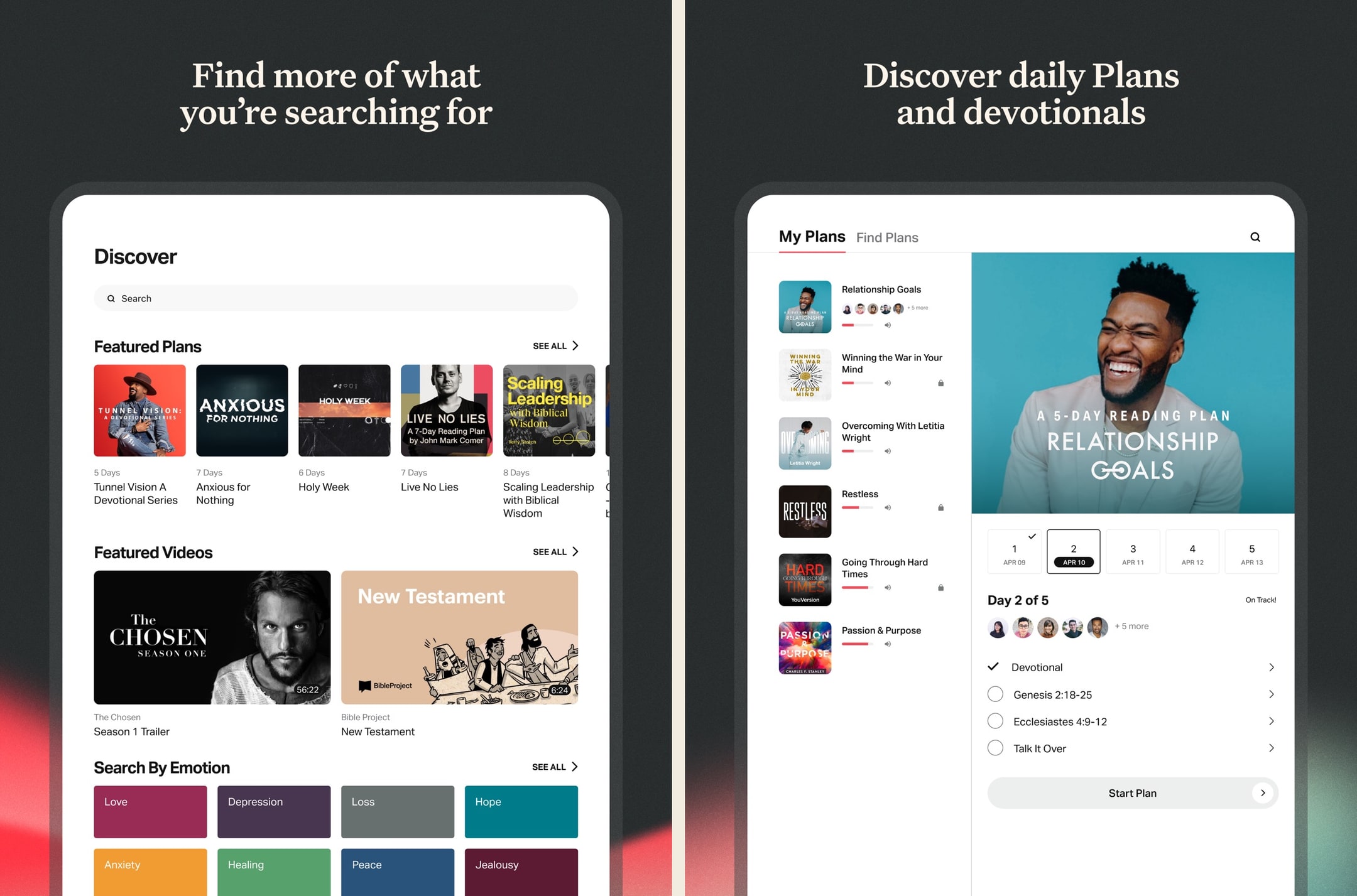
Reading plans are where the app earns its place on most phones. The library is enormous, well-curated, and the plan engine is forgiving — miss a day and you can catch up without losing your streak. We worked through a Bible-in-a-year plan, two short topical plans, and a couples plan with a partner over the course of testing, and the experience was uniformly good.² The notification timing is respectful, the daily passages load instantly, and the "with a friend" feature for plans is one of the few social-Bible features that doesn't feel forced.
The Apple Watch and widget integrations
Worth a separate mention. The Apple Watch complication that puts the verse of the day on your watch face, plus the iOS Lock Screen widget, made opening scripture a multiple-times-a-day habit during testing in a way that just having the app on a home screen never quite achieved. If you're an iPhone user trying to build a daily reading habit, these integrations alone are an argument for installing YouVersion alongside whatever else you use.
Where it surprised us
The friends feature is better than we expected. We assumed it would be the usual social-app graveyard — accept three friends, never use the feature again — but the prayer-request thread and the shared reading plan progress actually made the app feel less like a solo grind. For couples and small groups, this is a quiet differentiator that none of the heavier study apps even attempt.
The translation library went deeper than we needed and that's part of the point. Looking up The Message, the NRSVue, the CSB, and a Spanish translation in the same session, all without leaving the app and without any paywall, is the kind of breadth that the rest of the category just doesn't match.
Where it disappointed
Study tools are thin and that's the headline weakness. There's no commentary integration, no original-language word study, no concordance worth using, and the notes feature is closer to a verse highlighter than a real notebook. We can't write a long-form reflection on Romans 8 inside YouVersion in any way that we'd ever come back and find later. Search across our own highlights and notes is similarly weak. For anything past devotional reading, we hit the wall fast and reached for a different app.
The home feed has crept toward content slop. Some days the algorithmic recommendations feel curated; other days they feel like Christian Instagram. The trend over the years has been more home-feed content, not less, and we'd happily pay for a "just give me the Bible" mode that doesn't exist.
Some reading plans skew heavily toward Life.Church teachers and positions. Craig Groeschel and the Life.Church team produce a lot of the featured plans, which is fine if that's your tradition and lands awkwardly if you're Catholic, Orthodox, or denominationally cautious. The library has thousands of non-Life.Church plans (Bible Project, Crossway, Tim Keller, John Piper, the Daily Examen for Catholic users), but they're not always what the app surfaces by default.
The pricing reality
There isn't one to negotiate. YouVersion is free, ad-free, and has no paid tier.¹ That has been true since 2008 and Life.Church has shown no signs of changing it.³ If you're coming from Hallow ($69.99/year), Glorify ($69.99/year), or Logos Pro (~$149.99/year)⁴, YouVersion is the financial release valve — install it as your daily reader and reach for a paid tool only when you need depth the free app doesn't have.
The honest counterargument is that "free" doesn't mean "free of trade-offs." The trade-off is feature depth: you get breadth, social, and polish; you don't get serious study tools. Whether that's the right trade depends on what you want a Bible app to do.
Who else should consider it
Couples and small groups specifically benefit from the friends and shared-plan features in a way most apps don't enable. New believers and returning readers benefit from the low-friction onboarding and the deep reading-plan library. Parents looking for a phone-friendly Bible for teens get a safe, free, mainstream option. Travelers and missionaries benefit from the offline downloads and the non-English translation breadth.
Bible study power users — pastors, seminary students, lay teachers, anyone who treats scripture like research — should still install YouVersion (it's the universal lingua franca for verse sharing) but pair it with a serious study app. We use YouVersion daily for reading and Olive Tree, Blue Letter Bible, or Logos for everything else.
Our final word
YouVersion in 2026 is what it has been for a decade: the default Bible app for anyone who wants a free, frictionless, mainstream reader on a phone. The free-forever model alone makes it nearly impossible to beat at that job, and the reading plan library and verse-sharing tools are best-in-class for habit-formation. The home feed is busier than we'd like and the study tools are thin, but those are second-order complaints against a first-order product. Install it as your daily reader, and reach for a paid tool when you want to dig.
What real users say
Enjoyable but a Few Considerations
I like to use the app to listen to the Scriptures. It is pretty to easy to use and so far on my end there were not glitches or issues. The app has a lot of different English versions to choose from as well I did notice that one can choose from many different languages. There are a variety of reading plans to choose from. One can select plans that are topical, reading plans, or based on length. For motivation there are verses of the day, guided Scriptures, and guided prayers. A remind notification can be setup. The app allows users to create a community by adding friends and family through Facebook or Contacts. Another feature is that the app allows for the notes and highlights. Please note that these items do not carry over from translation or language version. The app has an internal reward system through an achievement system. For example, completing a reading plan regardless of length. To help incentivize those who are multi language speakers I would like see achievements related to readings completed in different languages. To help incentivize multiple translations I would recommend adding achievements related to how many different translations a user read. Finally, I would like to see statistics on which chapters were read because sometimes a user will get a whole Bible reading plan completed twice within a plan because certain plans reuse certain passages. This will help those who want to have a nice clean progress between plans.
— Kolya290 · September 12, 2025
Reviews should come up AFTER each use!
It is hard to remember any problems I’ve had with the app during a prior session, and I submit that the review opportunity should pop up after each use, rather than when someone starts using the app. I think that would help in identifying useful problems, issues and praises for the app. It is somewhat difficult and frustrating to bring up previous notes one has made. I make a lot of notes with scriptures which I need to review and further consider at a later point. But I can’t always find them! However, after further use, it’s pretty easy. Secondly, it is also difficult to remove a bible study plan that shows up four times under the selected plan list. I think I finally figured it out last night, but we’ll see... Thirdly, I do greatly enjoy the app, including the daily Bible verses and the opportunity to create a picture with the verse, or even use one’s own photos! That is fun! On the Bible study side, I love the ability to flip from one Bible version to another with great ease, while keeping with the passage you’re currently focused on. I use that option the most! It is also easy to find a verse one is looking for, or Bible chapters. I do enjoy and appreciate this app. Thank you for including such useful and creative options. Also, thank you for presenting the option for review and input, which I trust you read and take action on those you can identify as good for the app. Thank you for your time and consideration of the above matters.
— ParishWon1981 · February 8, 2022
Very accessible, plenty of options
I love the Bible app. It is remarkably one of the most helpful apps I have. It is super accessible, especially when you’re so busy you forget to read your Bible or spend some devotional time. I love the daily verse reminders, the numerous ways we can keep track of our reading, the beautiful options for making images out of verses. There is even an option for writing down prayers, and you can choose to make it private or public with friends. In the hustle and bustle of daily living, I am able to jot down a quick prayer and it doesn’t mean much at the moment, but months or weeks later I’d look back to it and realize just how impactful it was. Because it is so easy to write down a simple and quick prayer in the app, it helps with practicality: you can pray over it right away. And that one prayer changes a lot of things. I’m grateful for all the Bible app plans; there are so many options, short ones and long ones. I especially love the chronological and canonical reading plans. I love that the Bible app collaborates with a lot of Christian artists and preachers all over the country, even the world, and is able to make their voice, their teachings, and their wisdom accessible to the multitudes like me. Overall, an amazing app! Edit: lately there’s been trouble with bookmarking. The app doesn’t seem to stick to what you read last time, and it is difficult to keep track of what you read. I hope they fix this. Perhaps it is just on my end.
— nk_fye · June 10, 2022
My all time favorite app since 2012
This app has been life changing for me. It helps me connect with God and the Word. There is a daily scripture and video that helps you apply the scripture of the day. You can search reading plans based on emotions or topics or anything. You can also search for specific scriptures based on the words you remember and look by book or sang related scripture. You can do reading plans alone, invite others to join you or make it private so no one knows the current plan you are reading. This app has helped many through many chapters in my life and I continue to use it weekly and daily. I searched for reading plans when I lost a job, was preparing for marriage and nor that I have been going through parenthood. I am so grateful for the technology that this app provides for me to see what God’s Word says about anything. This app offers the Bible in many languages that continue to grow and many versions of the bible. You can compare a verse with other versions to get a better understanding, make a note about it, share it with others through social media, other apps, email or text. You can make images with a verse or several and share it that way or make an album of photos in your phone with the scriptures you need to focus on at this point in your life. I use the app on my phone and iPad and I am so grateful to the developers for making this amazing app and continue to make it better through th years! Thank you so much!
— Co-owner of Bella Valentine · August 14, 2022
What a Beautiful, Powerful Tool!!!
Having access to different translations makes digging into God’s Word for precious treasure an awesome adventure!!! Being able to search on certain topics, even with partial words or phrases is a great feature as well. Another blessing is being able to read it in the language and dialect i was born in. Though I didn’t learn the Bible in those languages growing up, I get blessed when I refer to it and get better understanding because of it! Thank you for making it available and thank you for the devotionals, videos, studies, languages, community, kids and teen resources, and for continually adding more to help us grow spiritually. A couple of suggestions would be: 1. To give us the ability to go back and forth with the results of a search, where we’re able to open up a reference, read the context, and then go back to the list, remembering where we were. Right now, if I open up a reference in the list to read for context, I can’t go back, and I have to type the search all over again and figure out where I was. 2. To give us the ability to highlight partial words or phrases, instead of whole verses of scripture. Sometimes, there are only certain words or key phrases that the Lord is highlighting to us, and it would be great if we could only highlight that word for impact. Thank you for always making the app better, and for making it more engaging to be in the Word!!! You are giving us a gift that is a treasure!
— ElsaIsh · February 7, 2026
Alternatives we considered
Compare YouVersion Bible to other Bible apps
Head-to-head
ESV Bible vs YouVersion Bible →
Head-to-head
YouVersion Bible vs Bible Gateway →
Head-to-head
YouVersion Bible vs Logos Bible Study →
Looking to switch?
YouVersion Bible alternatives →
Featured in
Best Bible apps for iPhone →
Featured in
Best Bible apps for Android →
Featured in
Best Bible apps for iPad →
Warmpeach — coming soon
A Bible chat app — pastor and therapist in one.
Warmpeach is a Bible chat app that blends a pastor's care with a therapist's questions, grounding every reply in scripture. Join the waitlist and we'll email you when it opens up.
Sources
-
YouVersion Bible — App Store listing (free, ad-free, 2,500+ translations, reading plans, friends feature). Accessed 2026-05-11. https://apps.apple.com/us/app/bible/id282935706
-
Hands-on testing notes captured during 2026-05 — multi-week evaluation of reading plans, Apple Watch complication, Lock Screen widget, and friends/prayer-request features on iPhone and Android. Raw screenshots in our internal archive.
-
YouVersion — official site (Life.Church origin, free-forever model since 2008). Accessed 2026-05-11. https://www.youversion.com/
-
Hallow — App Store listing (Plus annual pricing comparison). Accessed 2026-05-11. https://apps.apple.com/us/app/hallow-prayer-meditation/id1405323394