
Best Bible Apps for Android in 2026
By Sankalp Jonna · Last reviewed 2026-05 · 7 apps reviewed
How we tested
Every app here was installed and used personally. We capture raw findings — typed notes, screenshots, screen recordings, voice memos — and the writing is AI-assisted from those raw notes. Scores, rankings, and "best for / skip if" calls reflect our actual experience with each app. Read the full methodology →
How we evaluated apps for Android
Every app on this list was scored against the same 5 criteria. Hands-on testing, AI-assisted writing.
Android-native polish
Material You theming, system font support, dark-mode behavior, and whether the app feels like a 2026 Android product or a port of an older iOS-first build.
Widgets and home-screen behavior
Verse-of-the-day widgets, reading-streak widgets, and how they handle Android's restart-on-OS-update behavior without going blank.
Wear OS and Android Auto support
Wear OS complications, Tile support, and Android Auto integration for audio Bibles on a commute.
Offline reliability
Whether the app downloads translations and audio for genuinely offline use, and whether the offline files survive an Android storage cleanup.
Free tier honesty
Is the Play Store listing's '$0' price tag what you actually get, or does the first session push you straight into a weekly subscription paywall.
Comparison at a glance
The full ranked list with our score, pricing, and the buyer profile each app fits.
| # | App | Score | Users | Pricing | Best for |
|---|---|---|---|---|---|
| 1 | YouVersion Bible | 9.2/10 | 4.9(13M) | Free | The default Android Bible app — fully free, the strongest Android widget set in the category, and a Wear OS app that genuinely works rather than being decorative. |
| 2 | Olive Tree Bible | 8.5/10 | 4.8(314K) | From $2.99/mo | The serious study pick on Android — split-window reading is excellent on a Pixel Tablet or foldable, and the Android client is finally on real parity with iOS. |
| 3 | Bible Gateway | 8.0/10 | 3.7(10K) | From $6.99/mo | Web-first product but the Android wrapper is clean — 200+ translations, audio Bibles, and the most translation-comparison-friendly app on the platform. |
| 4 | Bible.is | 7.8/10 | 4.8(131K) | Free | The strongest free audio Bible on Android — multilingual coverage that nothing else matches, dependable offline downloads, and zero subscription pressure. |
| 5 | Glorify | 7.5/10 | 4.9(92K) | From $4.99 one-time | The best-designed devotional app on Android — Material You-friendly, short morning ritual, and a free tier that gives you real daily content. |
| 6 | Dwell | 8.4/10 | 4.9(81K) | From $9.99/mo | The best audio Bible on Android for the commute — production quality is the highest in the category and Android Auto integration is reliable on long drives. |
| 7 | Accordance Bible Software | 8.2/10 | 4.8(13K) | From $14.99 one-time | The deepest original-language study app that ships an Android client — for serious readers who want Mac-grade tools mirrored on a Pixel or Galaxy device. |
Our picks, ranked
YouVersion Bible
The free Bible app most people open first.
- Our score
- 9.2/10
- Pricing
- Free
- Platforms
- iOS, Android, Web, iPad, Apple Watch
- Tradition
- Protestant, Catholic, Ecumenical
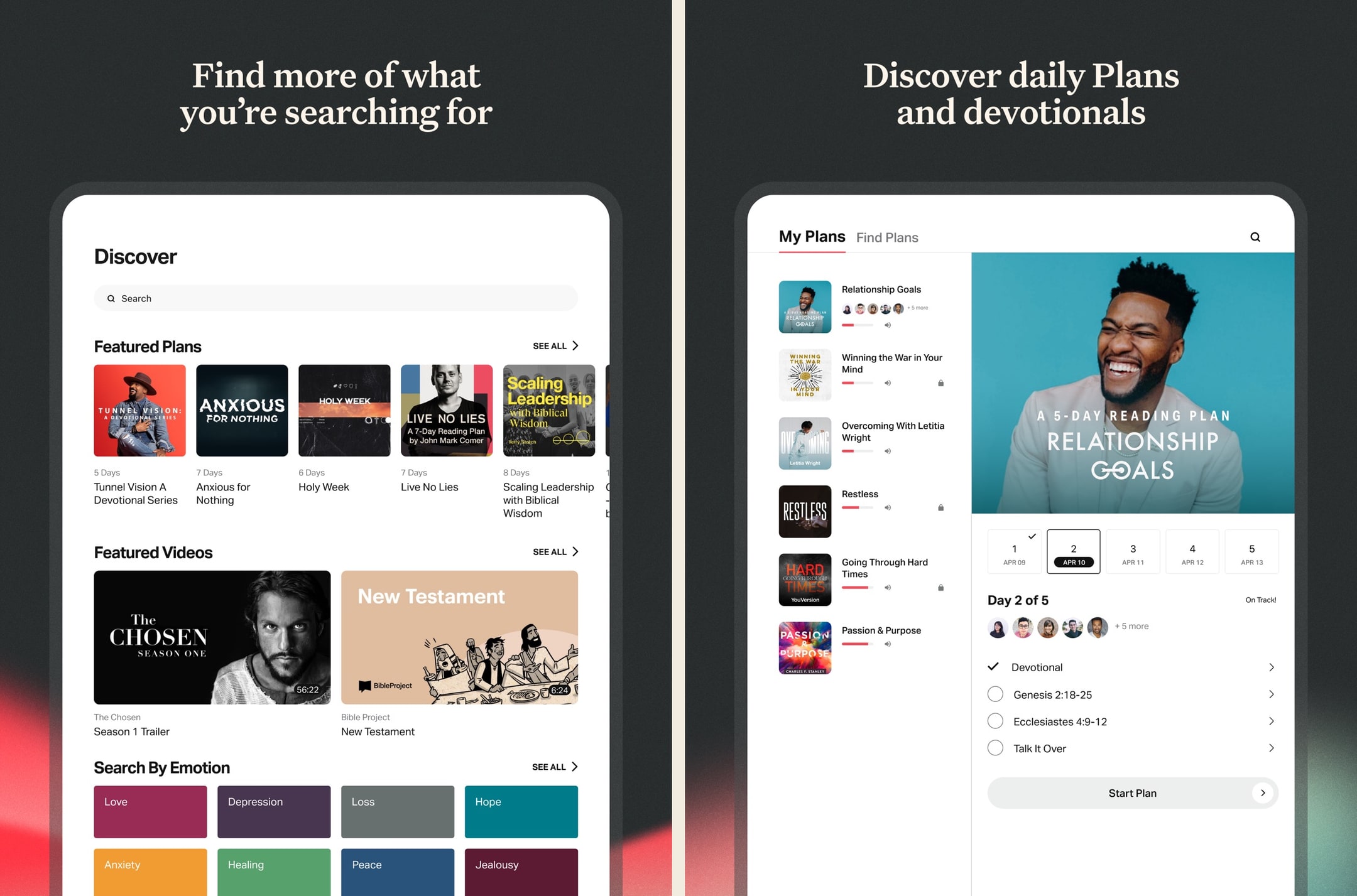
We've used YouVersion daily over an extended stretch and it's still the default for a reason: free, frictionless, and good enough for 80% of what most readers want. The reading plans alone keep us coming back, and the Apple Watch + widget integrations turn opening scripture into a one-tap habit. But the moment we wanted to do real study — cross-references, commentary, original Greek — we hit a wall and reached for a different app. As a primary daily-reading Bible, it's still the one to beat in 2026.
What we like
- By far the largest free Bible-reading app — 2,500+ translations including pretty much every English version anyone reads.
- Reading plans library is enormous and well-curated, ranging from 3-day devotional plans to year-long Bible-in-a-year tracks.
- Genuinely free with no ads, no paywalls, no premium tier hiding key features behind a subscription.
- Solid offline support — download translations locally and use them on a plane or in low-signal areas without losing functionality.
- Bible Lens / verse images make sharing scripture in iMessage and social posts effortless, which is a quiet but real driver of daily use.
What to know
- Study tools are thin — there's no commentary integration, no original-language word study, no concordance worth using.
- Notes feature is closer to a verse highlighter than a real notebook — you can't write longer reflections that anyone will ever go back and find.
- Search across your own highlights and notes is weak; finding a verse you saved six months ago is harder than it should be.
- Some reading plans are openly evangelistic about Life.Church positions, which won't bother most users but lands awkwardly for Catholic, Orthodox, or denominationally-cautious readers.
- App is feature-sprawling — every release adds something, and the home screen has slowly become a content feed instead of a Bible.
Best for
The default Android Bible app — fully free, the strongest Android widget set in the category, and a Wear OS app that genuinely works rather than being decorative.
Skip if
You want serious study tools — YouVersion's notes and search are weak compared to a real study app on Android.
Enjoyable but a Few Considerations
I like to use the app to listen to the Scriptures. It is pretty to easy to use and so far on my end there were not glitches or issues. The app has a lot of different English versions to choose from as well I did notice that one can choose from many different languages. There are a variety of reading plans to choose from. One can select plans that are topical, reading plans, or based on length. For motivation there are verses of the day, guided Scriptures, and guided prayers. A remind notification can be setup. The app allows users to create a community by adding friends and family through Facebook or Contacts. Another feature is that the app allows for the notes and highlights. Please note that these items do not carry over from translation or language version. The app has an internal reward system through an achievement system. For example, completing a reading plan regardless of length. To help incentivize those who are multi language speakers I would like see achievements related to readings completed in different languages. To help incentivize multiple translations I would recommend adding achievements related to how many different translations a user read. Finally, I would like to see statistics on which chapters were read because sometimes a user will get a whole Bible reading plan completed twice within a plan because certain plans reuse certain passages. This will help those who want to have a nice clean progress between plans.
— Kolya290 · September 12, 2025
Olive Tree Bible
A serious study Bible that doesn't punish you for being free.
- Our score
- 8.5/10
- Platforms
- iOS, Android, iPad, Mac, Windows, Web
- Tradition
- Protestant, Ecumenical, Reformed, Baptist
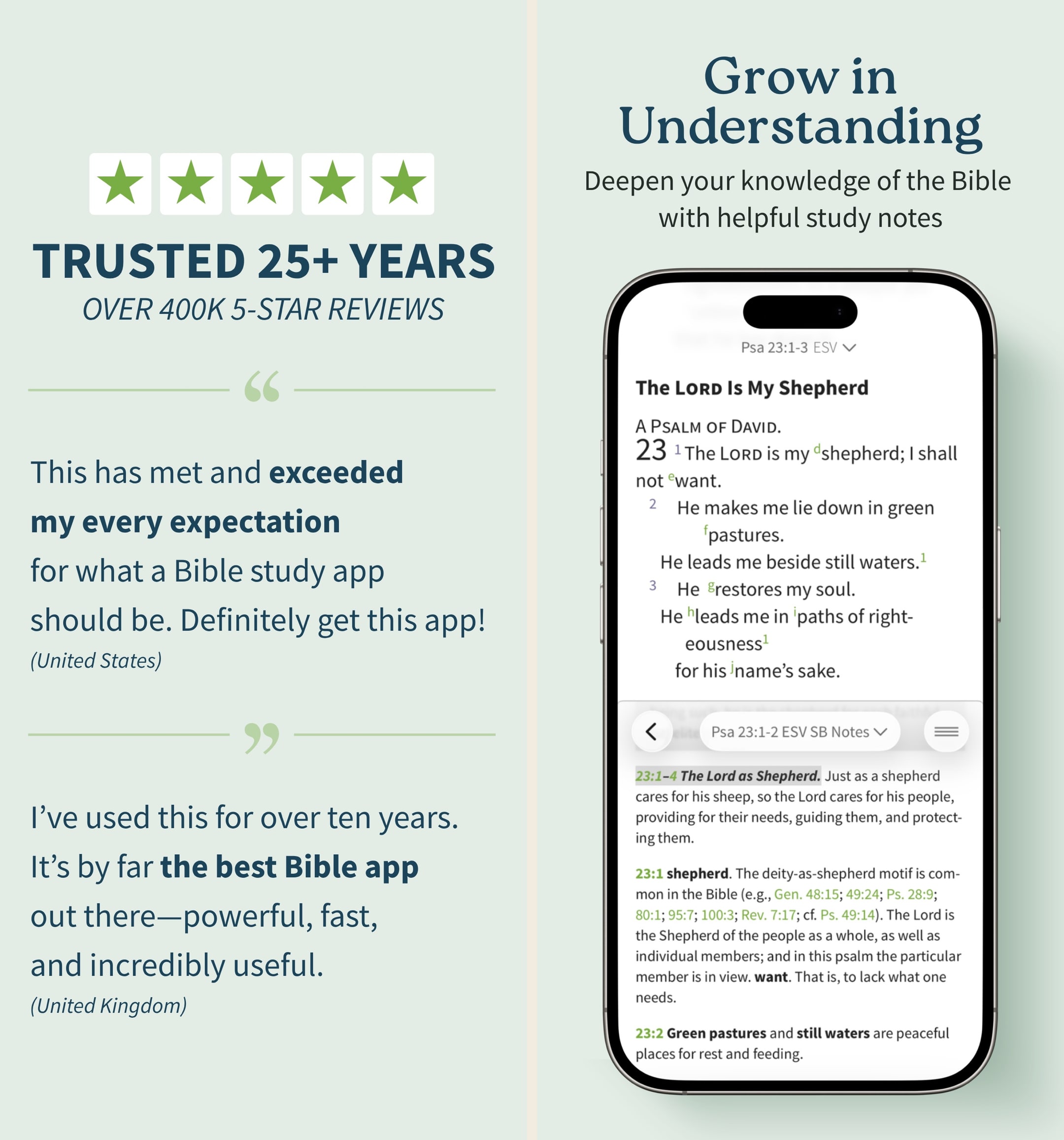
Olive Tree is the app we keep recommending to people who outgrow YouVersion but aren't ready to spend Logos money. In our hands-on testing, the split-window view and real notebook were the features we missed most when we switched away. The store is a mess and the look is dated, but the bones are excellent. If you want one app that handles daily reading and serious study without forcing you onto a subscription treadmill, this is still the cleanest answer in 2026 — especially if you read across iPhone and a Mac.
What we like
- Split-window reading lets you put two translations or a translation and a commentary side-by-side on a phone, which is the single best small-screen study feature on any Bible app.
- Notes are real notes — long-form, taggable, organized by passage, and they sync cleanly across iPhone, iPad, Mac, and Windows.
- You actually own resources you buy — perpetual licenses, no rug-pull when a subscription lapses, which still matters in 2026.
- Original-language tools (Strong's, interlinears, Greek/Hebrew lexicons) are genuinely usable for non-scholars who want to look up one word.
- The free tier is unusually generous — unlike Logos, you can do real study without ever paying a cent if you stick to free resources.
What to know
- The store is overwhelming — hundreds of resource bundles, frequent sales, and a UI that feels like a 2014 Bible bookstore.
- Premium study Bibles and major commentaries cost real money — building a serious library can run several hundred dollars even on sale.
- No groups, no social, no shared reading — this is a solo-study tool, not a community app.
- The mobile UI, while functional, looks dated next to YouVersion or Glorify; typography and spacing feel pre-iOS-17.
- Audio Bible options exist but are nowhere near as polished or dramatized as Dwell or Bible.is.
Best for
The serious study pick on Android — split-window reading is excellent on a Pixel Tablet or foldable, and the Android client is finally on real parity with iOS.
Skip if
You only want devotional reading — the resource library will feel like overkill, and the recent pricing changes hit Android users the same as iOS users.
God’s Word on the go!
I have used this particular Bible app. off and on for several years. I really enjoy this version of the Bible. The Bible itself is easily understood and user friendly. I would strongly recommend this wonderful book to any and all both Christian and novice alike. I intend to use it more often and try harder to absorb the words and their meanings each and every day. Probably the best approach would be to start a daily journal to better understand what I am reading. Many do not read the Bible I believe because some of the readings are hard to understand but this version is very user friendly as stated. So those reading these comments let me encourage you to take some time to read and pursue the Olive tree Bible version and see for yourself. Ask God to open your mind, heart and eyes in the pursuit of His truth and watch the blessings flow in your life. We are living in hard times so much doubt and fear surrounds us all. Many are looking for peace. The peace you look for can be found in God’s Word. Don’t believe me read for yourself. If you are looking for a true friend Look no further than God Himself. He loves you and cares very much for you and your family and friends. As a follower of Christ even though we have never met I love you as a bother and sister. My prayer is that God will open your eyes and heart to what He wants for you in this life. Never give up, keep reaching to the heavens and know your are loved beyond your comprehension. Blessings to all Rick
— a new begjnning · April 11, 2022
Bible Gateway
The web's biggest Bible site, in app form.
- Our score
- 8.0/10
- Platforms
- iOS, Android, iPad, Web
- Tradition
- Protestant, Catholic, Ecumenical
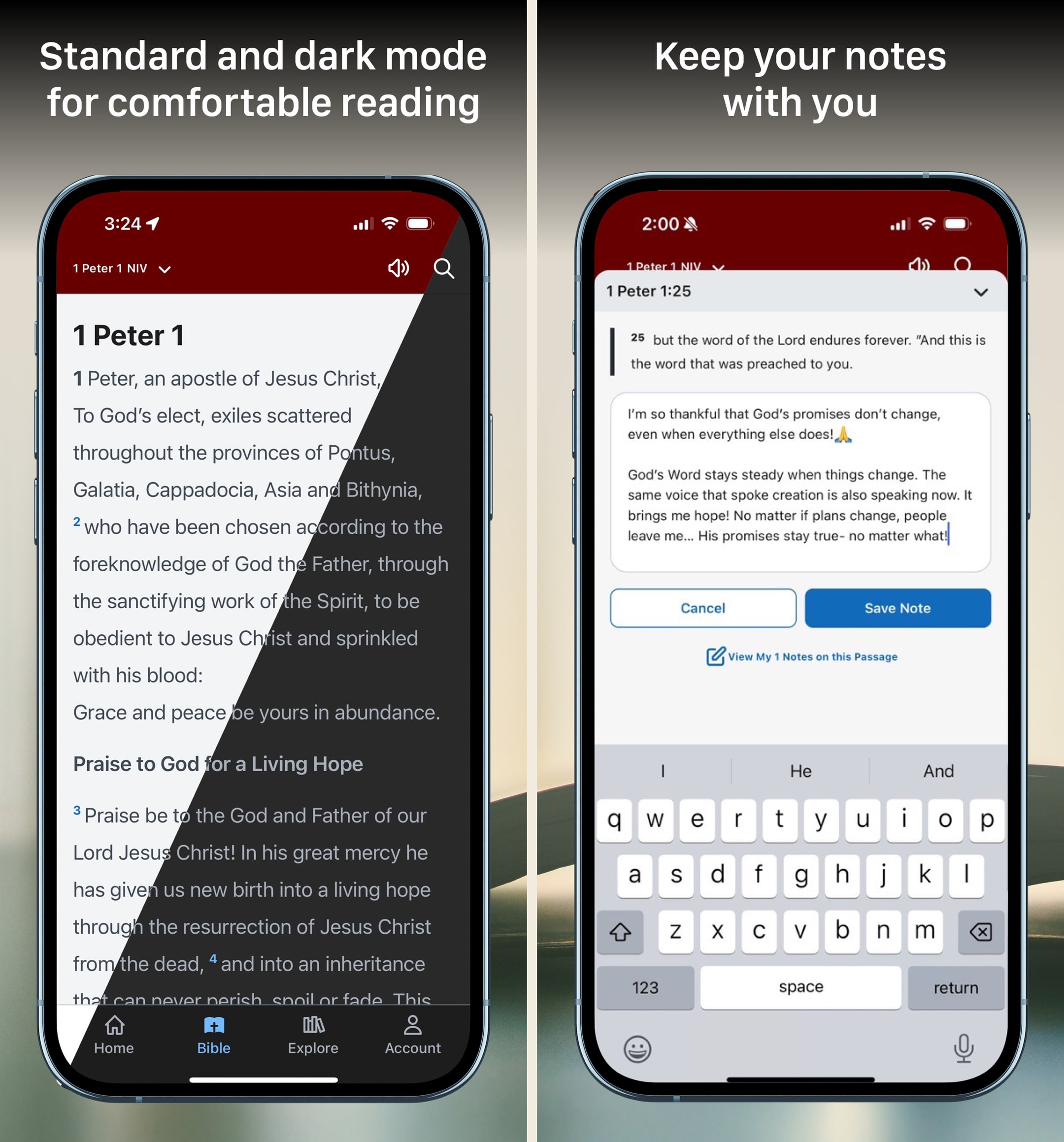
Bible Gateway has been the web's default Bible since the 1990s, and the app is finally catching up. In our testing, the free tier is solid for daily reading and the Plus tier is genuinely useful — at ~$5.83/month annually, getting access to the NIV Study Bible, MacArthur Study Bible, and Believer's Commentary is a real value. The catch: the app is best when online, and the offline experience is thinner than YouVersion's. We use it as a complement to a heavier study app, not as a primary daily-reading tool, but for anyone already on the website it's an easy install.
What we like
- The same vast translation library that made BibleGateway.com a default for two decades — 200+ versions including a strong Catholic and ecumenical lineup.
- Bible Gateway Plus is the cheapest path to a real study-Bible-and-commentary library at $69.99/year — much less than building a comparable Olive Tree or Logos library.
- Audio Bible coverage is excellent, with 30+ free dramatized and read-aloud audio versions in the free tier.
- Cross-device sync is solid — highlights and notes from the web carry to phone and back without much fuss.
- Ads in the free tier are restrained and disappear entirely with Plus, unlike some competitors where the free experience is intentionally crippled.
What to know
- Offline mode is weak — the app really wants a connection, and download options for translations are limited compared to YouVersion or Olive Tree.
- No original-language tools at all — no Strong's, no lexicons, no interlinear, even on Plus.
- The mobile app trails the website in features; some Plus resources read better in a browser than in the app.
- Notes editor is basic — fine for short reflections, frustrating for anything longer than a paragraph.
- No community or group features, no shared reading plans, no friends.
Best for
Web-first product but the Android wrapper is clean — 200+ translations, audio Bibles, and the most translation-comparison-friendly app on the platform.
Skip if
You want a strong offline experience — Bible Gateway is at its best on Wi-Fi, and the offline cache is thinner than competing apps.
Every morning for years, now uninstalling
First, I’m a programmer, and certainly realize a company needs a revenue stream. For several years, I started my day with the scripture of the day on the first screen. The latest update gets me invested in the first 4-5 words, then covers the screen in an ad which must be endured for an indeterminate amount of time. - Having a clear “Ad Free” buyout would be a good option, as the banner in the middle (which is actual an upgrade to paid) is not obvious. - Basically, a “Could you pay $30-40 one time to help us keep the lights on?” I would do today. But I don’t use the app enough to warrant another subscription, and the reviews for the paid version aren’t great. - I realize Christian folks (in US anyway) can be cheap and demanding. I make effort not to be either. That said, at 4:30am, a scripture is a good way to start the day. A Jack-in-the-box pop up ad I must endure to get to that scripture? I’ll turn on a light a read my Bible, or use a different app. Thank you much, for all the years. If I find you have a perpetual license option then great, if not, this will be deleted.
— jdstoker · September 7, 2024
Bible.is
Dramatized audio Bible in 2,600+ languages, free.
- Our score
- 7.8/10
- Pricing
- Free
- Platforms
- iOS, Android, iPad, Kindle Fire, Web
- Tradition
- Protestant, Catholic, Ecumenical
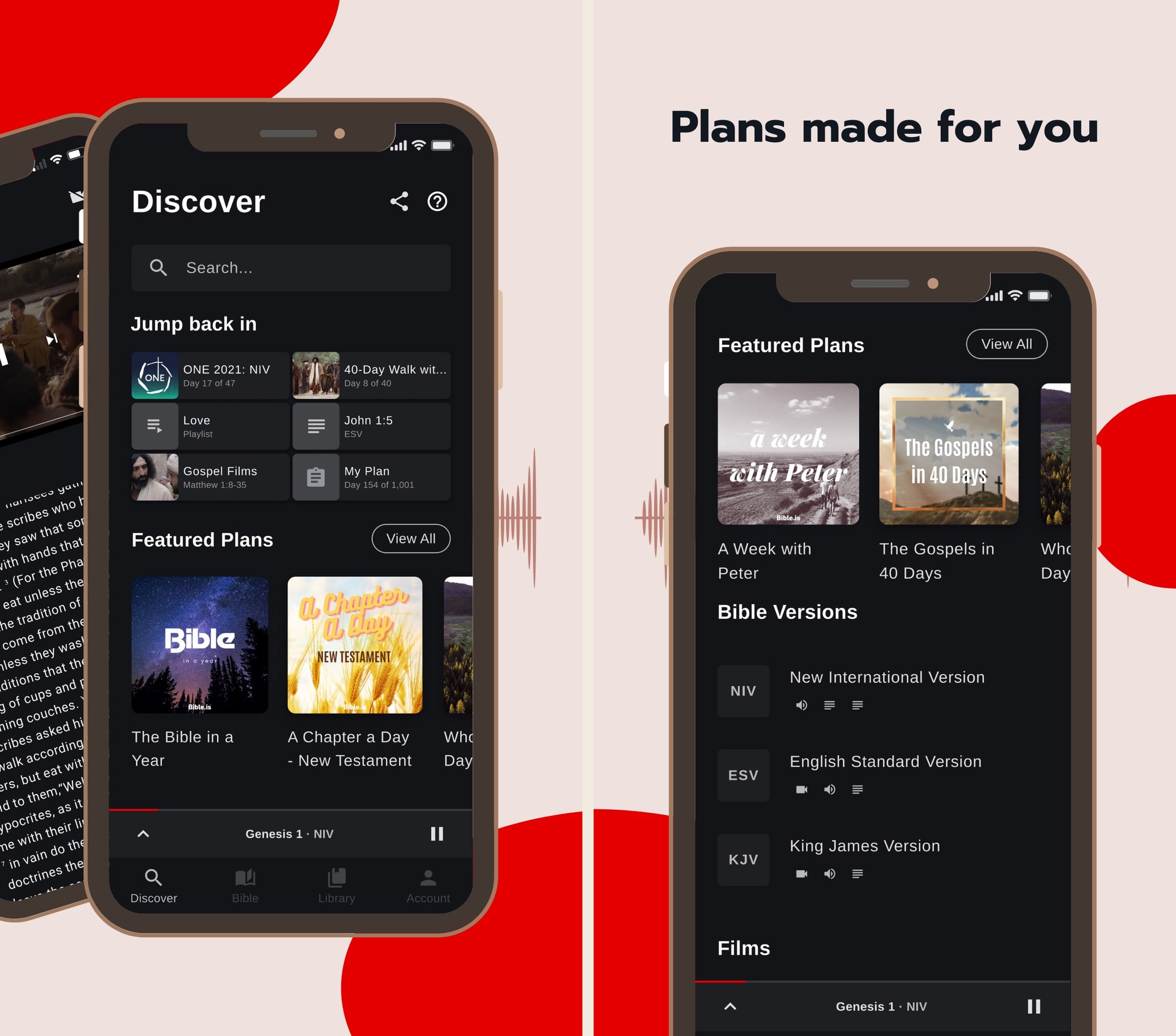
Bible.is is the audio Bible we recommend when someone says they don't read well or wants to listen in the car. In hands-on use, the dramatized audio quality is genuinely a step up from the flat narration most apps default to — you can hear the difference within thirty seconds. The text experience is fine but secondary; we treat this as an audio-first app and pair it with YouVersion or Olive Tree for reading. For multilingual families or anyone serving overseas, the language breadth makes this nearly impossible to beat in 2026.
What we like
- Dramatized audio with multiple voice actors and ambient sound is genuinely better than the read-aloud audio in most other Bible apps — closer to a great audiobook than a flat narration.
- Language coverage is unmatched: 2,600+ audio languages, with new releases every month, which makes this the default Bible app for missions and global use.
- Offline downloads work cleanly — download a New Testament in your language and you can listen on a plane in airplane mode.
- Gospel films library (1,700+ languages) is a quietly excellent resource for evangelism and family use.
- Donor-funded ministry, so there's no premium tier and no ads cluttering the experience.
What to know
- English-translation library is narrower than YouVersion — strong on the audio versions FCBH has produced, lighter on text-only modern translations.
- Study tools are essentially absent — no commentaries, no original languages, no cross-references.
- The notes/highlight system is basic and not as polished as YouVersion's or Olive Tree's.
- UI hasn't kept up with the slicker apps — functional, but visually it shows its age.
- Search across the audio Bible is workable but not as fast or fuzzy as text-only search elsewhere.
Best for
The strongest free audio Bible on Android — multilingual coverage that nothing else matches, dependable offline downloads, and zero subscription pressure.
Skip if
You want polished modern visual UI — Bible.is is audio-first and the Android UI is dated.
Phenomenal app, except this 3.0.5 version
This app is phenomenal and has gotten me so much further in the Bible than I have ever gotten before just in the past 2-3 weeks. I am not much of a reader and when I try to read, I fall asleep, and I wanna continue to dive deep into the Word, and these dramatized audio books help me to do just that. Everything was going well with the simple layout and pretty quick Bible book downloads for offline usage as well. However, when this new update came out and I updated the app, it deleted all of my downloads and now I had to make an account. Also it takes 3 times as long to download all the books and chapters and the app keep glitching where if I pause in the middle of a chapter, any of them, and maybe go to another app, and then come back to it, even a few seconds later, it buffers FOREVER. It doesn’t play until I use the skip button to go either forward or backward and then back to where I was. Also, every time I close the app, I have to log back in instead of it just automatically having me logged in. It’s a bit too many downfalls for a bunch of extra stuff. And the new layout (not including the extra features like the videos and bible plans, etc.) unfortunately is not as good as the old one. The old one was simpler and easier to utilize and faster. This one is a lot slower and has more defects unfortunately. That’s for version 3.0.5 by the way. It’s currently April 22,2020. I downloaded the app about a month ago or so.
— xSupernovax · April 22, 2020
Glorify
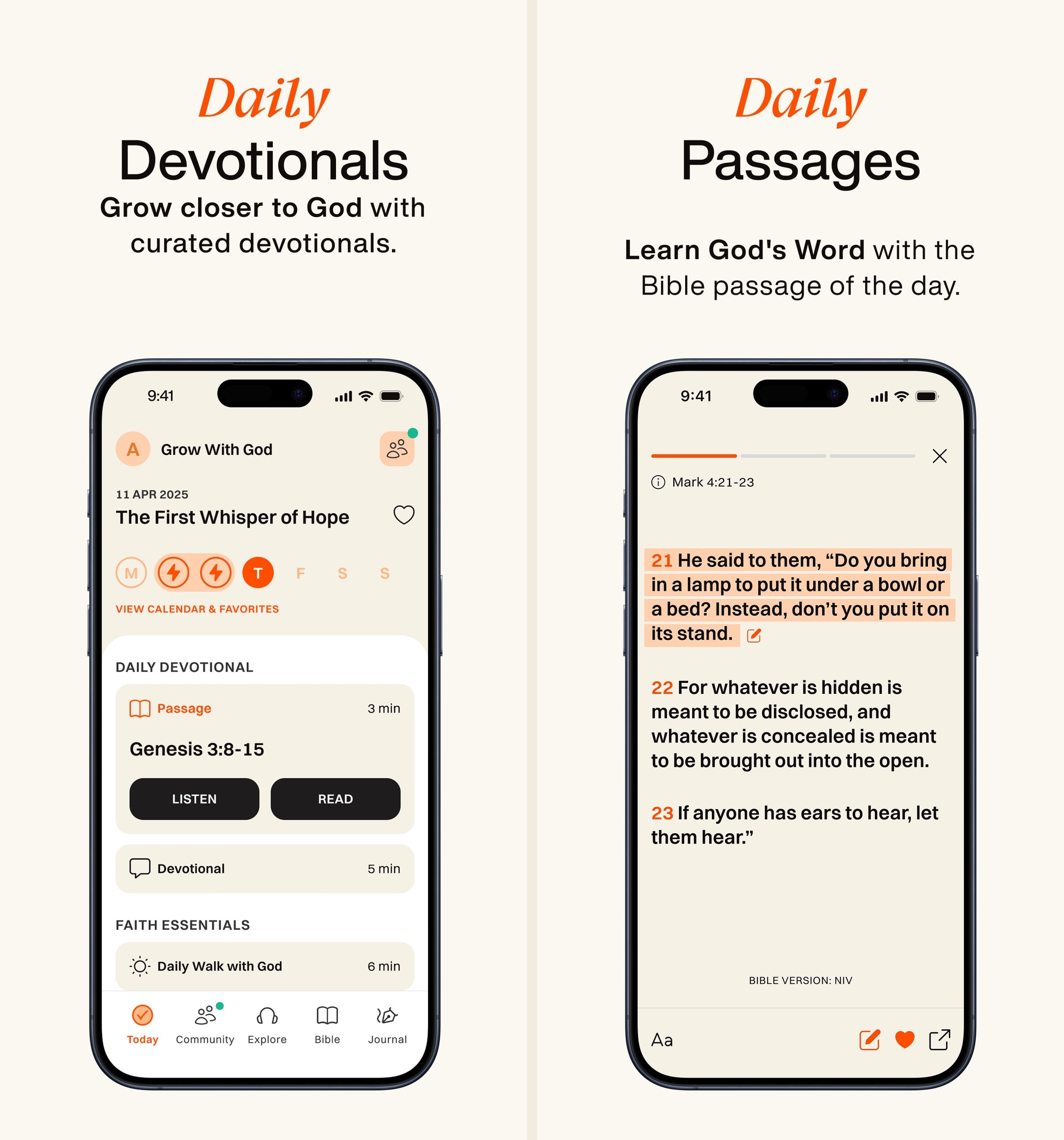
A Calm-style devotional app with a built-in Bible.
- Our score
- 7.5/10
- Platforms
- iOS, Android, iPad, Web
- Tradition
- Protestant, Catholic, Ecumenical, Non-Denominational
Glorify is the only Christian app we've used that genuinely competes with Calm and Headspace on production polish. In hands-on use, the morning-flow design pulled us into a daily habit faster than YouVersion did. But the Bible inside Glorify is thin — limited translations, no study tools, no real notes — so we use it alongside a primary Bible app rather than as one. The $69.99/year is fair for what's there, and the pay-it-forward option is a class move. Best for someone starting a daily rhythm; skip if you already have one.
What we like
- Best-looking Christian devotional app on the App Store — visually closer to Calm or Headspace than to a typical Bible app.
- Daily-rhythm flow (morning prayer, scripture, music, evening reflection) is genuinely habit-forming in the way Calm's daily flow is.
- Audio production quality on devotionals is high — voice talent and music are noticeably better than YouVersion devotionals.
- Prayer journal is solid: prompts, tags, history, and a real review flow.
- Pay-it-forward subscription option lets paying users sponsor access for those who can't afford it, which is a quiet but lovely feature.
What to know
- The Bible itself is a secondary feature — translations are limited, study tools are absent, and serious readers will outgrow it quickly.
- Most of what makes the app special is locked behind Glorify Plus at $69.99/year; the free tier is intentionally thin.
- Content can feel emotionally curated to a specific demographic (often described as women 25–45) — not bad, but not universal.
- No groups, friends, or shared features — the social layer is missing entirely.
- Some teaching content trends light/devotional rather than doctrinally substantive — fine for habit-building, weak for spiritual depth.
Best for
The best-designed devotional app on Android — Material You-friendly, short morning ritual, and a free tier that gives you real daily content.
Skip if
You want the Bible to be the centerpiece — inside Glorify, scripture is part of a wider devotional flow.
Amazing Resource!
I love this app so much! They have reminders that you can set in the morning and at night so you can start your day off right with a very manageable devotional as well as day centering meditations and then you can wind down with sleep stories! The daily worship devotionals take at most 15 minutes so it is just enough to whet your appetite and start your day off right. I even got my boyfriend into it because he has really early and busy mornings but there is an option to listen so all aspects of the daily worship so he can listen to it on his way to work. It is truly an amazing resource for everyone no matter the lifestyle you lead! I am blessed enough to have the plus membership so I have access to all the extra videos and things but even without that, it is an amazing resource. I lead some small groups and Bible studies so it’s a great way for me to deepen my faith in order to help teach others but I am also recommending it to just about ever believer that I meet. It’s helpful for no matter where you are in your walk and I just can’t recommend it enough nor express my gratitude to the team that creates and released this amazing resource. It’s a beautiful resource that you’ve given to strength the body and I am so thankful for it! I have not yet used the collaborating aspect of the app but I am really looking forward to that and getting to have some accountability between followers! Again, just thank you so much to the developers and that you truly have the good of the kingdom in mind in the creation of this resource!
— nateleroo · July 9, 2024
Dwell
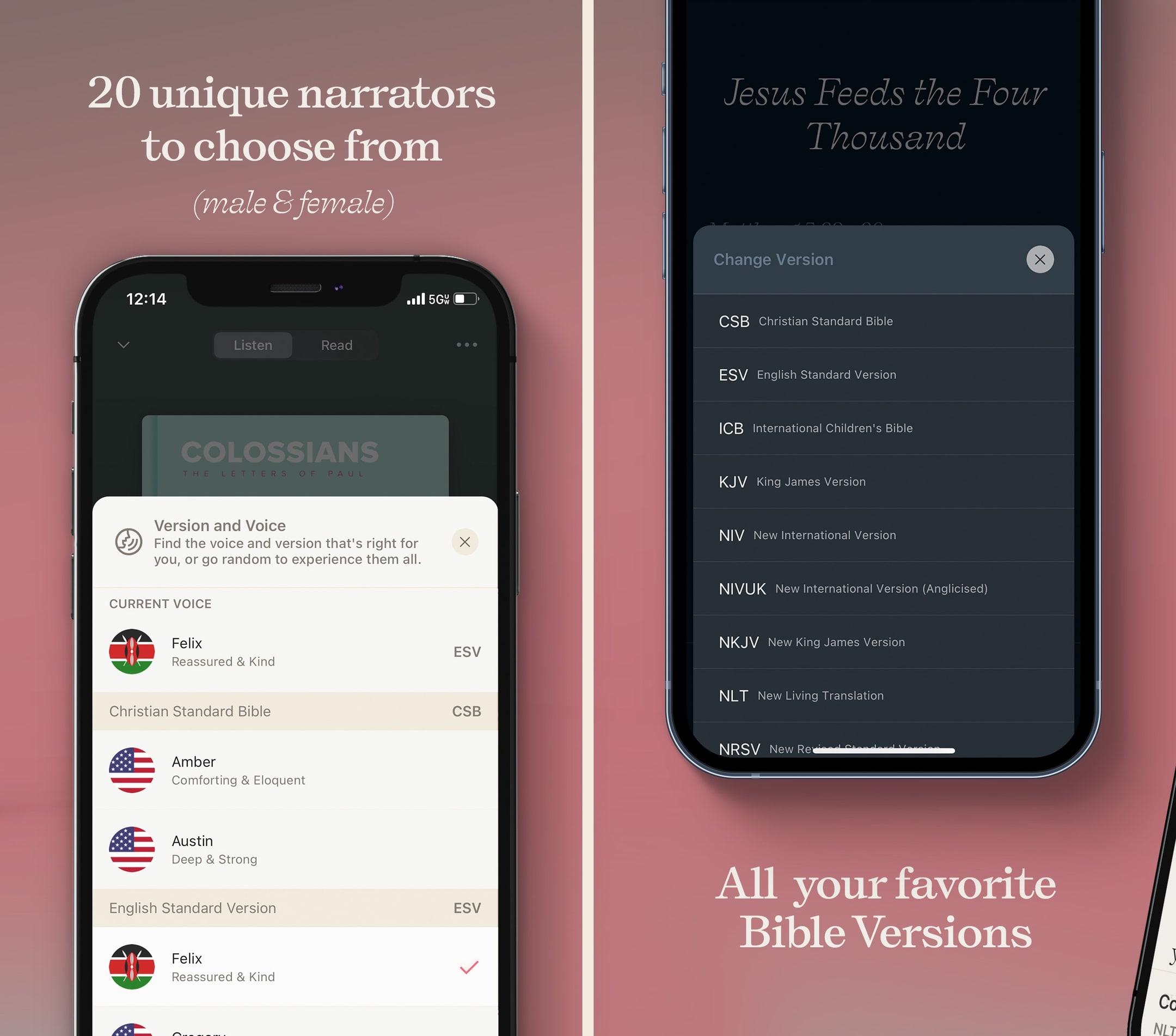
An audio Bible designed by people who love audiobooks.
- Our score
- 8.4/10
- Platforms
- iOS, Android, iPad, Apple Watch, Web
- Tradition
- Protestant, Ecumenical, Non-Denominational
Dwell does one thing — audio scripture — better than anyone. In our hands-on use, the difference between Dwell's voice acting and most read-aloud Bible audio is the difference between a great audiobook and a robotic text-to-speech. The annual subscription is steep next to free options like Bible.is, but the production quality is real and the CarPlay experience alone earns its keep for commuters. We pair Dwell with a text-first app rather than using it alone, but for the audio-listening half of our Bible time, it's the best app in 2026.
What we like
- Multiple narrator voices (male, female, dramatic, conversational) across translations — you can pick the voice you actually want to listen to for an hour.
- Background music tracks and ambient soundscapes turn the app into the closest thing to a Calm-style listening experience for scripture.
- Listening plans are genuinely well-produced — narrative arcs, themed playlists, sleep playlists — not just chronological audio drops.
- CarPlay and Android Auto integration is rock-solid; queuing the next listening plan from a steering wheel works the way you'd expect.
- Dark mode and minimalist UI are deliberately low-distraction — the app is designed for ears, not eyes.
What to know
- Strict subscription model with a thin free tier — almost everything meaningful sits behind $59.99/year.
- No real text-study features — no commentaries, no original languages, no notes worth keeping.
- Translation library is narrower than YouVersion or Bible Gateway — you get a curated handful, not a buffet.
- Not designed for skim-reading or visual study; the text view is functional but clearly an afterthought.
- Lifetime pricing requires emailing the company instead of being posted publicly, which is a small but real friction.
Best for
The best audio Bible on Android for the commute — production quality is the highest in the category and Android Auto integration is reliable on long drives.
Skip if
You want a primary text reader, or you do not want to pay $9.99/month or $59.99/year for audio quality.
Lifetime member!!
Scripture and God’s Word delivered in this way has totally transformed my life. I am so thankful for it!! It is so thoughtful and well-done. I’ve never experienced anything like it. At first I loved listening on the go to my Bible recap plan within the app, but now I honestly love being read to as a follow along in my own Bible. It’s hard to imagine reading and studying without it now. Somehow it helps my brain to know exactly how many minutes it takes to listen to my planned reading to get through it! I retain so much more and notice things differently. Listen—I can’t stand audiobooks—I get bored and tired and annoyed at the narrators or something. But I love the options in dwell and have never felt that way. Narrator Kiley is just tremendous and I all the options to control, like speed background ambiance. The background music is so soothing and gives the scripture such power and cadence. I’m just so grateful for how God is using his Word to transform our family and renew me daily in the grace of God. Thank you Dwell Bible! You are doing holy work! I honestly downloaded the app because I was hopeful for your kids content or yoto connection? But wow am I glad I stayed for more! The integration with the Bible Recap is what stuck for me and I love the other plan options. I can wait to try the Bible project one next! (Side note-It seems like the background music is too loud in the bible project commentary if you could check that out team?) I am your biggest fan! Keep doing what you’re doing and praise Jesus!
— haleysue · January 4, 2026
Accordance Bible Software
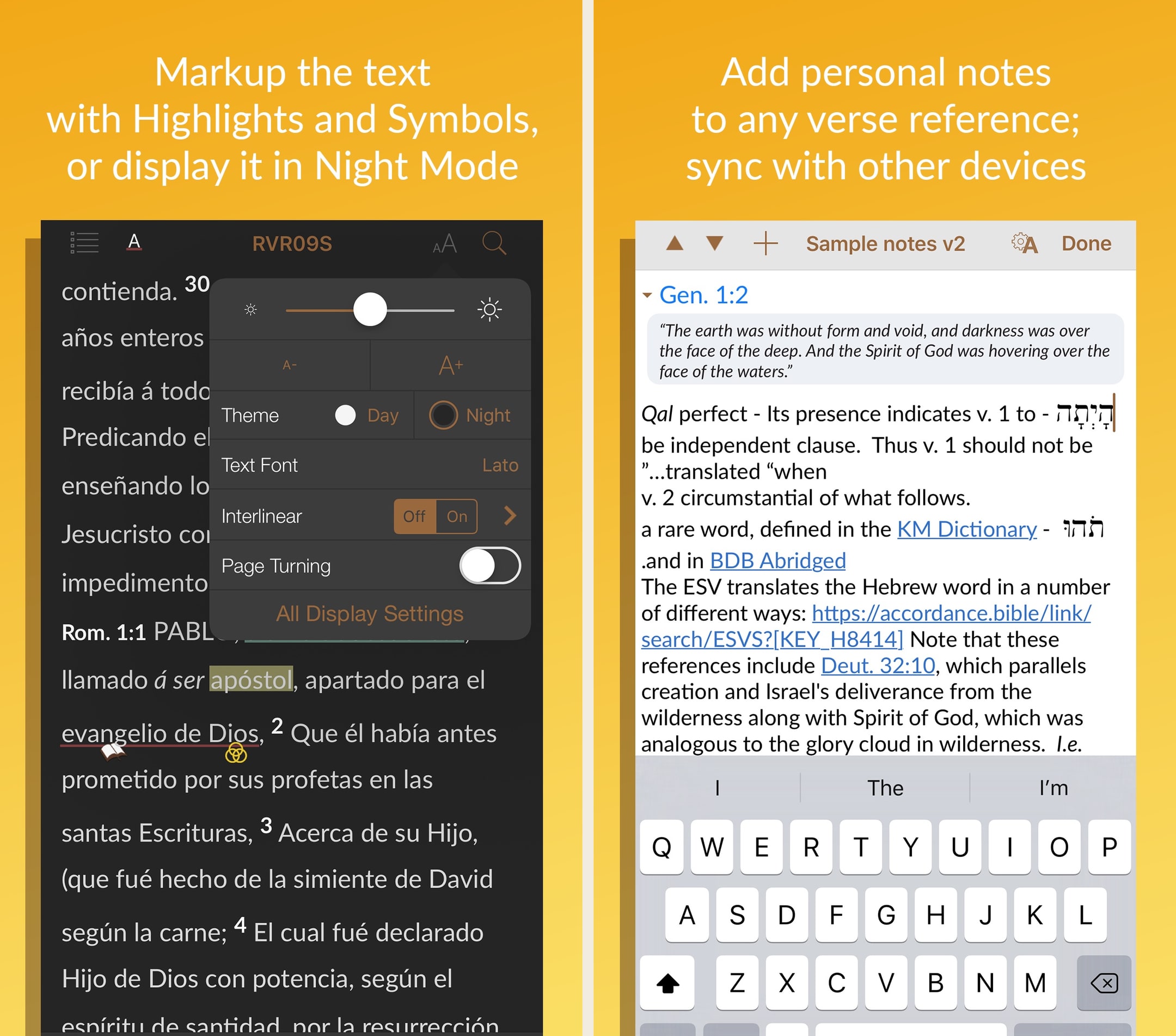
The Mac-first power user's Bible study platform.
- Our score
- 8.2/10
- Platforms
- iOS, Android, iPad, Mac, Windows
- Tradition
- Protestant, Catholic, Reformed, Baptist, Anglican, Lutheran, Methodist, Ecumenical
Accordance has been the quiet alternative to Logos for years, and on a Mac, it still holds up. In hands-on testing, search speed across a heavy library was visibly faster on Accordance than on Logos, and the cleaner UI matters for long study sessions. The mobile apps are noticeably thinner, which is the real tradeoff — if you live on your phone, this isn't your pick. But for Mac-using pastors and scholars who want a permanent library without a subscription, the $49 starter license plus targeted resource purchases is the most ownership-friendly path to a serious study setup in 2026.
What we like
- Mac performance is genuinely excellent — searches across a large library run faster than the equivalent in Logos, especially on Apple Silicon.
- One-time purchase / permanent license model means you actually own what you buy, with no subscription required to keep using your library.
- Original-language tools (Greek, Hebrew, Aramaic, Syriac) are research-grade — the app has a long history with biblical scholars and seminary use.
- $49 starter license is one of the cheapest paths to a real ownership-model study Bible platform, especially with the 90-day trial.
- Cleaner, less-cluttered interface than Logos for users who don't want a sprawling Faithlife ecosystem.
What to know
- Mobile apps are noticeably weaker than the Mac/Windows desktop experience — the iPhone/iPad app feels like a companion, not a full client.
- Resource catalog is smaller than Logos — some niche commentaries and academic resources just aren't available.
- Marketing site and store experience are dated, and the pricing across collections can be hard to parse without help.
- Smaller user base means a smaller community, fewer YouTube tutorials, and less third-party content than Logos.
- No subscription tier for users who'd rather rent a curated library than own one — every meaningful upgrade is a purchase.
Best for
The deepest original-language study app that ships an Android client — for serious readers who want Mac-grade tools mirrored on a Pixel or Galaxy device.
Skip if
You only want devotional reading — Accordance is a research tool and the Android client is a study companion to the desktop app, not a daily reader.
Great app, but a few user interface issues
Accordance is one of the best Bible study apps available, period. I use it regularly, both for personal reading and devotion, and in my studies and research. Version 3.4 has been much more stable than previous versions, however, I still run into user interface issues. For example, if I want to switch to a different book or resource while in reader view, I try to click in the top left corner, but 95% of the time, or more, it only brings up the instant details pop up or the verse tool. I have literally spent over 2 minutes just trying to change Bible books in the middle of sermon while trying to keep up with the teaching. If there is a gesture just for bringing up the resource selector, I am not aware of it. Also, the divider between the two text panes always changes position when switching between apps. I usually keep the divider halfway between my English and Hebrew/Greek texts. When I switch to my note taking app and then switch back, the divider has jumped to the ⅔ of the screen in English text and ⅓ in original language. That means every time I switch, I also have to reposition the divider. This is frustrating and should be easily fixed. As it is, sometimes, if I’m trying to take notes in the middle of a sermon or teaching, I don’t use Accordance, but use a simple Bible reader app, just because I get frustrated with the user interface issues. I hope OakTree Software takes care of this, because when Accordance works properly, it’s probably my favorite Bible app.
— j micah · May 27, 2023
Warmpeach — coming soon
A Bible chat app — pastor and therapist in one.
Warmpeach is a Bible chat app that blends a pastor's care with a therapist's questions, grounding every reply in scripture. Join the waitlist and we'll email you when it opens up.
Verdict
Warmpeach — coming soon
Join the Bible chat app waitlist
Who this guide is for
This guide is for Android users who want a Bible app that fits the way Android actually works in 2026 — Material You theming that respects the system accent, widgets that survive a Samsung One UI update without going blank, Wear OS complications that do more than launch the phone app, and Android Auto support that holds up on long drives. We are not interested in apps that ship a thin iOS port and call it Android support; we are interested in apps that have clearly been designed by people who use a Pixel or a Samsung every day.
If you have come here looking for a one-app answer, the short version is YouVersion. It is free, it is what almost everyone you know is on, and the Android build is genuinely well-maintained — including the parts (Wear OS, widget polish, share-sheet behavior) where iOS has historically led.¹ Most of the rest of this guide is about which second app to install — for reading, for study, or for audio — once YouVersion is doing the daily-driver job.
How we evaluated
We spent multiple sessions inside each app on Pixel hardware and on a Samsung Galaxy device running One UI, with widgets pinned, Wear OS complications running where supported, and Android Auto on a real commute. We also tested split-screen behavior on a foldable and tablet behavior on a Pixel Tablet, since the bigger-screen story on Android matters more than it does on iPhone.
A few things we paid extra attention to. First, Material You theming — many older Bible apps still ignore the system accent on a Pixel, which is a real design miss in 2026. Second, how the app handles Doze mode and battery optimization — Android's aggressive background-task killing breaks the verse-of-the-day widget on the apps that have not done the engineering. Third, the Play Store free-tier honesty. A $0 price tag should mean what it says. The sections below that mention paywall friction — particularly around Pray.com — reflect what we ran into in onboarding, not a theoretical complaint.
Key tradeoffs on Android
Polish vs depth
The best-looking Android Bible apps — Glorify, the AI-chat newcomers, parts of YouVersion — tend to be the lightest on study tools.²¹ The deepest study apps — Logos, Olive Tree, Accordance, Blue Letter Bible — tend to look at least one Material design generation older than the Play Store charts would suggest.³⁴⁵ There is not a single app on Android that is both the prettiest and the most powerful, and we would push back on anyone trying to sell you one. The honest move is to install one of each and let them play different roles.
Free vs subscription
Android is also where the subscription experience varies the most across apps. The mature free apps (YouVersion, Blue Letter Bible, Bible.is, Bible Gateway) will never pressure you into a weekly billing cycle.¹⁵⁶⁷ The newer AI-chat apps and some of the production-heavy audio apps lean hard on weekly or annual subscriptions, and the price you see in the Play Store listing is sometimes not the price you actually get charged.⁸⁹ Before you tap subscribe inside a Bible app on Android, check the Play Store receipt screen carefully — we have seen real variance between what the marketing page promises and what the actual paywall offers.⁹
Widgets and Wear OS matter more than you think
The single biggest determinant of whether a Bible app sticks on Android is whether the user actually opens it daily. Widgets and Wear OS complications change the math here. A verse-of-the-day Tile on a Wear OS watchface turns scripture into a glance, not a tap, and after a few weeks the habit forms with almost no effort. The apps that ship excellent widgets and Wear OS support — YouVersion, Dwell — tend to outlast the apps that do not, regardless of how impressive their onboarding flows are.¹¹⁰
One app vs a stack
The most common mistake we see Android users make is trying to find a single Bible app that does everything well. Reading, study, audio, prayer journaling, and memorization are five different jobs, and every app on this list is genuinely good at two or three of them, not all five. The most satisfied Android Bible-app users we know run a small stack — usually YouVersion or ESV Bible for reading, Olive Tree or Logos for study, Dwell or Bible.is for audio, and something dedicated like Echo Prayer or The Bible Memory App for prayer or memorization — and accept that the home screen will hold three or four icons rather than one.¹¹¹³¹⁰⁶¹²¹³
Tablet and foldable workflows
A Pixel Tablet or a Samsung Galaxy Tab S is where Android genuinely pulls ahead of an iPhone-only setup for serious study. Olive Tree's split-window reading on a foldable is one of the best small-screen-and-big-screen study workflows available on any platform. Logos on a Pixel Tablet has improved significantly and is now a real option for adults who want a study desk that lives in their backpack. If you are committing to Android for serious study, the tablet decision matters as much as the app decision.
What we did not test
We did not test on Kindle Fire here — Fire OS is technically Android-derived but the Bible-app catalog is much smaller and gets a separate guide. We also did not weigh Play Store rating averages heavily, since the most-reviewed apps in this category have known A/B-tested onboarding flows that goose the rating numbers. Our ranking is based on what we actually used, not what the rating curve suggests.
Sources
-
YouVersion Bible — Play Store listing (free, Wear OS, widgets). Accessed 2026-05-11. https://play.google.com/store/apps/details?id=com.sirma.mobile.bible.android
-
Glorify — Play Store listing (devotional design, subscription). Accessed 2026-05-11. https://play.google.com/store/apps/details?id=com.glorify.app
-
Logos Bible Study — Play Store listing (study depth, subscription tiers). Accessed 2026-05-11. https://play.google.com/store/apps/details?id=com.logos.androidlogos
-
Olive Tree Bible — Play Store listing (study, Plus subscription). Accessed 2026-05-11. https://play.google.com/store/apps/details?id=biblereader.olivetree
-
Blue Letter Bible — Play Store listing (free, original-language tools). Accessed 2026-05-11. https://play.google.com/store/apps/details?id=org.blueletterbible.blb
-
Bible.is — Play Store listing (free, multilingual audio). Accessed 2026-05-11. https://play.google.com/store/apps/details?id=com.faithcomesbyhearing.android.bibleis
-
Bible Gateway — Play Store listing (free, translation comparison). Accessed 2026-05-11. https://play.google.com/store/apps/details?id=com.csnmedia.android.bg
-
Haven Bible Chat — Play Store listing (weekly subscription). Accessed 2026-05-11. https://play.google.com/store/apps/details?id=com.vertmedia.haven
-
Pray.com — Play Store listing (paywall behavior, subscription pricing). Accessed 2026-05-11. https://play.google.com/store/apps/details?id=com.prayapp.client
-
Dwell — Play Store listing (audio production, Wear OS support, subscription). Accessed 2026-05-11. https://play.google.com/store/apps/details?id=com.dwellapp.dwell
-
ESV Bible — Play Store listing (free, single-translation reader). Accessed 2026-05-11. https://play.google.com/store/apps/details?id=com.subsplash.esv
-
Echo Prayer — Play Store listing (prayer-list management). Accessed 2026-05-11. https://play.google.com/store/apps/details?id=com.cloversites.echo
-
The Bible Memory App — Play Store listing (memorization, spaced repetition). Accessed 2026-05-11. https://play.google.com/store/apps/details?id=com.millennialsolutions.scripturetyper