
Blue Letter Bible Review
By Sankalp Jonna · Last reviewed 2026-05
Get the app
How we tested
Every app here was installed and used personally. We capture raw findings — typed notes, screenshots, screen recordings, voice memos — and the writing is AI-assisted from those raw notes. Scores, rankings, and "best for / skip if" calls reflect our actual experience with each app. Read the full methodology →
Our verdict
We'd recommend Blue Letter Bible as the first study app on every budget-conscious reader's phone. The Strong's concordance, lexicons, interlinear view, and Treasury of Scripture Knowledge cross-references are best-in-class for free, and the offline-friendly design means you can do real word study without a connection or an account. Pair Blue Letter Bible with YouVersion for daily reading and you have a genuinely capable free Bible setup that costs nothing. Skip Blue Letter Bible if you want a polished, social, reading-first app with the latest modern translations — the UI is utilitarian and the modern-translation library is thin, and you'll feel both. Also skip if you want premium modern commentaries (NIV Application, Expositor's, Word Biblical) — those are licensed resources that aren't in the public domain, and you'll need Olive Tree Plus or Logos to access them. Blue Letter Bible is what you install when you want serious tools without serious money.
Setup and first run
Installing Blue Letter Bible is the most utilitarian onboarding in the Bible app category, and that's a feature once you understand the audience. We installed it on a fresh iPhone and were dropped into a search-bar-first home screen — no warm questions, no daily-rhythm flow, no content feed, just a Bible search box and a verse-of-the-day card underneath. Account creation is optional. You can use the app fully without signing up; an account only helps if you want to sync notes between phone, iPad, and the web.
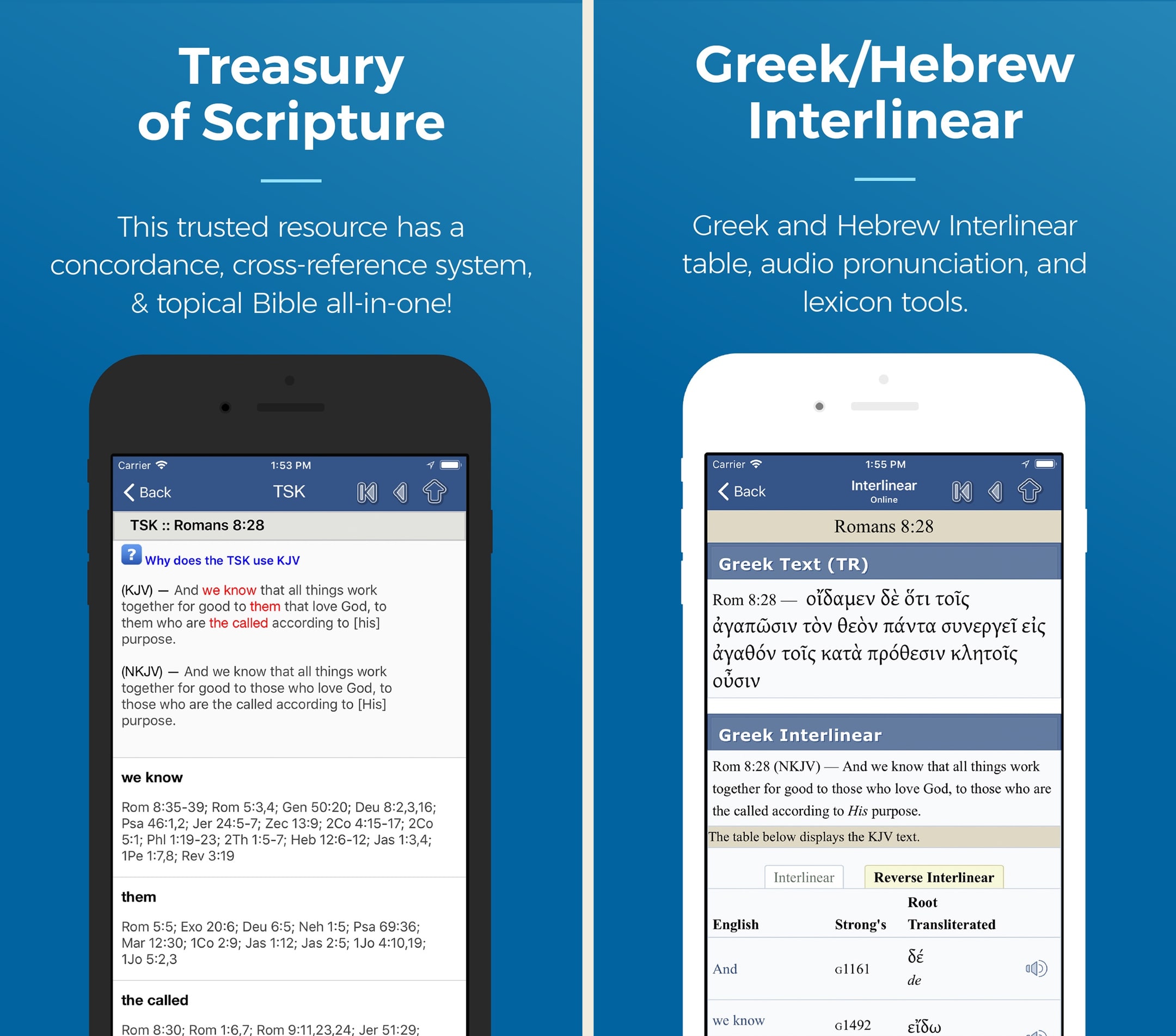
The first thing we did was tap a word in Hebrews 4:12 and watch the Strong's lookup pop up. That single interaction is the entire pitch for Blue Letter Bible — tap any word, get the underlying Greek or Hebrew, the Strong's number, the lexicon entry, and every other place the root appears in scripture. We had it working inside thirty seconds, on a free app, with no account. Most users who'll love this app know that's the headline within the first minute.
Day-to-day use
We used Blue Letter Bible primarily for two jobs over multiple weeks: daily reading with on-the-fly word lookups, and a focused word study on a single Greek concept across the Pauline epistles. Both jobs are exactly what the app is built for.
Word lookups during reading
The on-tap Strong's lookup is the feature that earns Blue Letter Bible its place on a study-minded reader's phone. While reading through Romans, tapping a word like "righteousness" pulls up the Greek dikaiosune, the Strong's number G1343, the lexicon entry, and a list of every place dikaiosune appears in the New Testament. We could follow a thread of usage through Paul without leaving the app. Olive Tree Plus does this same job; Logos does it deeper; Blue Letter Bible does it free, and the free version is genuinely close to the paid alternatives for one-word lookups.
Word studies across books
For sustained word study, we ran a search on the Greek agape across the Johannine epistles, looking for participle uses. Blue Letter Bible's search isn't as syntactically powerful as Logos's morphological searches — there's no querying for "all participles modifying X" — but for "every place agape appears in 1 John," it's plenty. The results page links each occurrence with the lexical form, and one tap gives you the lexicon entry for context. For a non-scholar doing word-level study, this is the right depth.
Cross-references with Treasury of Scripture Knowledge
The Treasury of Scripture Knowledge integration is a quiet differentiator. Tap a verse, hit cross-references, and you get a hand-curated chain of related verses. We followed the cross-reference chain from Hebrews 4 to Genesis 2 to Psalm 95 in three taps — the kind of thread that takes a Bible app with poor cross-references twenty minutes to assemble. The fact that this is a free feature in 2026 is genuinely surprising.
Where it surprised us
The offline experience is better than expected. We downloaded the KJV, the Strong's lexicon, and the Matthew Henry commentary on a hotel Wi-Fi connection and used the app on a flight without issue. Search works offline against everything you've downloaded. Most apps in the category — including some paid ones — degrade meaningfully without a connection.
The public-domain commentary depth is more useful than the dismissive label suggests. Matthew Henry, Jamieson-Fausset-Brown, John Gill, Adam Clarke, and David Guzik are not modern, but they're substantial. For sermon prep on a budget or for personal study, having five full commentary sets free is non-trivial. The trade-off is that the modern critical commentaries (NIV Application, Word Biblical, Expositor's) aren't here — those are licensed resources that require Olive Tree Plus or Logos.
The Calvary Chapel and Reformed lean turned out to be more visible than we'd expected, especially in the curated content (David Guzik featured, Calvary Chapel sermon notes available). For users in those traditions, that's a feature; for Catholic or Wesleyan users, it's worth knowing about. The original-language tools themselves are tradition-neutral, but the curatorial defaults aren't.
Where it disappointed
The UI looks like 2017 study software. Typography, spacing, animations, and visual feel all lag noticeably behind YouVersion, Glorify, or even Olive Tree's recent updates. The functionality is excellent; the polish isn't there. If you care about visual feel, this is a real deduction.
The modern-translation library is thin. KJV and NASB anchor the experience; ESV access is limited; NIV, NLT, and CSB aren't here at the depth most readers expect from a 2026 Bible app. If you read primarily in modern translations, pair Blue Letter Bible with YouVersion (free) or Bible Gateway (free) for the reading and use Blue Letter Bible specifically for the lookup work.
The reading plans library is small and dated compared with YouVersion's enormous, well-curated set. Blue Letter Bible has reading plans, but they're not why you'd install the app, and the curation hasn't been updated as actively as YouVersion's.
The community and social layer is non-existent. No friends, no shared notes, no groups. Blue Letter Bible is a solo-study tool by design, and that focus is exactly the point — but pair it with another app if you want shared reading with a spouse or small group.
The pricing reality
There isn't one to negotiate. Blue Letter Bible is free, ad-free, and has no paid tier.¹ That has been true since the website launched in 1996, and the donor-funded model has held steady through the move from web-only to mobile apps.² If you're coming from Olive Tree Plus ($59.99/year)³ or Logos Pro ($149.99/year),⁴ Blue Letter Bible is the financial release valve — install it as your study toolkit and reach for a paid tool only when you need depth the free app doesn't have (modern critical commentaries, syntax-aware Greek searches, sermon-prep workflows).
The honest counterargument is that "free" doesn't mean "free of trade-offs." Blue Letter Bible's trade-offs are UI polish, modern translations, modern commentaries, and the absence of a community layer. For users whose study is predominantly word-level work in classical translations, those trade-offs are minor. For users who want a polished, modern, reading-and-study app in one, Olive Tree at $59.99/year³ is the cleaner pick.
Who else should consider it
Seminary students on a budget specifically benefit from Blue Letter Bible — the original-language tools and Treasury of Scripture Knowledge cover most non-research-grade study at a price point ($0) that fits a student's reality. Pair with the free Logos app for occasional Logos resource access.
Small-group leaders and Sunday school teachers preparing weekly teaching get a real tool here. The Strong's lookups and cross-references cover most prep needs without committing to Olive Tree pricing.
Bivocational pastors who don't preach weekly often don't need Logos Pro — Blue Letter Bible plus a few targeted Olive Tree resource purchases on sale is a more sustainable financial shape.
Our final word
Blue Letter Bible is the free study app we'd recommend to every budget-conscious reader as their first install after YouVersion. The Strong's concordance, lexicons, interlinear view, and Treasury of Scripture Knowledge cross-references are best-in-class for free, and the offline-friendly design means you can do real word study without a connection. The UI is dated and the modern-translation library is thin — both real deductions — but the substance is there in a way no other free app matches. If we could only have one free study app on a phone in 2026, this would be the pick. Pair with YouVersion for reading and you have a capable Bible setup that costs nothing.
Best for
Budget-conscious lay readers, small-group leaders, and seminary students who want serious word-study tools without paying for Olive Tree Plus or Logos.
Skip if
Readers who want a polished, social, reading-first app with the latest modern translations and modern commentaries.
What real users say
This is the ultimate bible online study
Totally awesome! and without ads :This is Tremendous bible resource in every way, just start exploring and be sure to click on a verse and click the one in the middle of menu and you will be able view Greek and Hebrew and explanation of all words (that choice is: Concordance/Interlinear); and so much more, all ad free. It is truly amazing. I started using this app over 7 years ago. The desktop edition is also great. For this app:They keep improving on what is already great. Example: choice for you to have the chapter read aloud for you, or the whole of the book within the 66 books of the Bible. Just about every translation of the many English translations are available. Also includes Thayer’s in depth original and amazing words in Bible I continue to learn about the root meanings through this tremendous resource that the brilliant geniuses of the development team make available when you go to a verse in linear concordance and tap any word you will get Hebrew and Greek of word it even pronounces it for you and click at bottom of that page for the Thayer selection which opens up a whole realm of authentic text Insight- when you see it you’ll get what I mean - hard to describe depths of this and for each word. I’m not an employee of this remarkable non profit, may I recommend supporting it. Also fully available on your web browser. iPad version is also dynamic and outstanding as well.
— blueBibleReader · March 29, 2025
ONE Bible App to rule them all!
This is the most versatile Bible app I’ve ever tried. I had several before, but this one has replaced all of them. I can’t possible list all the features here, but I’ll list a few. It’s VERY customizable. You can turn Red Letter (on/off), you can toggle between single column or double column. And you can toggle parallel view off or on, when you need to compare translations. If you just want to do straight READING, for pleasure, you can select which options you want turned off… chapters, verses, paragraph markers, footnote markers, headings (aka: periscope), etc, which allows you to read the Bible like a novel. As for translations, there’s a lot! And you can choose as many or few as you want downloaded. For scholars, they even have five different Greek Septuagints (XXL) including the Textus Receptus, Byzantine, and others. and I just read that a recent update added an ENGLISH translation of the Septuagint (Brenton’s BES), so I’m excited to have an Eng vers. (I haven’t actually seen it yet, but it was mentioned in the release notes) I could go on forever, but I wanted to keep this short, so that’s all for now. I’ll update again if other features get added that are noteworthy enough to mention here. Bottom line: Five HUGE stars! ⭐️⭐️⭐️⭐️⭐️ UPDATE: the release notes say that Brenton’s English Septuagint was added, but when I open the translations selections, Brenton’s Septuagint is not there! Attention DEVS, is that a bug? Why is it not in the list of available translations?
— Vmurp · April 29, 2024
BLB... SHARING BIBLICAL RESEARCH TOOLS GODS WAY
I had been purchasing pricey software when through a Chuck Missler teaching I learned about this amazing software which did as much and perhaps more than that which I decided was worth the hih purchase price, but was always dismayed when once on the PC... there were separate offers to provide the “key” to “open” up the “available modules” adding to both the true cost to have he tools desired as well as the questions those ways of marketing and judeo/christian ethics in business. I realize the costs of producing the bible software need to be covered... the overhead... but God’s word though freely given, is a well of water, springing up within those who receive it into eternal life to which their is no amount of earthly stuff that can even come close to the hope knowing that when I pass... within the time it takes for an eye to blink... I have the great hope... through faith... that so rapidly I will e with my Lord and Savior in His heavenly kingdom... forever! BLB has given all the ability to have every tool necessary to adequately do our bible homework. It is easy to use and has enabled me a retired man with a wonderful life, to be able to explore the depths of God’s Word for no cost. Though free, I presume it is not cheap to give us this foundational website. For us who rely on it, I ask that we include it in the rotation of our tithes. If we be honest we who DO rely on it have a moral duty to help keep it alive and available in perpetuity. How tragic it would be to lose this great tool. Right?
— xmagma1 · February 1, 2019
Amazing study feature removed with latest update
Hello. I’ve been using your app for years and it’s one of the best study tools available on iOS. I was extremely surprised to see in the latest update released this week that in the interlinear you NO LONGER can see where a Strong’s number is used for the corresponding Hebrew or Greek word you want to study. For instance there are several words used for wisdom in proverbs. I used to could pick a verse, click on the word for wisdom and see all verses where the word was used. That I can still do but it NO LONGER shows in the list of scriptures where the Strong’s word I’m researching was actually used. Sometimes the word wisdom can be used twice in the same verse but 2 different Hebrew words are used. Well I no longer can see which is used for the word I’m currently studying! I just know it’s one of them but I can’t tell which one unless I actually go into that verse and study it separately. This is a major feature loss and I’m shocked this was removed. Please let us see the Strong’s numbers in the list of usage verses again. Thanks! Update: Thanks for your response. You can see the Strong’s numbers for all verses using a word AS LONG as you go to interlinear in the KJV version. I wish it was with any translation like before but at least you can still access it. This is still the best bible study app on the store!
— Tony&ChrisNM · February 27, 2018
Sola Scrriptura • Solus Christus • Soli Deo Gloria
The Word of God is my barometer for life; for spiritual life. The Blue Letter Bible enables me to have His Word available at times I don't have my Bible. It is truly a "user friendly" App. Blue Letter Bible also has a great website. I've been blessed with the opportunity to meet some of the Blue Letter Staff on a couple of occasions and from them, learn much more about the App and about Blue Letter's ministry. It is obviously to make God's Word available to more souls. It is a God honoring ministry • Soli Deo Gloria. The App contains many wonderful features: a) Search; b) Ability to highlight text; c) Background color/text color change; d) Audio read; and e) Scroll feature to name a few. I have found the App's features to be consistently reliable. The Blue Letter App doesn't contain a lot of extraneous, options (or programs) to distract from the pure Word of God as do some Bible Apps. In essence, The Blue Letter Bible provides one with the opportunity to have The Word in an unclouded format. In a format in which one needn't be concerned with the potentially misleading opinions of man. I love the purity of The Word of God and, with the assistance of The Holy Spirit, drawing nigh Him through His precious Word. When I consider The Blue Letter Bible App, I am made mindful of the monicker "Sola Scriptura"! Thank you Blue Letter Bible for your wonderful App! ~WyoKid
— TheWyoKid · November 26, 2017
Alternatives we considered
Compare Blue Letter Bible to other Bible apps
Warmpeach — coming soon
A Bible chat app — pastor and therapist in one.
Warmpeach is a Bible chat app that blends a pastor's care with a therapist's questions, grounding every reply in scripture. Join the waitlist and we'll email you when it opens up.
Sources
-
Blue Letter Bible — App Store listing (free, ad-free, Strong's lookup, Treasury of Scripture Knowledge, commentary library). Accessed 2026-05-11. https://apps.apple.com/us/app/blue-letter-bible/id365547505
-
Blue Letter Bible — official site (history, donor-funded model). Accessed 2026-05-11. https://www.blueletterbible.org/
-
Olive Tree Bible — App Store listing (Plus annual pricing). Accessed 2026-05-11. https://apps.apple.com/us/app/bible-app-by-olive-tree/id332615624
-
Logos Bible Study — App Store listing (Pro annual pricing). Accessed 2026-05-11. https://apps.apple.com/us/app/logos-deep-bible-study/id336400266