
BibleScroll: Christian Focus Review
By Sankalp Jonna · Last reviewed October 12, 2026
Get the app
How we researched this
We have not tested the apps on this page hands-on. It is built from App Store and Google Play listings, the developers' own sites, and recent user reviews, captured as raw notes, and the writing is AI-assisted from those notes. Scores, rankings, and "best for / skip if" calls are our judgments from that research. Read the full methodology →
Our verdict
We'd recommend BibleScroll to adults who want reading time, not a quick prayer, to be the price of opening their apps, and who are willing to pay for that. The idea is the cleanest in the category, the flexibility (your apps, your passage, your translation, your minutes) is well judged, and the 6,600-rating track record suggests it works for many people. Apple's privacy label saying the developer collects no data from the iPhone app is a welcome extra. Skip it if you want to use it for free past a week, if $59.99 a year is too much for a lock, or if you know you will talk yourself out of a timer you can edit. Reviewers say the lock is easy to loosen, one says the reading timer ran while their phone was asleep, and the lock is blunt enough to block a map or Messenger until you read. If you want a free option, start with FaithLocked or Bible Mode.
Is BibleScroll free, and does it work?
Is it free? No. BibleScroll is free to download, but the App Store listing says a subscription is required to keep using it after a 7-day free trial.¹ As of October 12, 2026 the main plans are $9.99 a week or $59.99 a year.¹
Does it work? For many people, yes. BibleScroll holds a 4.8-star average across more than 6,600 US App Store ratings eight months after launch, and reviewers describe reading streaks, less late-night scrolling, and a daily habit that finally stuck.¹³ The catch, covered below, is that the lock is easy to loosen if you want to.
What BibleScroll actually is
BibleScroll is made by Screen Detox Inc, the developer of BePresent: Screen Time Control, and was first released on the App Store on February 1, 2026.¹ It runs on iPhone and iPad with iOS 18 or later, and an Android version is on Google Play.¹²
The listing is four sentences long, and the idea fits in one: BibleScroll blocks your most distracting apps, every day, until you spend time reading the Bible.¹ The listing also says the app connects directly with the YouVersion Bible app, so you can read in your favorite digital way. It does not spell out how that connection works, and we could not confirm it from the listings.
The difference from other prayer lock apps is the toll. FaithLocked asks for a prayer, Bible Mode for a page scan or a short reflection; BibleScroll asks for minutes of reading.
Day-to-day features
The daily lock
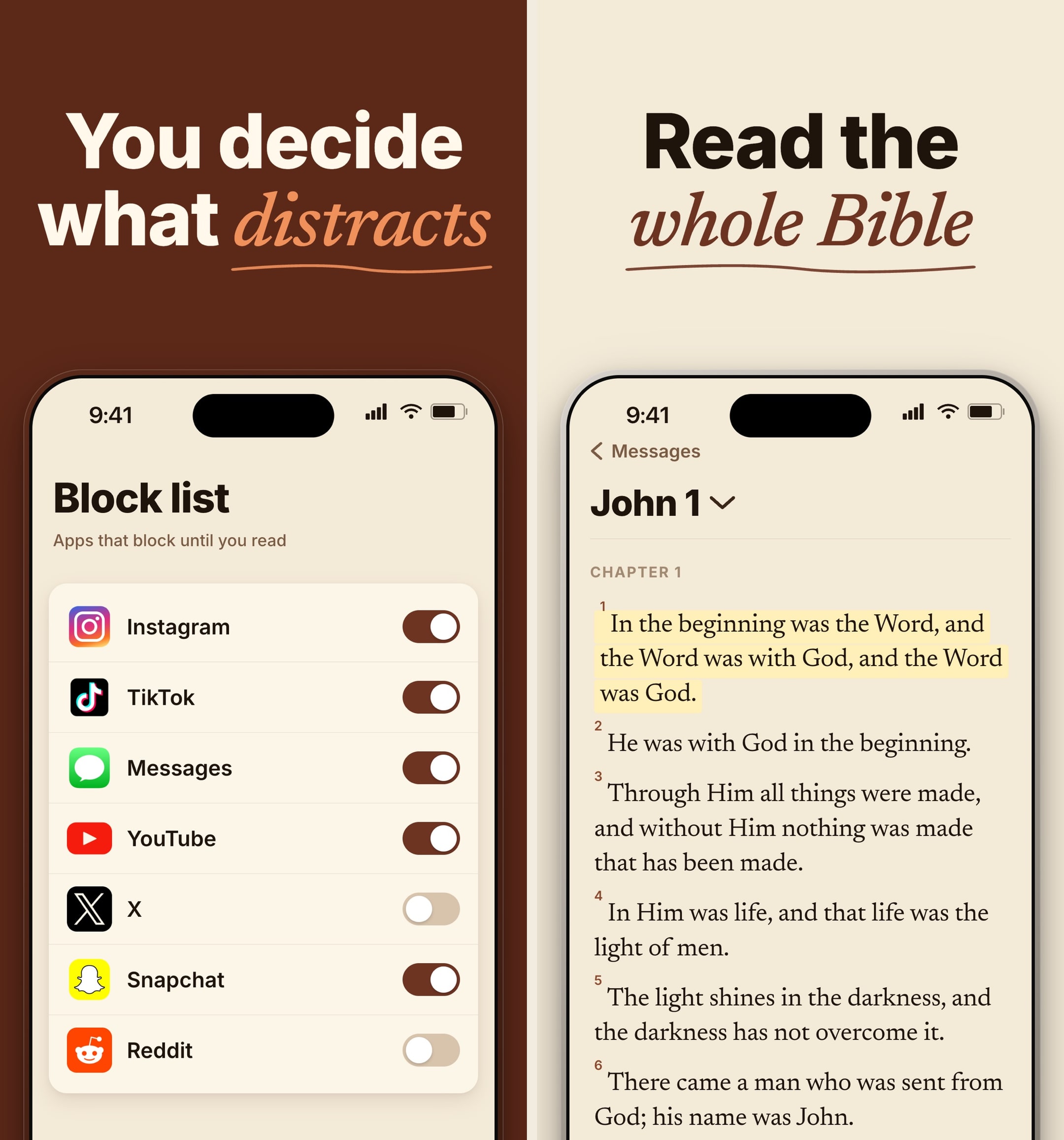
You choose which apps, categories, and websites to block. One reviewer leaves messaging open so they can always be reached in an emergency.³ Once you have read for the time you set, your apps open. Reviewers describe the lock applying every day, and one found it locked them out of apps later in the day as well, including when they needed a map.³
Reading time you set
Reviewers describe choosing 10 minutes, 40 minutes, or anything in between, and adjusting it day to day based on how much time they have.³ Another describes a 15-minute session that adds up to about 91 hours of reading over a year.³
Passage, translation, and notes
The first suggested reading for one reviewer came from Paul's letters, and a tap switched it to their own choice of passage. The same reviewer picked a modern translation they had not used before.³ Readings include short notes on who a passage was written for and what it means, with a "read more" for extra context.³ Reviewers also describe highlighting and sharing verses.³
Streak record
The app keeps a running record of the days you read, so you can watch the habit grow.³
Where it stands out
The cleanest idea in the category. Reading time is the unlock, and you control the apps, the passage, the translation, and the minutes.³
A real track record on iPhone. More than 6,600 ratings at 4.8 stars, and the listing ranked #16 in Reference on the US App Store when we checked.¹
Privacy. Apple's privacy label for the iPhone app says the developer does not collect any data from it.¹ The Google Play data safety section is less clean: it says the Android app may collect personal info, app activity, and device IDs, though it shares none with third parties.²
No ads. An Android reviewer points this out specifically.²
Where it falls short
No free tier. After the 7-day trial, you pay or stop.¹ One reviewer says they had to pay for a year up front with no way to try a week first.³
The lock is easy to loosen. One reviewer who paid $60 says it is easy to shorten the timer, so the lock is "not much more than a pause." Another describes a one-tap disable as an emergency exit.³
Timer glitches. One reviewer says the 15-minute reading timer kept running while their phone was asleep and unlocked their apps without any reading.³
Blunt categories. One reviewer found WhatsApp and Messenger blocked along with social media, and had to read before replying to family.³
Android is unproven. As of October 12, 2026 the Android version has 100+ downloads and 66 reviews, and one Android reviewer asked for the NLT to be added.²
The pricing reality
As of October 12, 2026 the App Store lists:¹
- BibleScroll Pro Weekly: $9.99
- BibleScroll Pro Annual (and an unlabeled "BibleScroll Pro"): $59.99
- Annual Donation plans: $25, $40, $60, $39.99, $59.99, $99.99, and $199.99 a year
An onboarding capture shows the paywall framed as a donation screen.⁴ Reviewers confirm the main prices: one says "$10/wk" is the most expensive subscription they have, and another says they paid "the $60."³ At $9.99 a week you would pay about $520 over a year, so if you commit, pay annually. For comparison, FaithLocked and Bible Mode both have free plans, and YouVersion is free, though it has no lock.⁵⁶⁷
All paid plans visible on the BibleScroll: Christian Focus App Store listing. Free trials and intro pricing may vary by region.
Weekly
- BibleScroll Pro Weekly$9.99
Yearly
- BibleScroll Pro Annual$59.99
- BibleScroll Annual Donation$25.00–$199.99
Who else should consider it
YouVersion readers who keep getting pulled away. An Android reviewer moved from YouVersion because its own notifications distracted them while reading.²
Late-night scrollers. One reviewer credits it with replacing bedtime doomscrolling and sleeping better.³
People who want structure but not a script. You choose the passage and the length, not a fixed devotional.
Our final word
BibleScroll is the most polished read-to-unlock app we have added to this directory. The idea is simple, the controls are sensible, and thousands of iPhone users rate it highly. The trade-offs are price and grip: no free tier, $9.99 a week or $59.99 a year, and a lock you can talk your way around in a tap. If you want reading time to be the toll and you are ready to pay, it is a strong pick. If you want to start free, or want prayer as the unlock, begin with FaithLocked or Bible Mode.
Best for
Adults who already want a daily Bible reading habit and want their social apps to stay closed until they have done it.
Skip if
Anyone who wants a free plan, prayer rather than reading as the unlock, or a lock that is hard to override.
What real users say
Best accountability partner!
I love this app much more than I expected to. I didn’t want to pay for it, but now I see this is the best money I’ve ever spent. You can choose the website and social media that you want to block, so I don’t block messaging, that maintains my emergency access. You can choose how long you want to read. 10 minutes? 40 minutes? you choose. The initial reading was from Paul’s letters, but with one click, you can choose your own section of the Bible to read. Finally, the app lets you choose the translation you want. I chose oneI’ve never tried before, compared that same reading selection to other versions and chose one I’ve never used before, and I like it very much. It’s modern language and understandable. This app was obviously put together by some very bright people whose hearts and minds are in the right place and I’m happy to support small American business while developing my own spiritual discipline oh and if something awful happens, you can always disable it with one click check all of your media and then go back to reading an emergency eject button!
— Janloh · September 26, 2026
A Better Way to Scroll—and Sleep Better
Bible Scroll has been a game-changer for me. Like many people, I found myself mindlessly scrolling social media late at night, consuming content that often increased my anxiety, stole my peace, and robbed me of sleep. This app has helped me replace doom scrolling with something far more meaningful.Instead of wasting time on endless feeds, Bible Scroll redirects my attention to God’s Word and keeps my focus on what truly matters. It’s amazing how much calmer, more grounded, and more purposeful I feel when I end my day reading Scripture instead of social media.If you’re looking for a practical way to spend less time on social media, reduce anxiety, improve your sleep, and grow spiritually, I highly recommend Bible Scroll. It’s helped me be more intentional with my time and has become a daily habit that adds value to my life instead of draining it. 🙏📖✨
— MJ I. · June 13, 2026
Got a streak for reading the Bible!
I set up BibleScroll to lock all of my entertainment and social media apps. It is surprising to me that WhatsApp was considered something under these categories, and since I use it to connect with my family a lot, it was funny to see how many times I had to go read the Bible before I started reaching out to everyone else. Sometimes I would go into Facebook marketplace to sell something and needed to review Messenger, but found I had to wait and read the Bible first. I really liked that the app allows you to choose how long to read the Bible for, every time. It doesn’t have to be a preset amount of time, you can adjust it daily based on your an availability. At $10/wk, it is the most expensive subscription service I have. I think everyone should at least try it one week.
— Roxthefox06 · June 14, 2026
Love the Resource
I love the way the daily readings are provided and the reminder to put dirt things first…God’s Word. The reminder to not get caught up in worldly time stealers. I do not care for the locking apps out until scripture is read first because even after reading the time allotted I get locked out of apps through out the day. Sometimes I need to get to apps without rereading first, such as when needing a map for directions. I will keep this Bible App because I do love being in God’s Word daily and often. I want to change the settings on my app not to totally lock me out until reading is first accomplished. I will compare this Bible app to the other two I have over the next few weeks. Appreciate the effort put into this resource for drawing closer to God’s Word.
— KDBencun · August 4, 2026
One step at a time
I’ve been slowly reading more and more of my bible. I have been struggling with time management. This app has helped me tremendously by keeping my bible reading/study consistent. Anytime I feel the urge to doom scroll it reminds me to read the bible first. The readings break down before and after who this passage is for and what it means. I’ve learned that if you click read more you can get more context and it’s a great way to “meditate” first thing in the morning. I also noticed that one day I didn’t read the bible I also didn’t open my other apps that normally distract me and I was able to get all the things done in the day that I wanted. It felt very peaceful for me to not have an urge to scroll social media or play games on my phone.
— Pabligio · September 11, 2026
Alternatives we considered
Compare BibleScroll: Christian Focus to other Bible apps
Warmpeach — coming soon
A Bible chat app — pastor and therapist in one.
Warmpeach is a Bible chat app that blends a pastor's care with a therapist's questions, grounding every reply in scripture. Join the waitlist and we'll email you when it opens up.
Sources
-
BibleScroll: Christian Focus, App Store listing (description, trial and subscription terms, in-app purchases, ratings, chart rank, release history, privacy label, developer). Checked 2026-10-12. https://apps.apple.com/us/app/biblescroll-christian-focus/id6755406222
-
BibleScroll, Google Play listing (Android version, downloads, rating, data safety, reviews). Checked 2026-10-12. https://play.google.com/store/apps/details?id=com.bepresent.biblescroll
-
BibleScroll: Christian Focus, US App Store customer reviews (reading time, passage and translation choice, lock behavior, pricing), read 2026-10-12. https://apps.apple.com/us/app/biblescroll-christian-focus/id6755406222?see-all=reviews
-
ScreensDesign, BibleScroll onboarding and paywall capture (onboarding flow, donation paywall). Accessed 2026-10-12. https://screensdesign.com/apps/biblescroll-christian-focus/
-
Bible Widget: FaithLocked, App Store listing (free plan). Accessed 2026-10-12. https://apps.apple.com/us/app/bible-widget-faithlocked/id6764309082
-
Bible Mode: Reduce Screen Time, App Store listing (free with in-app purchases). Accessed 2026-10-12. https://apps.apple.com/us/app/bible-mode-reduce-screen-time/id6744124873
-
YouVersion Bible, App Store listing (free). Accessed 2026-10-12. https://apps.apple.com/us/app/bible/id282935706