
The 7 Bible Journaling Apps That Actually Survive Past Day 30
By Sankalp Jonna · Last reviewed 2026-05 · 7 apps reviewed
How we tested
Every app here was installed and used personally. We capture raw findings — typed notes, screenshots, screen recordings, voice memos — and the writing is AI-assisted from those raw notes. Scores, rankings, and "best for / skip if" calls reflect our actual experience with each app. Read the full methodology →
How we evaluated apps for best-bible-apps-for-journaling
Every app on this list was scored against the same 6 criteria. Hands-on testing, AI-assisted writing.
Writing UX and prompt scaffolding
Whether the app makes the act of writing — opening the app, getting to a blank page, finishing an entry — frictionless, and whether it offers prompts when the reader is stuck.
Scriptural anchoring
Whether journal entries are tied to specific passages or to a daily reading, since passage-anchored entries are the most distinctive feature of Bible-app journaling versus a generic notes app.
Search, tags, and retrieval
Whether the reader can find an entry from six months ago — by passage, by tag, by date, or by phrase — since entries you cannot find are entries that do not exist.
Cross-device sync
Whether the journal syncs cleanly between phone, tablet, and laptop, since journaling sessions span devices in real practice.
Export and portability
Whether you can get your journal entries out of the app — as PDF, plain text, or Markdown — if you leave it or want a long-term archive outside any one tool.
Privacy and lock-screen behavior
Whether the app supports PIN, Face ID, or biometric lock for journals containing real confessions, intercessions, or marriage-related reflections in shared-device households.
Comparison at a glance
The full ranked list with our score, pricing, and the buyer profile each app fits.
| # | App | Score | Users | Pricing | Best for |
|---|---|---|---|---|---|
| 1 | Spirit Notes | 7.8/10 | 4.8(528) | From $4.99/mo | Apple-ecosystem readers doing serious-study journaling — Scripture auto-complete drops verses inline, synced audio recording captures sermon journaling, and iCloud sync across iPhone, iPad, and Mac is the cleanest in the category. |
| 2 | Christian Journal — Bible & More | 7.7/10 | 4.8(724) | From $0.99/mo | Cross-platform devotional journaling with PDF export, PIN lock, and a $12.99 lifetime tier — the cleanest answer to the export-and-portability question for readers committing to a multi-year practice. |
| 3 | Pencil Bible | 7.9/10 | 4.2(1.4K) | From $0.99/wk | iPad-and-Apple-Pencil handwritten journaling — the only Bible app built around real PencilKit annotation, with pageable spreads, ink that feels like writing in a paper Bible, and a lifetime purchase available. |
| 4 | Amen — Christian Prayer Journal | 7.5/10 | 4.8(850) | From $2.99/wk | Apple-ecosystem prayer-journal practice — category-based prayer organization, Apple Watch sync, Face ID lock, and prayer streak tracking that quietly carries the practice through the second-week wall. |
| 5 | Echo Prayer | 7.6/10 | 4.8(21K) | From $2.99/mo | Cross-platform prayer-journaling on iPhone and Android — the most focused prayer-list-and-reminder app, with a fully-functional free tier and small-group sharing for couples and families. |
| 6 | Glorify | 7.5/10 | 4.9(92K) | From $4.99 one-time | Devotional-by-prompt journaling tied to a Calm-style morning flow — beautiful design, short entries by design, and a content library aimed at readers who want shape on a daily reflection rather than a blank page. |
| 7 | Olive Tree Bible | 8.5/10 | 4.8(314K) | From $2.99/mo | Study journaling tied to a real Bible reader — clean notebook system with passage anchoring, sync across devices, and journaling that lives alongside translations, cross-references, and the rest of the study stack. |
Our picks, ranked
Spirit Notes
A purpose-built Christian note-taking and journaling app with Scripture auto-complete and synced audio.
- Our score
- 7.8/10
- Platforms
- iOS, iPad, Mac, Apple Vision
- Tradition
- Protestant, Catholic, Ecumenical, Non-Denominational
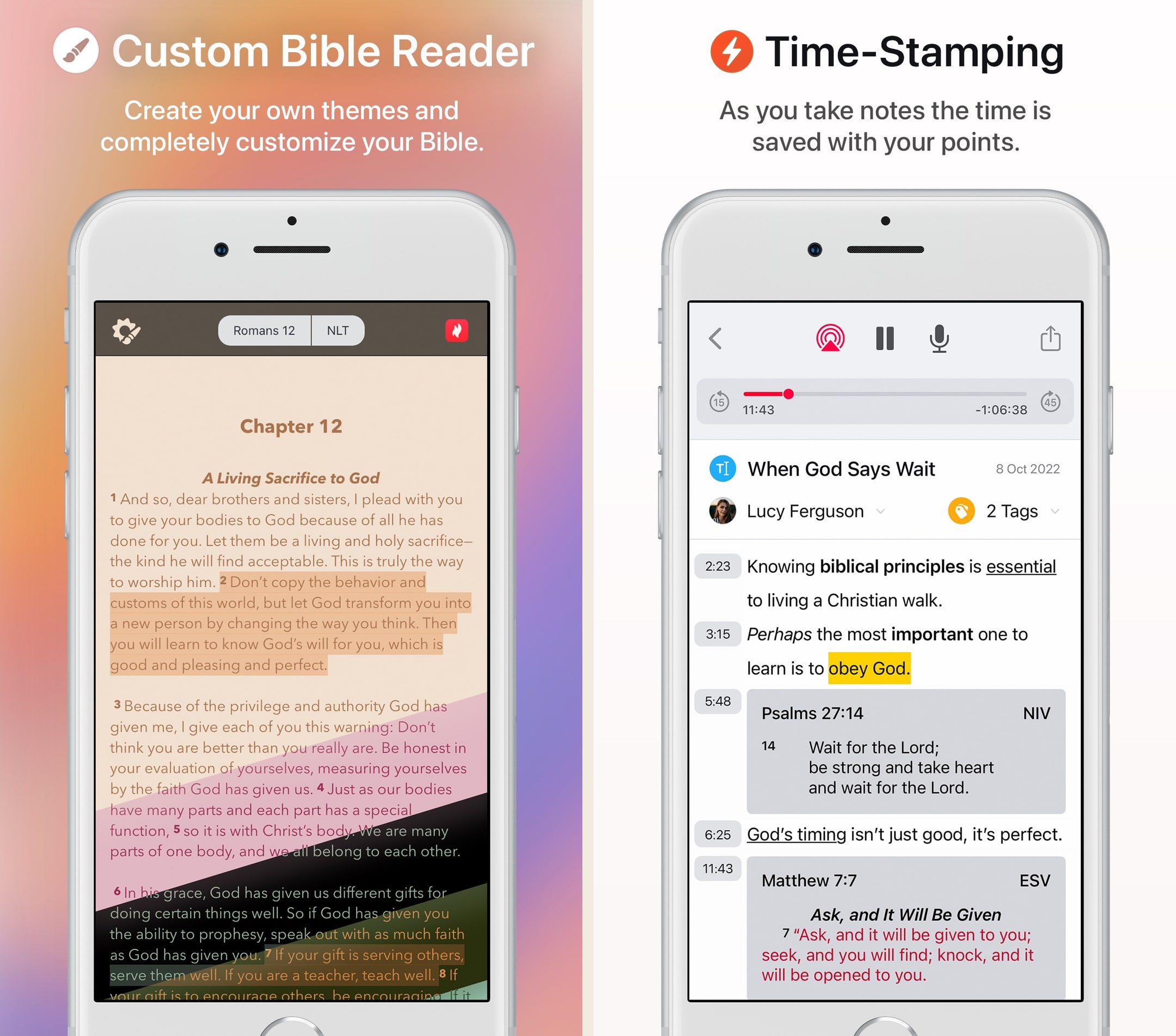
Spirit Notes is the indie Christian-notes app we keep returning to when the question is 'where do I write my journaling and study notes.' The Scripture auto-complete is the unlock — typing 'Romans 8:28' and watching the verse drop in saves the constant context-switching between Bible app and notes app that breaks the flow of any serious journaling session. The simultaneous-audio-and-text mode is the second feature that earns the keep, particularly for sermon journaling where capturing what was said alongside what you wrote about it is the actual workflow. The trade is the obvious one: Apple-only locks out Android households, and the $49.99 annual is competitive with apps that ship a full Bible reader. For Apple-ecosystem journalers who already have a Bible reader they like and want a notes layer that takes Scripture seriously, this is the strongest niche pick we've tested.
What we like
- Scripture auto-complete is the killer feature — type a reference like 'John 3:16' and the full verse drops into the note, in any of ten supported translations, with no copy-paste from a separate Bible app.
- Combined audio recording and text notes mean a sermon, small-group session, or personal journaling session can capture spoken and written content in one timestamped file.
- iCloud sync across iPhone, iPad, and Mac is reliable in a way that journal-first apps often aren't — a note typed on Mac surfaces on phone within seconds.
- Free tier is a real trial (five notes, full feature access) rather than a one-day countdown timer, which is the rare honest free tier in a paid Christian app.
- Built solo by a designer-developer who shipped patiently — the design quality and feature focus reflect a single editorial vision rather than a feature-sprawl backlog.
What to know
- iOS / Apple-only — no Android, no Windows, no web client, which rules out a meaningful share of journalers and note-takers in shared-device households.
- Annual pricing ($49.99) is on the steeper side for what is functionally a journaling app — Logos and Olive Tree, both deeper feature sets, sit in the same tier.
- Five-note free trial is honest but tight — readers who want to evaluate the tool against a real journaling rhythm will hit the wall fast.
- No reading-plan layer, no devotional content, no Bible-of-the-day surface — the app is purely a notes-and-journaling tool, not a daily-driver Bible app.
- Notebook organization is good but doesn't reach the depth of Logos's tag system; for serious-study journalers with thousands of notes, retrieval across years isn't the strongest in the spine.
Best for
Apple-ecosystem readers doing serious-study journaling — Scripture auto-complete drops verses inline, synced audio recording captures sermon journaling, and iCloud sync across iPhone, iPad, and Mac is the cleanest in the category.
Skip if
You're on Android, you want a primary Bible reader rather than a notes layer, or your journaling already lives inside Logos or Apple Notes.
I want to love it, but…. (EDITED, MUST-HAVE TOOL)
EDIT: I reached out to Leio either as I wrote this review or very shortly after. He worked with me back and forth through a few emails, and ultimately I was given a refund of the Premium cost. Out of the blue today, he reached out to me again to let me know that version 1.7 has been pushed out with the fixes to the problems mentioned below. The app is fixed! I leave the original review below only as a show of the vision that he has. Leio heard a problem, worked hard to fix it, and then followed up. This type of service is truly extraordinary, and I’m overjoyed that I can have the opportunity to love this app as much as I originally wanted to! Thanks Leio for this tool that can save so much time and organization to a lifelong adventure through the Scriptures! I have to rate a 3, and want to explain why. I have been using Spirit for awhile and really do love the auto-verse input and other features. However, the part that I hate, and makes me somewhat regret my buying of premium is the fact that it seems as though every other note made seems to glitch out as I’m writing it causing me to lose half if not all of the notes that had been taking, in turn creating a ton of double work that really is horrible to my schedule. Further, the handoff between my iPad and my iPhone is not complete and there isn’t a way of forcing a backup that I’ve found yet. This causes further delays and the like. Obviously, both of these faults are clearly promised in the app description. It is just sad to see such a great idea being halfway done. I really do want to LOVE this app, but these two things cause so many headaches. This makes this app just an okay tool. It seems to be good to take notes on if you don’t mind losing them, and won’t need them from another device.
— Jjw11255 · August 8, 2024
Christian Journal — Bible & More
A purpose-built Christian journaling app with mood tracking, PDF export, and a PIN lock.
- Our score
- 7.7/10
- Platforms
- iOS, Android, iPad, Mac, Apple Vision
- Tradition
- Protestant, Catholic, Ecumenical, Non-Denominational
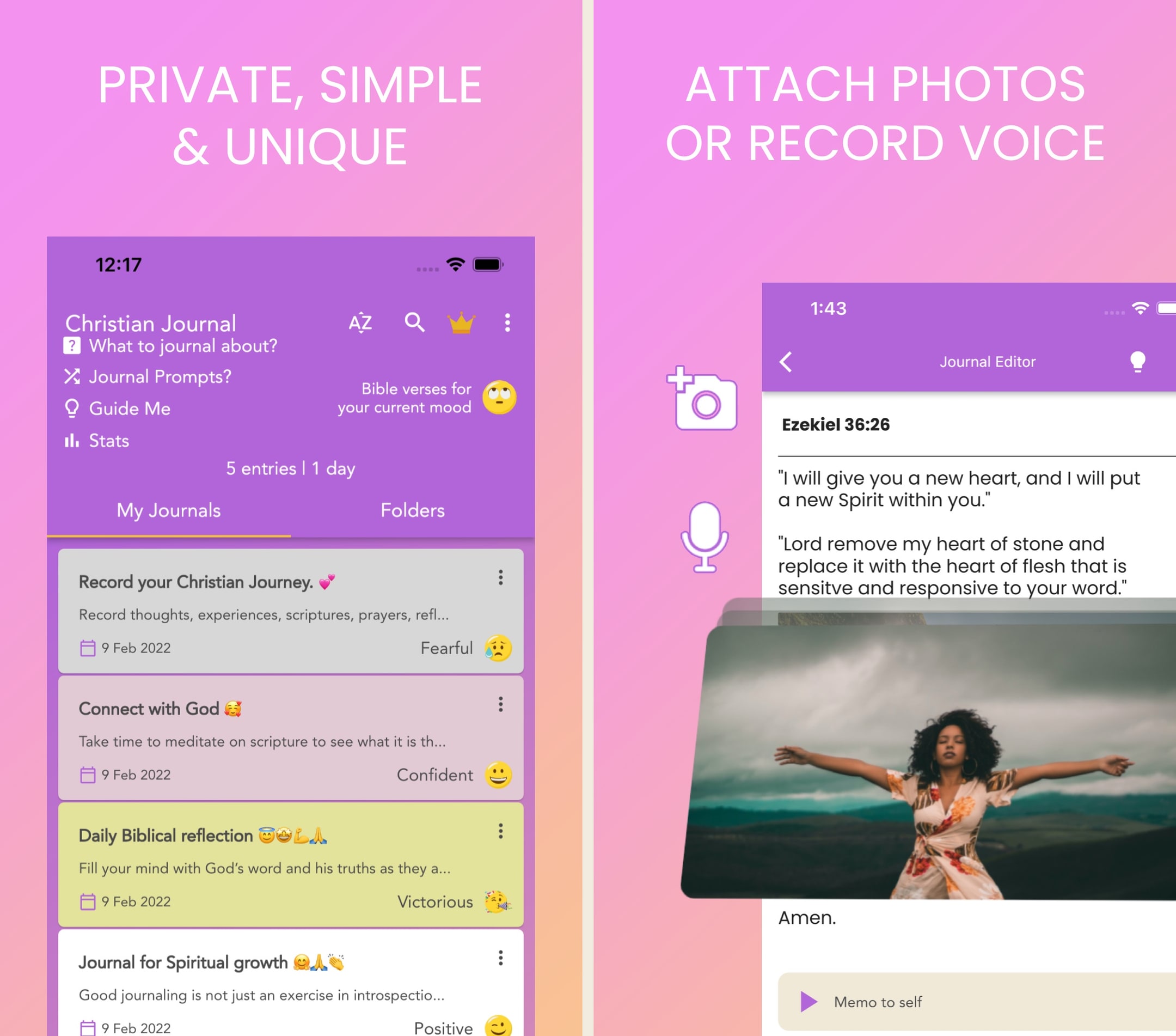
Christian Journal is the rare app in this category where journaling is the actual product rather than a secondary feature stapled onto a Bible reader. In hands-on use, the daily prompts (morning and evening) are the part that earns the keep — not because the prompts are unique, but because the app is built around showing up to write rather than around showing up to read. The mood tracker is the part we'd push back on; mapping a feeling to a Scripture is a workflow some readers want and others find reductive, and it's worth knowing in advance which camp you fall into. The lifetime tier at $12.99 is the path we'd recommend if a reader knows after the trial that the format works — paying once and owning the journal forever is the cleanest answer to the export-and-portability question this whole category struggles with.
What we like
- The journaling experience is the headline feature, not a side panel — guided morning and evening prompts, gratitude entries, prayer entries, and free-form reflection are all primary surfaces in the app.
- PDF and TXT export means a reader's journal isn't trapped inside the app — it can be printed, archived to a cloud drive, or migrated to a different journaling tool later.
- PIN / biometric lock is genuinely useful for shared-device households where a journal contains real confessions, intercessions, or marriage-related reflections.
- Mood tracker tied to Bible verses gives the app a narrow but credible mental-health lane — picking a feeling and getting a Scripture matched to it is a real workflow some readers want.
- Lifetime price ($12.99 one-time) is one of the cheapest paid-once options in the entire spine — for a reader committing to a multi-year journaling practice, the math works out fast.
What to know
- Not a serious Bible reader — there's no full-text Bible browser, no translation switching, and Scripture appears as quoted prompts rather than as a passage you can sit and read.
- Search across journal entries is functional but slower than the note-grade systems in Logos or Olive Tree — finding a specific entry from six months ago takes more taps than it should.
- Tone is design-forward and journal-first, which leans toward a women's-devotional aesthetic — readers who want a study notebook, not a diary, will find it doesn't fit their workflow.
- Sync is via iCloud or local backup rather than a real cross-device account, so an Android-to-iOS migration involves an export-import dance rather than a clean login.
- Free tier is functional but the paywall surfaces aggressively after the first few entries — the lifetime tier resolves it cleanly but the subscription rhythm is more present than it needs to be.
Best for
Cross-platform devotional journaling with PDF export, PIN lock, and a $12.99 lifetime tier — the cleanest answer to the export-and-portability question for readers committing to a multi-year practice.
Skip if
You want a serious Bible reader, deep notebook-style organization with tags, or your journaling already lives inside Logos or Olive Tree.
I love God
I was just looking a great Christian app and then I found this! What made me download this is that I was listening to a song that I was saying stuff along with have Lord have my heart. Then I read the Bible verse form Ezekiel that was on the first page of the pictures thingy to advertise the app and it just went perfectly with the song. I was thinking at the time this must be a sign that I need to download this! (I don’t want assume anything wrong) So I downloaded the app the app is very good! I like the style and everything! I hope who ever is reading this will have a blessed day and remember to read your Bible and pray every day!
— Butterflies : · May 25, 2023
Pencil Bible
The only Bible app built around Apple Pencil annotation on iPad.
- Our score
- 7.9/10
- Platforms
- iOS, iPad
- Tradition
- Protestant, Catholic, Non-Denominational, Ecumenical
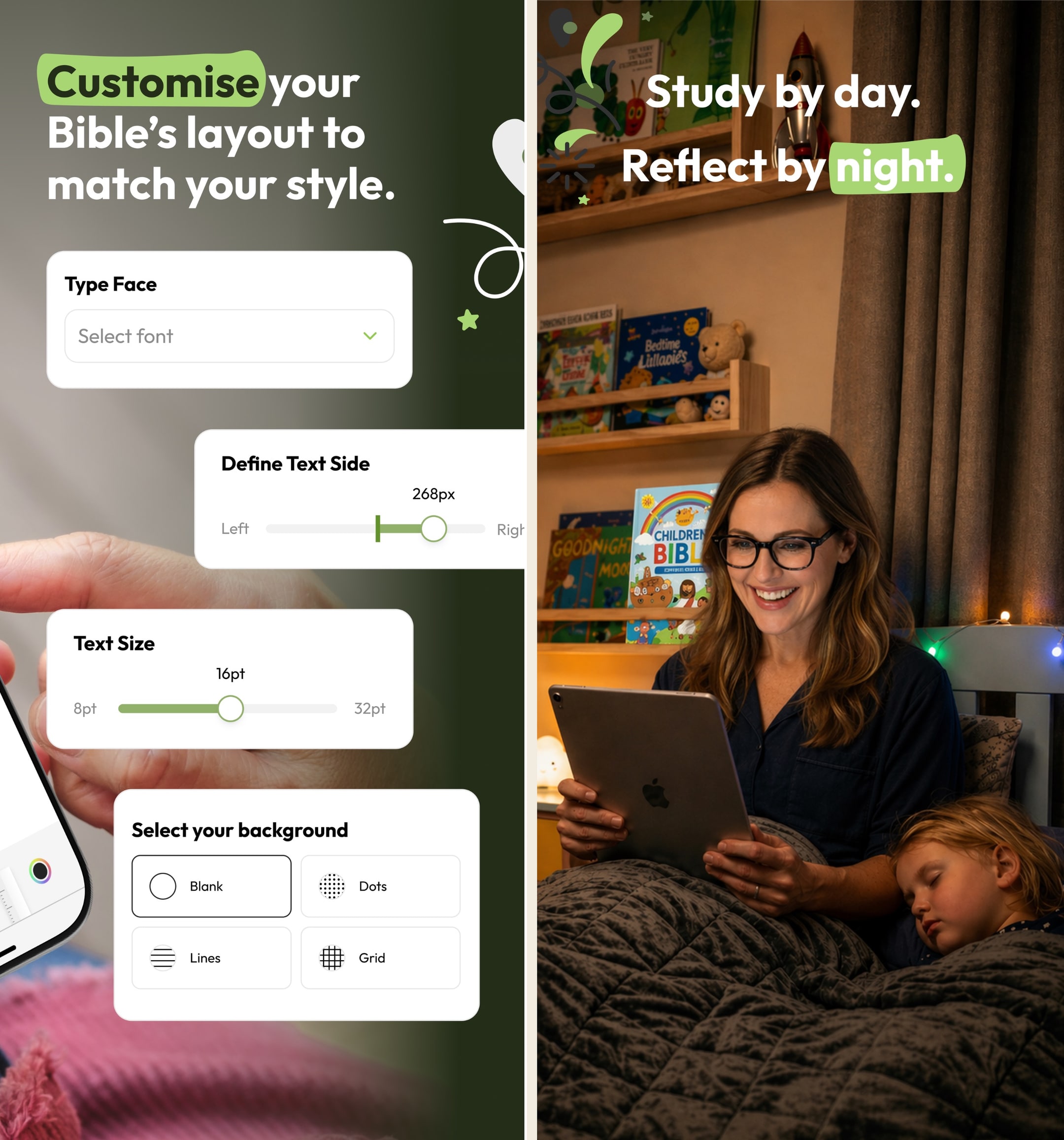
Pencil Bible is the kind of indie app the App Store does well — narrow, focused, and genuinely better than the big players at one specific thing. In hands-on testing on iPad with a Pencil, the annotation experience is the closest digital equivalent to writing in a paper Bible we've used. The page-spread layout, the ink feel, the ability to flip back through hand-marked passages — none of the bigger apps come close. The constraints are real: iOS-only, no audio, no plans. We pair it with YouVersion or Olive Tree for daily reading and use Pencil Bible as the study notebook on the iPad. For Apple Pencil users who study seriously, it's a no-brainer.
What we like
- The only Bible app built around Apple Pencil + PencilKit annotation — drawing on scripture with a real pen feel that no other Bible app gets close to.
- Page layout is designed for handwritten notes — wide margins, pageable spreads, and ink that feels like writing in a paper Bible rather than typing into a notes field.
- Indie-built and lean — no AI chat sprawl, no ad layer, just the annotation experience refined over multiple updates.
- Lifetime purchase at $59.99 is genuinely available, which is rare for indie apps and means no subscription treadmill for serious users.
- iCloud sync across iPad and iPhone is reliable — annotations made on iPad show up on iPhone in the same passage immediately.
What to know
- iOS-only (iPhone + iPad) — no Android, no Mac client, no web. Android note-takers have no equivalent product.
- No reading plans, no audio Bible, no devotional content — this is a pure annotation app, not a daily-reading app.
- Indie developer with a small team means feature velocity is slower than YouVersion or Olive Tree; bugs are usually fixed but slowly.
- Bible-translation library is smaller than mainstream apps — major versions are present but obscure translations may not be.
- Annual subscription at $24.99 is fine, but for a small indie app the lifetime tier is the better value if you'll use it for more than two years.
Best for
iPad-and-Apple-Pencil handwritten journaling — the only Bible app built around real PencilKit annotation, with pageable spreads, ink that feels like writing in a paper Bible, and a lifetime purchase available.
Skip if
You're on Android, you don't have an Apple Pencil, or you want a typed-journal workflow rather than handwritten.
Beautiful concepts, needs some tweaks to the Pencil support
I absolutely love this concept. I have always wanted some sort of digital bible with the ability to hand write your own notes into it, rather than type them in some hidden menu where they are hidden from view and hard to access/remember that you even took a note on that verse in the past. It always seemed clunky to me to use a digital bible and a physical notebook. Even with the addition of splitting the screen between two apps, it never felt natural to use a bible one one half of the screen and a note taking app on the other, especially because the note taking apps get squished so much they’re hard to use. The translation selection, while limited, does offer a good selection of translations and I see that there are several more on the way as well. I understand obtaining rights to use the text is hard, but what’s there already is a very good starting point. My one complaint with the app is when using the pencil, palm rejection is not great. I unfortunately noticed it right off of the bat when using the Bible in landscape mode. Resting my hand on the display to write will result in the pencil sometimes working, sometimes not, which makes taking notes in the margins more difficult. It seems to confuse some strokes with swipes and tries to scroll the screen, or it won’t write anything for a bit so I try again a couple times, it’ll flash everything I tried to write, then it disappears. Not sure if this is because I am using an older iPad and there’s more lag than the newer ones, but other apps with pencil support, like Penultimate, work just fine and I never have palm rejection issues. Hopefully this can get patched at some point, but until then I will definitely continue using this. It’s about time someone developed an app like this.
— durablecardboard · October 24, 2023
Amen — Christian Prayer Journal
A focused prayer-list-and-journal app with Apple Watch sync and category-based prayer tracking.
- Our score
- 7.5/10
- Platforms
- iOS, iPad, Mac, Apple Watch, Apple Vision
- Tradition
- Protestant, Catholic, Ecumenical, Non-Denominational
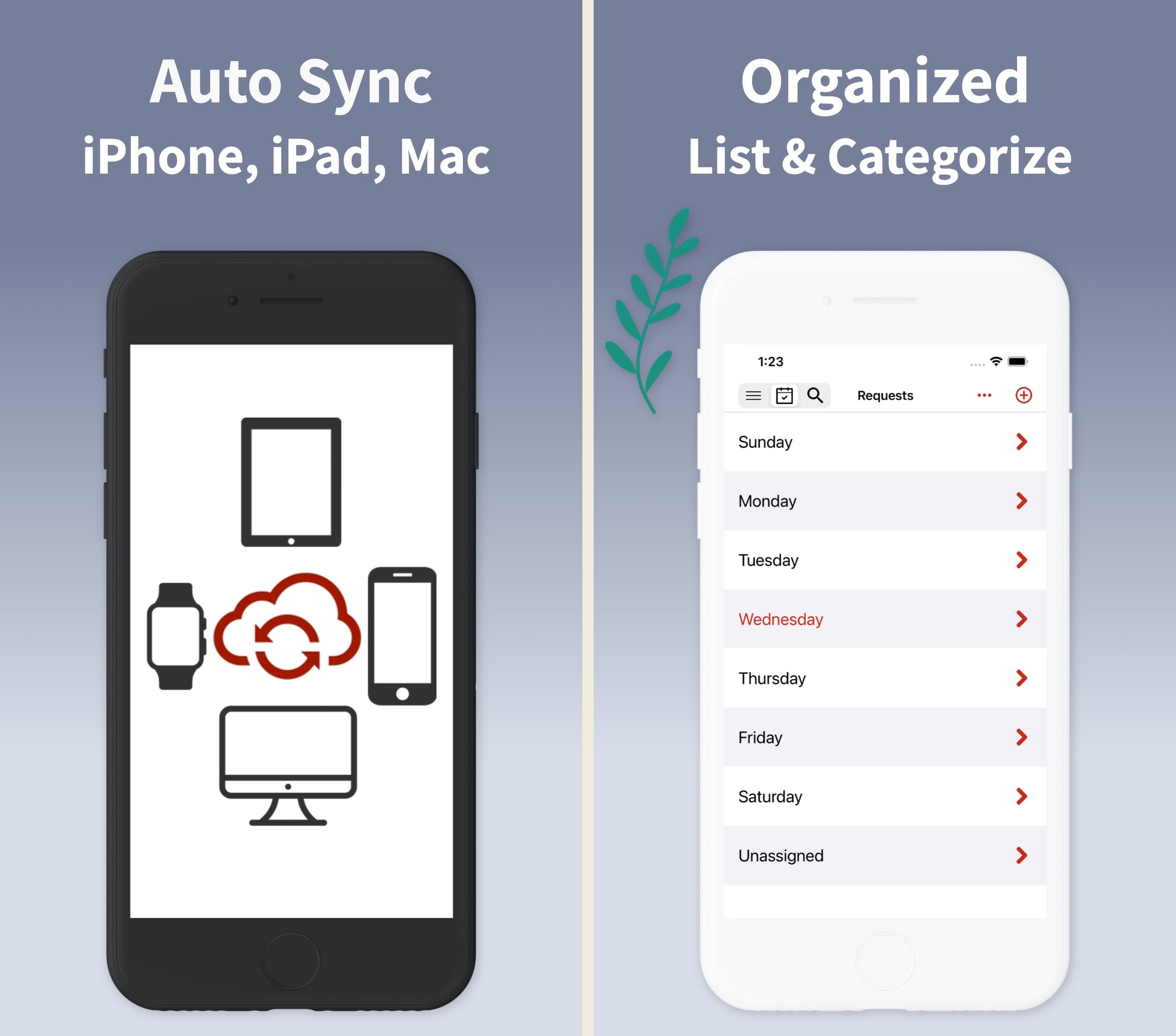
Amen is the prayer-journal app we'd recommend to readers who already use Echo Prayer's prayer-list model and want it deeper into the Apple ecosystem — particularly the Apple Watch surface, which Echo doesn't ship. The category-based prayer organization is the part that earns the keep: praying for specific people on specific days of the week is a real practice the app supports cleanly, and the streak tracking quietly carries the habit through the second-week wall most prayer-journals fail at. The trade is real: it's iOS-only, the in-app Bible is thin, and the AI Prayer Builder is a feature we'd ignore. For Apple-ecosystem readers who want prayer journaling to live separately from Bible reading and notes, Amen plus YouVersion or Olive Tree is a stack we'd actually recommend.
What we like
- The prayer-organization model — categories, days of the week, recurring prompts — is the most thoughtful prayer-list system on iOS, and the Apple Watch app means a wrist tap can mark a prayer prayed.
- iCloud sync across iPhone, iPad, Mac, and Apple Watch is the deepest Apple-ecosystem integration of any prayer-journal app we've tested.
- Face ID / Touch ID lock is more discreet than a PIN — opening a private prayer journal in public no longer requires a code-entry moment.
- Lifetime tier ($99.99) exists for users who want to escape the subscription rhythm permanently, and the yearly ($29.99) is reasonable for a focused single-purpose app.
- Prayer statistics and streak tracking are the small mechanics that quietly support a daily practice — most prayer-journal apps don't ship these and the difference shows up in week three.
What to know
- iOS / Apple-only — no Android, no web client, which is a real gap for couples or families on mixed-device households.
- Bible inside the app is functional but limited (five translations) and isn't competitive with YouVersion or Olive Tree as a reader.
- AI Prayer Builder is a nice-to-have rather than a primary feature — readers writing their own prayers will rarely use it, and readers leaning on it should know AI-assist is part of the workflow.
- Weekly Pass at $2.99/wk is a high-cadence subscription point that makes the entry tier feel like a meter even though the yearly works out to less.
- Visual design is utilitarian rather than design-forward — the app prioritizes function and reliability over the aesthetic some journalers want.
Best for
Apple-ecosystem prayer-journal practice — category-based prayer organization, Apple Watch sync, Face ID lock, and prayer streak tracking that quietly carries the practice through the second-week wall.
Skip if
You're on Android, you want one all-in-one Bible-and-prayer app, or you don't separate prayer from devotional journaling.
Outstanding Prayer App to Organize Your Prayer Life
I was on the hunt for an app to help me organize my prayers, and found this one, and I am SO glad I did! It is super easy to organize all your personal requests by category or by days of the week. I am thrilled with the way I can easily back this app up to iCloud so that it syncs between my iPad and iPhone seamlessly. I had an issue with my requests not staying in the order I wanted them in, but I emailed the Developer, got a response and my problem completely solved that very same day. Excellent app, excellent customer service, very reasonable subscription price, easy backup —all things important to me. And I’ve only just gotten started with the app —I haven’t even tried out the prayer journal or some of the other features yet. I’m thrilled with this app, and I’d recommend it to anyone serious about getting their personal prayer time organized and staying organized.
— TigerLair · January 2, 2023
Echo Prayer
A clean, focused prayer app — not a Bible app, but a useful companion to one.
- Our score
- 7.6/10
- Platforms
- iOS, Android, Web
- Tradition
- Protestant, Catholic, Ecumenical, Non-Denominational
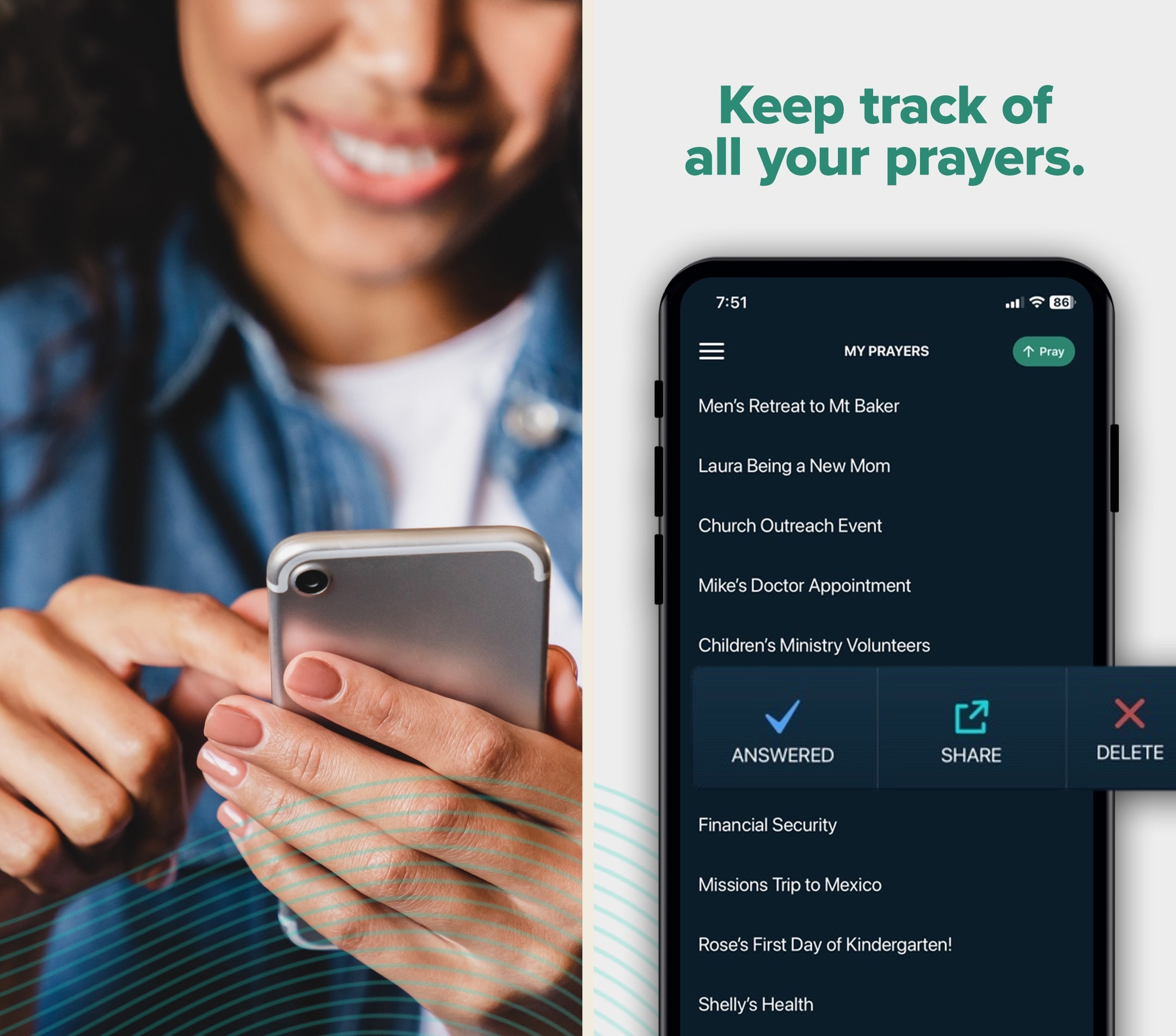
Echo is the prayer app we keep coming back to because it does one thing — manage a prayer list — better than the prayer features inside any general Bible app. In hands-on use, the reminder system actually changed our prayer rhythm in a way YouVersion's prayer module never did. It's not a Bible app, and we'd never recommend it as a standalone. But paired with YouVersion, Olive Tree, or Hallow, Echo is the missing piece for anyone who wants to keep a real, organized, returning prayer practice. ECHO+ at $14.99/year is genuinely reasonable.
What we like
- The single most focused prayer-list app in the category — the entire UI is built around the act of praying through a list, which most apps treat as an afterthought.
- Reminder system is genuinely useful: schedule a verse or a person at a recurring interval and the notifications actually feel like prompts to pray, not nags.
- Free tier is fully functional for individual use — you don't need to pay anything to maintain a long-term prayer practice.
- Groups and feeds (ECHO+ for creators) make it easy for families and small groups to share prayer requests without sliding into Facebook-style noise.
- ECHO+ at $14.99/year is one of the most reasonable subscription prices in the category, with a clear feature set.
What to know
- Not a Bible app — there's no scripture reader at all, so it has to be paired with a Bible app to be a complete experience.
- Group/feed creation is paywalled; if you want to start a small-group prayer feed, ECHO+ is required.
- UI is functional but visually conservative — works well, doesn't dazzle.
- No deep journaling — entries are short and list-style; if you want long-form prayer journaling, look elsewhere.
- Discovery of public feeds is limited compared to a community app like YouVersion's groups.
Best for
Cross-platform prayer-journaling on iPhone and Android — the most focused prayer-list-and-reminder app, with a fully-functional free tier and small-group sharing for couples and families.
Skip if
You want long-form journaling — Echo's entries are short and list-style, and serious devotional reflection won't fit the format.
Great tool
I’ve recently felt convicted that there are important people and circumstances in my life for whom and for which I am called to cover in prayer. My problem is I don’t remember very often to to stop and pray. I say I’ve been praying for God to move in these areas, but do I really? I think about them. I wish they would be healed or redeemed, but do I really often take time to pray? Enter this app. It was so helpful to me to even add the prayer. It forced me to be still and take time listening to God about what the need really is and to articulate it. Then the reminders. I was able to be thoughtful about times that are often transitional times between scheduled commitments. Those times would usually be filled with planning for the next thing, but with the reminder popping up on my phone, I remember to just be still and commune with God in prayer. And not just that, but to be in prayer over these specific things I know He wants me to bring to Him all day every day. I’m so thankful and pray this will help me to be less impulsive and self-centered in my prayers and really leave things at the feet of Christ and wait for the Holy Spirit to move.
— LaineeS · March 9, 2023
Glorify
A Calm-style devotional app with a built-in Bible.
- Our score
- 7.5/10
- Platforms
- iOS, Android, iPad, Web
- Tradition
- Protestant, Catholic, Ecumenical, Non-Denominational
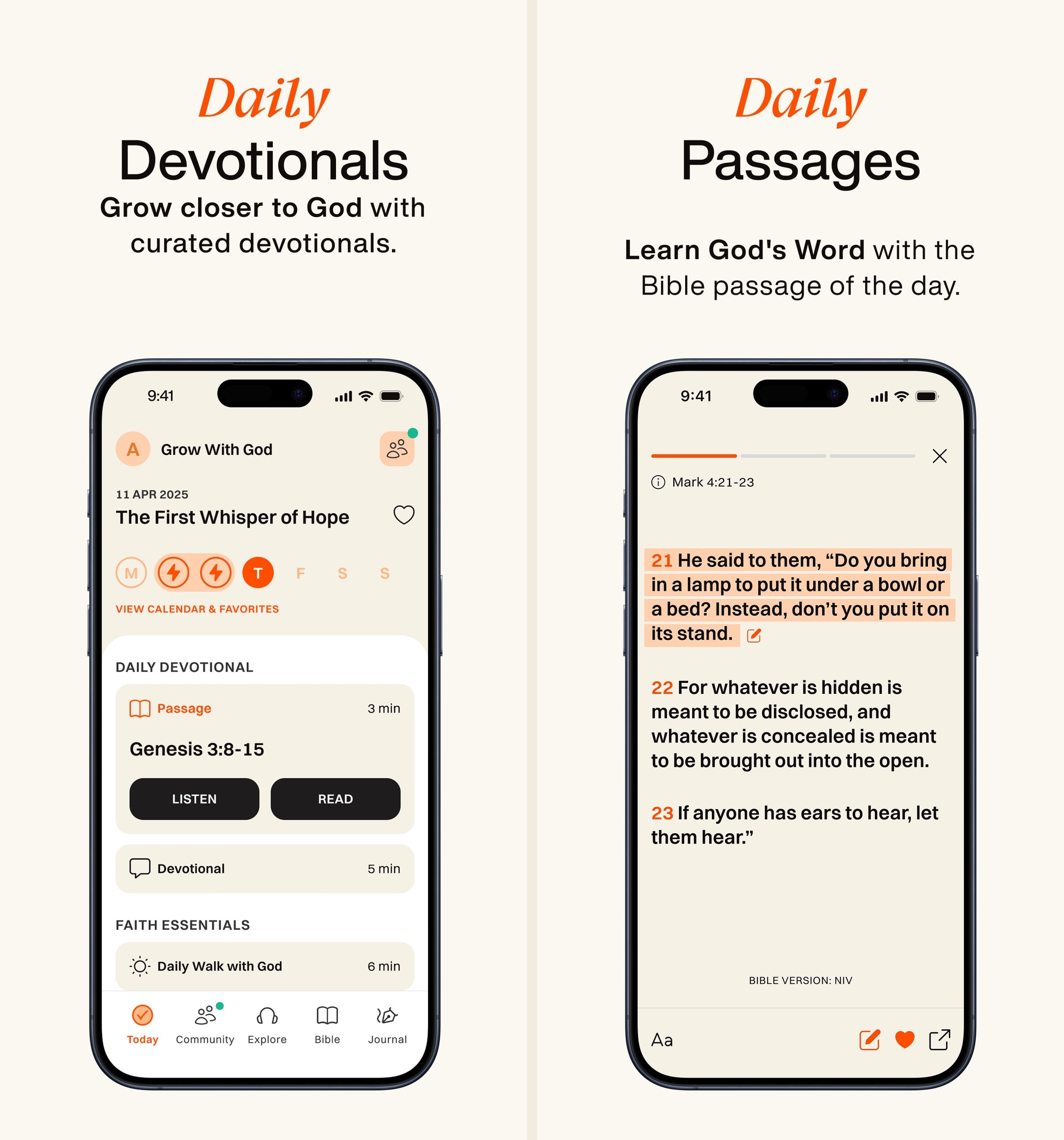
Glorify is the only Christian app we've used that genuinely competes with Calm and Headspace on production polish. In hands-on use, the morning-flow design pulled us into a daily habit faster than YouVersion did. But the Bible inside Glorify is thin — limited translations, no study tools, no real notes — so we use it alongside a primary Bible app rather than as one. The $69.99/year is fair for what's there, and the pay-it-forward option is a class move. Best for someone starting a daily rhythm; skip if you already have one.
What we like
- Best-looking Christian devotional app on the App Store — visually closer to Calm or Headspace than to a typical Bible app.
- Daily-rhythm flow (morning prayer, scripture, music, evening reflection) is genuinely habit-forming in the way Calm's daily flow is.
- Audio production quality on devotionals is high — voice talent and music are noticeably better than YouVersion devotionals.
- Prayer journal is solid: prompts, tags, history, and a real review flow.
- Pay-it-forward subscription option lets paying users sponsor access for those who can't afford it, which is a quiet but lovely feature.
What to know
- The Bible itself is a secondary feature — translations are limited, study tools are absent, and serious readers will outgrow it quickly.
- Most of what makes the app special is locked behind Glorify Plus at $69.99/year; the free tier is intentionally thin.
- Content can feel emotionally curated to a specific demographic (often described as women 25–45) — not bad, but not universal.
- No groups, friends, or shared features — the social layer is missing entirely.
- Some teaching content trends light/devotional rather than doctrinally substantive — fine for habit-building, weak for spiritual depth.
Best for
Devotional-by-prompt journaling tied to a Calm-style morning flow — beautiful design, short entries by design, and a content library aimed at readers who want shape on a daily reflection rather than a blank page.
Skip if
You want long-form study journaling, real notebook organization, or a serious Bible reader — Glorify's journaling is woven into a devotional flow rather than treated as a primary feature.
Amazing Resource!
I love this app so much! They have reminders that you can set in the morning and at night so you can start your day off right with a very manageable devotional as well as day centering meditations and then you can wind down with sleep stories! The daily worship devotionals take at most 15 minutes so it is just enough to whet your appetite and start your day off right. I even got my boyfriend into it because he has really early and busy mornings but there is an option to listen so all aspects of the daily worship so he can listen to it on his way to work. It is truly an amazing resource for everyone no matter the lifestyle you lead! I am blessed enough to have the plus membership so I have access to all the extra videos and things but even without that, it is an amazing resource. I lead some small groups and Bible studies so it’s a great way for me to deepen my faith in order to help teach others but I am also recommending it to just about ever believer that I meet. It’s helpful for no matter where you are in your walk and I just can’t recommend it enough nor express my gratitude to the team that creates and released this amazing resource. It’s a beautiful resource that you’ve given to strength the body and I am so thankful for it! I have not yet used the collaborating aspect of the app but I am really looking forward to that and getting to have some accountability between followers! Again, just thank you so much to the developers and that you truly have the good of the kingdom in mind in the creation of this resource!
— nateleroo · July 9, 2024
Olive Tree Bible
A serious study Bible that doesn't punish you for being free.
- Our score
- 8.5/10
- Platforms
- iOS, Android, iPad, Mac, Windows, Web
- Tradition
- Protestant, Ecumenical, Reformed, Baptist
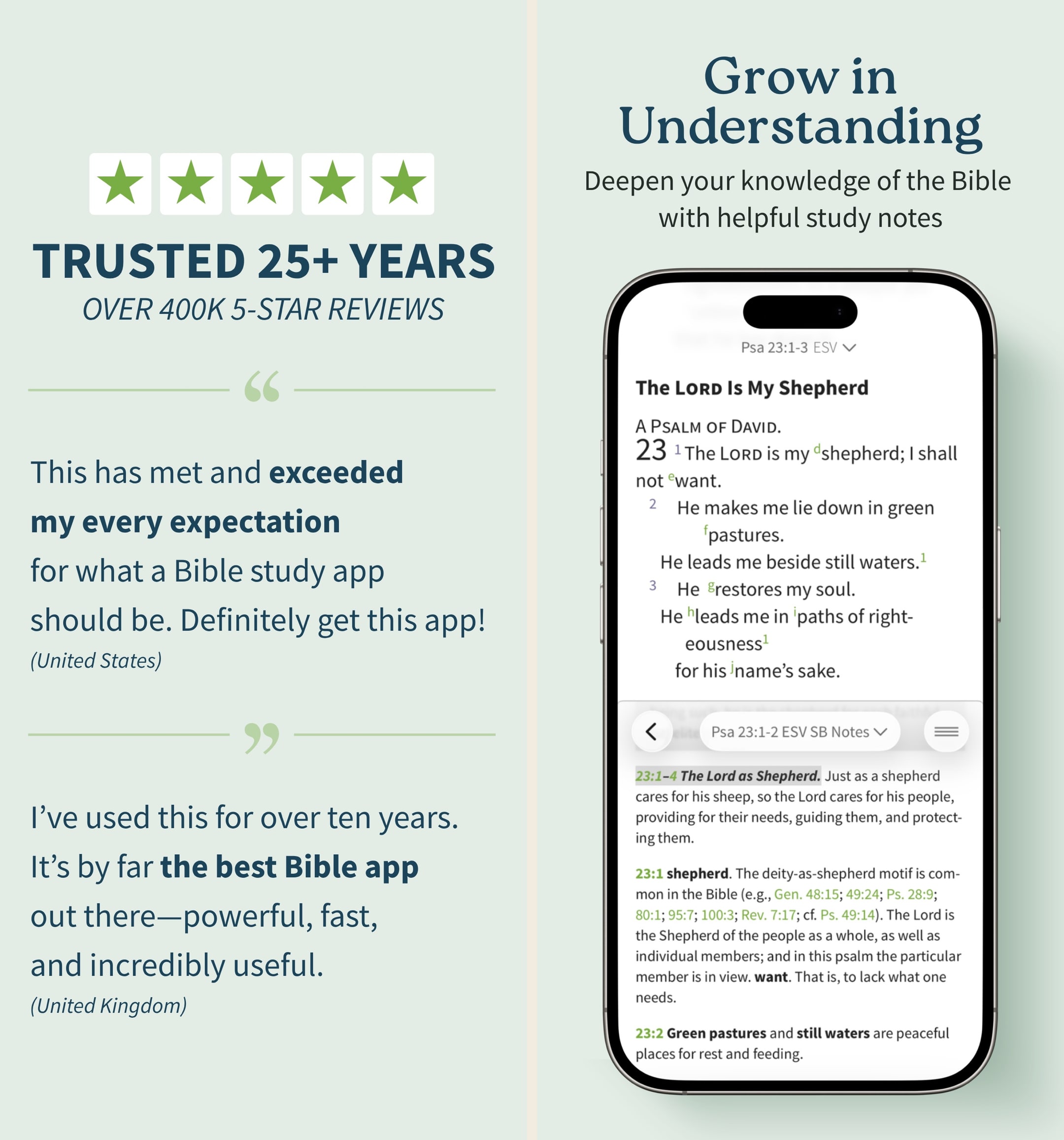
Olive Tree is the app we keep recommending to people who outgrow YouVersion but aren't ready to spend Logos money. In our hands-on testing, the split-window view and real notebook were the features we missed most when we switched away. The store is a mess and the look is dated, but the bones are excellent. If you want one app that handles daily reading and serious study without forcing you onto a subscription treadmill, this is still the cleanest answer in 2026 — especially if you read across iPhone and a Mac.
What we like
- Split-window reading lets you put two translations or a translation and a commentary side-by-side on a phone, which is the single best small-screen study feature on any Bible app.
- Notes are real notes — long-form, taggable, organized by passage, and they sync cleanly across iPhone, iPad, Mac, and Windows.
- You actually own resources you buy — perpetual licenses, no rug-pull when a subscription lapses, which still matters in 2026.
- Original-language tools (Strong's, interlinears, Greek/Hebrew lexicons) are genuinely usable for non-scholars who want to look up one word.
- The free tier is unusually generous — unlike Logos, you can do real study without ever paying a cent if you stick to free resources.
What to know
- The store is overwhelming — hundreds of resource bundles, frequent sales, and a UI that feels like a 2014 Bible bookstore.
- Premium study Bibles and major commentaries cost real money — building a serious library can run several hundred dollars even on sale.
- No groups, no social, no shared reading — this is a solo-study tool, not a community app.
- The mobile UI, while functional, looks dated next to YouVersion or Glorify; typography and spacing feel pre-iOS-17.
- Audio Bible options exist but are nowhere near as polished or dramatized as Dwell or Bible.is.
Best for
Study journaling tied to a real Bible reader — clean notebook system with passage anchoring, sync across devices, and journaling that lives alongside translations, cross-references, and the rest of the study stack.
Skip if
You want a journaling-first app — Olive Tree is a Bible reader with notes, not a journal with a Bible attached.
God’s Word on the go!
I have used this particular Bible app. off and on for several years. I really enjoy this version of the Bible. The Bible itself is easily understood and user friendly. I would strongly recommend this wonderful book to any and all both Christian and novice alike. I intend to use it more often and try harder to absorb the words and their meanings each and every day. Probably the best approach would be to start a daily journal to better understand what I am reading. Many do not read the Bible I believe because some of the readings are hard to understand but this version is very user friendly as stated. So those reading these comments let me encourage you to take some time to read and pursue the Olive tree Bible version and see for yourself. Ask God to open your mind, heart and eyes in the pursuit of His truth and watch the blessings flow in your life. We are living in hard times so much doubt and fear surrounds us all. Many are looking for peace. The peace you look for can be found in God’s Word. Don’t believe me read for yourself. If you are looking for a true friend Look no further than God Himself. He loves you and cares very much for you and your family and friends. As a follower of Christ even though we have never met I love you as a bother and sister. My prayer is that God will open your eyes and heart to what He wants for you in this life. Never give up, keep reaching to the heavens and know your are loved beyond your comprehension. Blessings to all Rick
— a new begjnning · April 11, 2022
Warmpeach — coming soon
A Bible chat app — pastor and therapist in one.
Warmpeach is a Bible chat app that blends a pastor's care with a therapist's questions, grounding every reply in scripture. Join the waitlist and we'll email you when it opens up.
Verdict
Warmpeach — coming soon
Join the Bible chat app waitlist
What "journaling" actually means in a Bible app
Bible journaling is three different practices wearing the same word. Prayer journaling is short anchored entries — a sentence about a friend, a date next to it, a return visit six months later. Study journaling is longer reflections anchored to passages — the kind of notebook a serious reader builds across a decade. Devotional journaling is a daily morning reflection, often prompt-driven, often gratitude- or feeling-led. Each lane has different ergonomic requirements, and the apps that win each lane are different apps. Readers who try to make a single tool serve all three usually quit the practice by week six, not because the tools are bad, but because the workflows don't combine cleanly.
If you came here for a one-app answer, the honest first question is which lane you're actually in. The marketing copy on most journaling apps glosses over this — every app claims to handle prayer journaling and study journaling and devotional journaling — but in real use, an app built around prompted morning reflections is a different product than one built around a searchable study notebook. We're going to be direct about which apps are genuinely good at which lane and which apps are stretching beyond their actual fit.
Where the existing tools fall short
The big general Bible apps (YouVersion in particular) treat journaling as a side panel rather than a primary feature.¹ The result is a notes layer that's closer to a beefier highlighter than a real journal — quick reflections that are hard to find six months later, weak search across your own entries, and retrieval flows that punish sustained practice. We love YouVersion as a daily-reading app. The notes feature is genuinely weak, and serious journalers who try to make it work almost always migrate to a dedicated app within a few weeks.
The serious-study apps (Logos, Olive Tree, Accordance) handle study journaling well and prayer or devotional journaling poorly.²³⁴ Their notebook systems are built for passage-anchored reflection, not for short prayer entries with category tags or for prompt-driven morning devotionals. They're the right pick for the long-form study journaler, and the wrong pick for the reader trying to keep a daily prayer practice.
The dedicated journaling apps split into two camps. The journaling-first camp (Spirit Notes, Christian Journal, Amen Prayer Journal, Echo Prayer) treats writing as the headline feature, and Scripture as a quoted prompt rather than as a passage to read.⁵⁶⁷⁸ The Bible-with-journaling camp (Glorify, Olive Tree's notebook, Pencil Bible) attaches journaling to a Bible-reading flow.⁹³¹⁰ Neither camp is universally better — they fit different practices — but the readers who pick the wrong camp for their actual workflow are the ones who quit.
The export-and-portability problem is the criterion most readers don't think about until it's too late. If you write in an app for two years and then leave, can you actually get your entries out as PDF, plain text, or Markdown? Christian Journal has the cleanest export.⁶ Spirit Notes is solid.⁵ Amen exports across Apple devices.⁷ Echo Prayer exports.⁸ Glorify and YouVersion are harder.⁹¹ For a multi-year practice, this is the criterion to weight heaviest, and most journalers underweight it.
Why we'd separate prayer journals from study journals
The single best piece of advice we'd give someone starting a Bible journaling practice is: pick one lane and build the habit there before adding a second app. Prayer journaling and study journaling are different enough as workflows that combining them in a single tool almost always means doing one of them poorly. A prayer journal works best as short, anchored, returnable entries — Echo Prayer's category-and-reminder model or Amen's day-of-the-week model captures this cleanly.⁸⁷ A study journal works best as longer reflections anchored to passages — Spirit Notes' Scripture auto-complete or Olive Tree's notebook system fits.⁵³
The compromise apps that try to do both — and there are several — usually end up shallower at both than a focused tool would be. The prayer-list features get bolted on without the reminder and category sophistication of a real prayer-list app, and the study-notebook features get bolted on without the search and tag depth of a real study tool. We'd rather see a reader use Echo Prayer for the prayer practice and Spirit Notes (or Olive Tree) for the study notebook than try to consolidate.
The same logic applies to devotional journaling. A prompt-driven morning reflection inside Glorify is a different practice than a passage-anchored evening reflection inside Olive Tree. They can coexist in a stack — Glorify in the morning for the prompt, Olive Tree in the evening for the study — but they're rarely well-served by a single app trying to be both.
How to actually keep at it for more than 30 days
The most common reason journalers quit at week three isn't the app — it's the bar they set for an entry. Treating a journal as a multi-paragraph daily essay is unsustainable for almost everyone. The journaling practices that survive are the ones where a single sentence on a hard day counts as a finished entry. The apps that handle this well (Glorify, Christian Journal, Echo Prayer) lean into prompt scaffolding so the reader doesn't face a blank page;⁹⁶⁸ the apps that don't (raw notes apps) require the reader to bring their own structure, which is a real ask after a long day.
The second factor is friction. A journal that's three taps away on a Lock Screen widget gets used; a journal that requires opening an app, navigating to a screen, and tapping "new entry" gets skipped. The apps with strong widget support (YouVersion-style verse-of-the-day plus a journal entry button, or a widget that opens directly to a blank entry) materially improve sustained practice. We'd specifically recommend a Lock Screen verse widget paired with a separate Home Screen journal-entry shortcut for any reader serious about the habit.
The third factor is forgiving missed-day behavior. Apps with aggressive streak mechanics (some prayer-journal apps) can be motivating for streak-driven readers and demoralizing for streak-anxious readers. Pick an app whose missed-day behavior matches how you actually respond to broken streaks; the most common quitting moment is missing two days in a row and feeling like the practice is "ruined."
What we did not test
We did not separately test note-taking workflows that involve writing journal entries in a non-Christian app (Day One, Notion, Apple Notes, Obsidian) and linking back to scripture. That's a valid workflow for some serious journalers, particularly Obsidian-native users who want everything in their personal knowledge graph, but it lives outside this category. We also did not weight App Store rating averages heavily — journaling is a use case the rating curves don't really speak to, since most ratings are about general usability rather than sustained practice. The ranking reflects what genuinely supported a journaling habit during real testing across months and devices.
We did not test paper-Bible journaling apps that exist only as guides or prompts without a writing surface — those are devotional content products rather than journaling apps. And we did not include AI-prayer-builder products as a separate category, though several of the apps above (Amen, Glorify) include AI-assisted prompts inside their flows.⁷⁹ AI-assisted journaling is a separate question worth a separate review when the category matures further.
Sources
-
YouVersion Bible — App Store listing (free, notes/highlight feature). Accessed 2026-05-11. https://apps.apple.com/us/app/bible/id282935706
-
Logos Bible Study — App Store listing (notebook system, study notes). Accessed 2026-05-11. https://apps.apple.com/us/app/logos-deep-bible-study/id336400266
-
Olive Tree Bible — App Store listing (notebook, passage-anchored notes). Accessed 2026-05-11. https://apps.apple.com/us/app/bible-app-by-olive-tree/id332615624
-
Accordance Bible Software — App Store listing (notes export, study tools). Accessed 2026-05-11. https://apps.apple.com/us/app/accordance-bible-software/id411970514
-
Spirit Notes — App Store listing (Christian note-taking, Scripture auto-complete). Accessed 2026-05-11. https://apps.apple.com/us/app/spirit-notes-christian-notes/id1531045060
-
Christian Journal — App Store listing (export, Bible-and-journal flow). Accessed 2026-05-11. https://apps.apple.com/us/app/christian-journal-bible-more/id1608244605
-
Amen Prayer Journal — App Store listing (day-of-the-week prayer model, export). Accessed 2026-05-11. https://apps.apple.com/us/app/prayer-journal-app-amen/id1483009713
-
Echo Prayer — App Store listing (prayer-list management, reminders). Accessed 2026-05-11. https://apps.apple.com/us/app/echo-prayer/id880759027
-
Glorify — App Store listing (devotional ritual, prompt-driven reflection). Accessed 2026-05-11. https://apps.apple.com/us/app/glorify-devotional-prayer/id1490587079
-
Pencil Bible — App Store listing (Bible-with-journaling flow, Apple Pencil annotation). Accessed 2026-05-11. https://apps.apple.com/us/app/pencil-bible-bible-notes-app/id1612587185